AI-Generated Content and SEO: How to Audit for Quality
A plain-English guide for small business owners to audit AI-written pages for search quality, helpfulness, and trust signals before they hurt rankings.
# AI-Generated Content and SEO: How to Audit for Quality
You used ChatGPT, Claude, or Gemini to draft a batch of blog posts. Maybe you hired someone on Upwork who quietly did the same. The pages are live, the sitemap is submitted, and now you're wondering: is this helping or hurting your search rankings?
The honest answer is, it depends on what you do after the AI writes the draft. Google has been clear that it doesn't care whether content was written by a human, an AI, or a combination. What it cares about is whether the content is helpful, original, and trustworthy. Raw AI output rarely clears that bar without work.
This guide walks you through a practical audit you can run on any AI-assisted page. No technical background required. By the end you'll have a checklist, a sense of what to fix first, and a clearer picture of which pages are quietly dragging the rest of your site down.

Why AI content gets ignored or penalized
Google's stance is straightforward. Content made primarily to game search rankings is treated as spam, regardless of how it was produced. That has not changed with the rise of generative AI.
What gets AI content into trouble isn't the AI itself. It's the pattern that usually comes with it:
- Thousands of words that say nothing specific
- No first-person experience or evidence
- Generic examples that could apply to any business
- Missing or fake author information
- Topics chosen by keyword volume, not by what your customers actually ask
- Recycled structures: "Top 10 X for Y," "Ultimate Guide to Z," repeated across the site
When Google's systems see a cluster of pages with these traits, they tend to deprioritize the whole site, not just the bad pages. That's the part most small business owners miss. One thin AI article in isolation isn't fatal. Fifty of them, published in a week, on topics unrelated to your actual products, will tank trust scores for everything else you publish.
The five-part quality audit
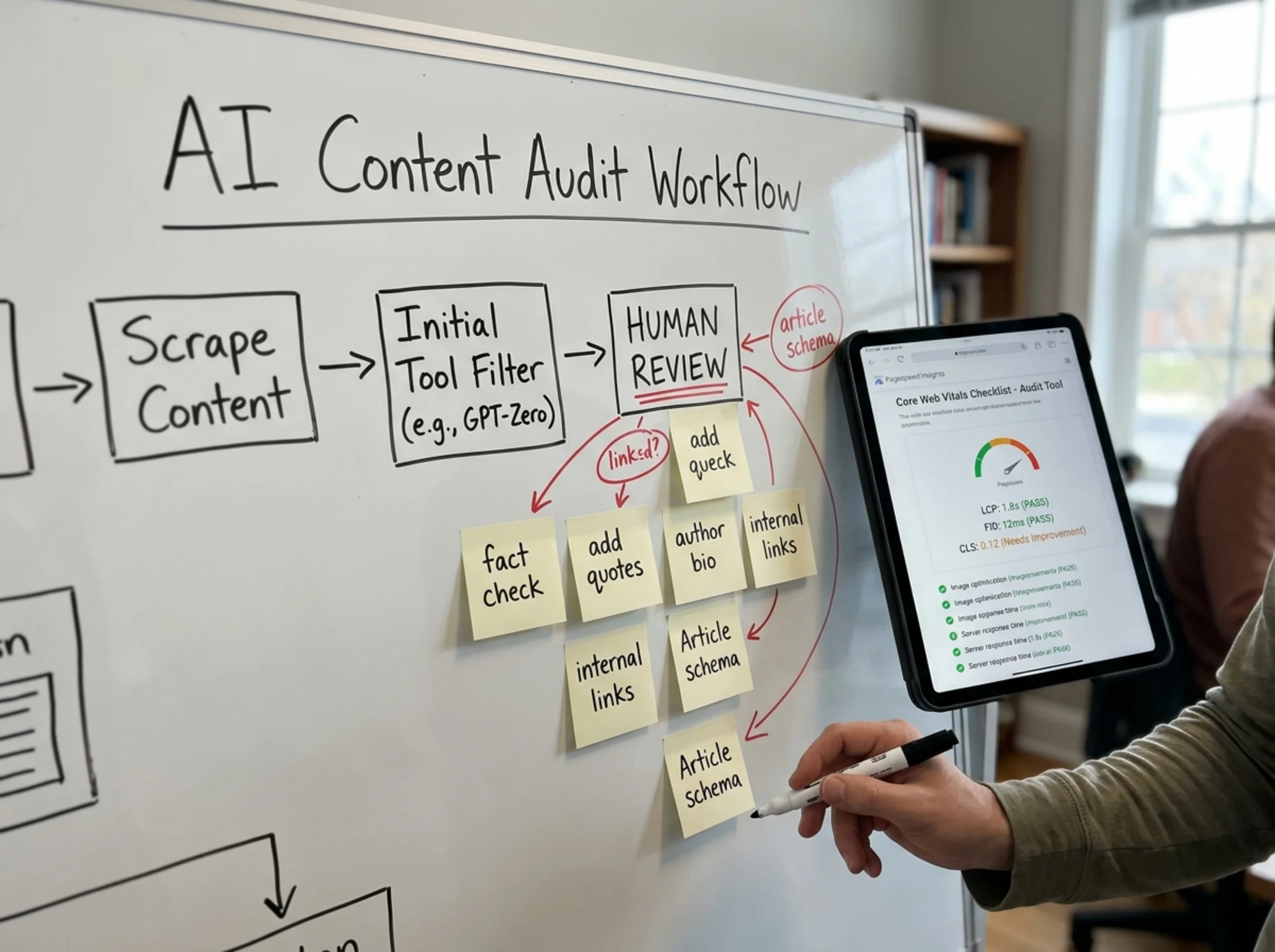
Run each AI-assisted page through these five checks. You don't need a tool, though we'll cover one at the end that automates most of it. A spreadsheet and an honest hour is enough to start.
1. The "would a real customer find this useful?" test
Open the page. Read it slowly. Ask two questions:
- If a real customer of mine landed here from Google, would they get a concrete answer, or would they leave feeling like they read a Wikipedia stub?
- Is there anything in this article that someone without my specific experience couldn't have written?
If the answer to the second question is "no," the page is at risk. AI models are trained on the public internet. They produce content that sounds like the average of everything already written on a topic. That's the opposite of original, useful content.
Quick test: search a sentence from your article in quotes on Google. If you see five other sites with nearly the same phrasing, your draft was too generic.
2. The evidence and example check
Helpful content includes specifics: real numbers, real customer stories, real screenshots, real product names. AI drafts default to vague claims ("studies show," "experts recommend," "many businesses find").
Mark whether each paragraph contains:
- A specific example from your business or industry
- A number, price, date, or measurement
- A direct quote from a person, document, or product
- A screenshot, photo, or diagram
A page should have at least one of these per major section. If a 1,500-word article has zero specifics, it's filler. Rewrite the sections that fail or cut them.
3. The author and trust signal check
Google's guidelines on helpful content emphasize knowing who wrote the page, why they're qualified, and how to verify their claims. This applies more strictly to topics involving money, health, safety, or legal issues, but it matters for every commercial site.
Check each AI-assisted page for:
- A real author byline with a real photo (not a generated face)
- A short bio explaining the author's relevant experience
- A link to an author page listing their other articles and credentials
- An accurate "last updated" date
- A clear publication date
If your AI-generated articles are bylined "Admin," "Editor," or a fake persona, that's a trust problem. Either assign them to a real person on your team who reviewed and approved the post, or remove the byline and rely on your brand's identity.
4. The structured data check
Article schema is the small block of code Google reads to understand what kind of content a page is, who wrote it, and when it was published. It's invisible to readers but heavily used by search engines and AI summarizers.
For each article you want:
ArticleorBlogPostingschema with headline, datePublished, dateModified, and author- An author object with a name and ideally a
sameAslink to a real profile (LinkedIn, your team page) - An image URL pointing to a real featured image on the page
- A publisher object naming your business
Most modern WordPress, Webflow, and Shopify themes add this automatically. If yours doesn't, or the author field is blank or wrong, fix it. Google's official Article structured data documentation lists every required and recommended field.
5. The performance and crawl check
A high-quality article on a slow, broken page still loses. AI-generated content often comes with bloat: oversized stock images, extra plugins added by whatever automated workflow produced the post, third-party scripts for "AI content optimization" that never get removed.
For each page check:
- Largest Contentful Paint (the time until the main content appears) under 2.5 seconds on mobile
- A real, properly sized featured image (not a 4MB unedited render)
- No broken internal links
- Headings in order (H1, then H2, then H3, no skipping)
- The page is actually indexed (paste the URL into Google Search Console)
Core Web Vitals are a real ranking factor on borderline pages, and the published thresholds from web.dev are the standard Google uses.

A specific walkthrough: the bakery blog problem
Let's make this concrete. Imagine you own a small bakery in Austin. Last quarter a freelancer published 30 AI-generated articles on your site: "Best Cake Flavors for Weddings," "How to Pick a Birthday Cake," "Wedding Cake Trends 2026," and so on. Six months later your traffic is flat and your local pack rankings have slipped.
Here's how you'd audit one of those pages, say "Best Cake Flavors for Weddings."
Read-through: The article lists vanilla, chocolate, red velvet, lemon, and carrot. The descriptions are generic. None mention your bakery, your actual menu, your pricing, or the couples you've baked for.
Verdict: Fails the customer-usefulness test. A bride searching for wedding cake flavors in Austin doesn't need a Wikipedia summary. She needs to know which flavors you recommend, why, what they cost, and how to taste them.
Fix path:
- Rewrite the intro to mention that you've baked over 200 wedding cakes in Austin since opening.
- Replace the generic list with your actual top five sellers, with price ranges and a sentence about which couples tend to choose each.
- Add two real photos: one of a cake you made, one of a couple cutting it (with permission).
- Add a "Book a tasting" call to action at the end.
- Assign the byline to yourself or your head baker, with a real bio and photo.
- Update the publish date and add a "last reviewed" date.
- Ensure the
Articleschema points to the real author and updated date.
That single page goes from generic AI filler to something only your bakery could have produced. Now repeat for the other 29. Or, if 20 of them are on topics no one searches for in Austin, delete them and 301 redirect to a related, stronger page.
There's no shortcut, but there is a triage order: fix the pages that already get some impressions in Search Console first, then prune the ones that get none.
The five-minute audit checklist
For a quick call on a single page:
- [ ] Read it out loud. Does it sound like you, or like a textbook?
- [ ] At least one specific number, name, or example per section?
- [ ] Real author byline with a real photo and bio?
- [ ] Published date and updated date visible?
- [ ] Featured image present, under 200KB, and relevant?
- [ ] Article schema includes author, dates, and publisher?
- [ ] First-person experience or opinion somewhere in the article?
- [ ] At least two internal links to related pages on your site?
- [ ] No copied phrasing that shows up on five other sites?
- [ ] Loads in under 3 seconds on a phone with normal cell service?
If a page fails three or more, prioritize it for rewriting. If it fails six or more, consider whether the page should exist at all.
What to do with pages that fail badly
You have three options for low-quality AI pages, in order from least to most aggressive:
Rewrite in place. Best for pages that already get search impressions. Keep the URL and the indexed history, but replace the body content with something genuinely useful. Update the publish date.
Consolidate. If you have five thin articles on overlapping topics, merge them into one strong page. Pick the URL with the best existing rankings, fold the unique parts of the others into it, then 301 redirect the rest. This concentrates trust signals rather than spreading them thin.
Delete and redirect. For pages with zero impressions and no path to becoming useful, remove them. Redirect to the most relevant remaining page or to your homepage. Don't leave them up "just in case." They cost crawl budget and dilute the perceived quality of your site.
A common mistake is to leave bad pages live while adding more good ones on top. That doesn't work. Google evaluates sites in aggregate. You have to remove or fix the drag before new work can lift you.
How a website audit tool fits in
You can do all of the above manually, but at 50+ pages it gets exhausting. An automated audit can flag, in one pass:
- Pages with thin word counts or low content-to-template ratios
- Missing or broken Article schema
- Pages with no author information
- Slow load times, oversized images, render-blocking scripts
- Duplicate or near-duplicate content across your site
- Pages with no internal links pointing to them
- Pages with no impressions in the last 90 days
FreeSiteAudit runs this scan on your site and gives you a prioritized list of pages to fix, with the specific issue on each. It's free to try on one site, and the results map directly to the checklist above. If you've published a batch of AI content recently and want to know where to start, that's the fastest way to get a triage list.

The bigger picture
AI tools have made it cheap to produce text. They haven't made it cheap to produce trust. The pages that win search results demonstrate, in the writing itself, that a real person with real experience took the time to publish something useful.
Treat AI as a fast first-draft tool, then put your own knowledge, examples, photos, and judgment into the final version. Search engines won't penalize you for that workflow. They'll often reward it, because the bar has gotten lower as more people publish unedited model output.
Ship the raw output instead, and you're competing with everyone else doing the same, betting that Google's quality systems won't notice. That bet has been getting worse every year.
Audit what you have. Fix what's salvageable. Cut what isn't. Then publish less, but better.
Sources
Check your website for free
Get an instant score and your top 3 critical issues in under 60 seconds.
Get Your Free Audit →