Author Bio Optimization: What AI and Google Want to See
A practical guide to writing author bios that satisfy Google's E-E-A-T signals, pass structured data checks, and help AI search engines trust your content.
# Author Bio Optimization: What AI and Google Want to See
If you've ever published a blog post under "Admin" or left the author field blank, this article is for you. Author bios used to be a nice-to-have that designers added at the bottom of a template because it looked complete. That world is gone. Google's helpful content guidance, the rise of AI Overviews, and tools like ChatGPT and Perplexity have made one thing clear: the byline matters now. It signals who wrote the content, why they're qualified, and whether a search engine or AI model should treat the page as a trustworthy answer.
This isn't about gaming a system. It's about making sure the real expertise behind your content is visible, structured, and verifiable. If you run a small business, sell services, or publish even occasionally, your author bios are doing more work than you think.

Why Author Bios Suddenly Matter More
Google has been talking about E-E-A-T (Experience, Expertise, Authoritativeness, Trustworthiness) for years, but the practical impact on small sites has grown sharply since AI-generated content flooded the web. When anyone can publish a thousand articles a week with no real human behind them, the signals that distinguish a real expert from a content farm get weighted more heavily.
At the same time, AI search engines like ChatGPT search, Perplexity, and Google's AI Overviews are choosing which sources to cite. These systems do not have time to vet every page. They look for shortcuts: a clear author, a real bio, links to outside profiles, structured data, and consistent attribution across the web. A page that has all of these is more likely to be picked up as a source. A page that doesn't is competing with millions of indistinguishable alternatives.
For small business owners, this is good news. You don't have to be a brand-name publication. You just have to be a real person who clearly shows up on the page.
What "Author Bio" Actually Means in 2026
A modern author bio is not the same as a 1990s "About the Author" paragraph. It's an identity signal that lives in three places at once:
- On the article itself — a visible byline with name, photo, and a short credential line
- On a dedicated author profile page — one URL that lists every article that person has written, plus a longer biography
- In structured data — machine-readable
Personschema embedded in the page so Google and AI models can parse it cleanly
When all three are present and consistent, you're giving search systems everything they need to verify the author. When they're missing or inconsistent, you're telling them you might be a content farm, even if you aren't.
The Problem State: What Most Small Sites Look Like Right Now
If you audit a hundred small business blogs, here's what you'll typically find:
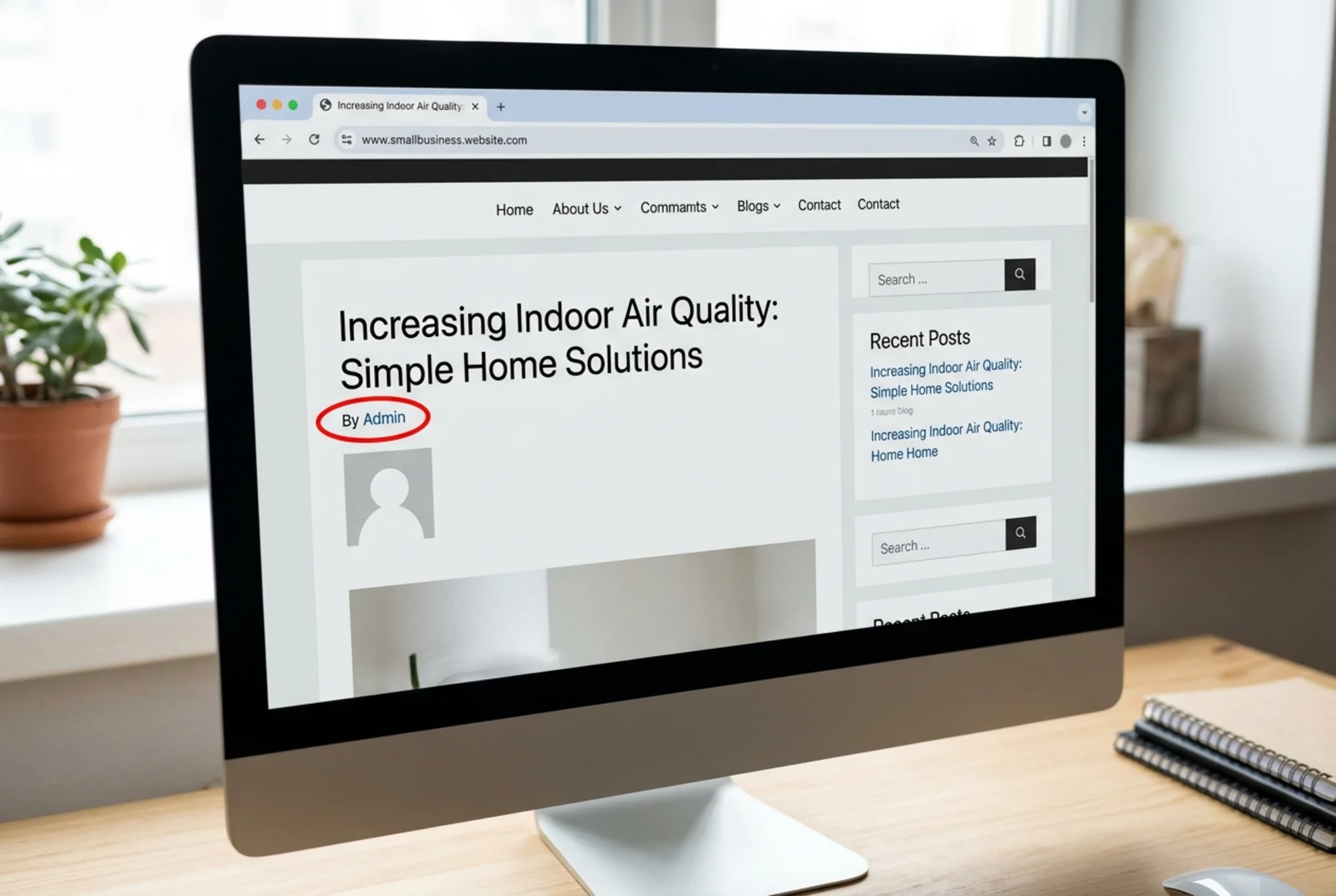
- No author name, or "Admin" / "Editor" / the company name as author
- A photo but no credentials
- A first name only ("By Sarah")
- A bio that says "Sarah is passionate about helping clients succeed" with zero verifiable facts
- No link to an author page, LinkedIn, or anywhere else
- No structured data at all
- The same generic bio reused under articles on wildly different topics
If any of these describe your site, you're not alone. But you are leaving trust signals on the table that competitors are starting to claim.
What Google's Documentation Actually Says
Google's "Creating helpful, reliable, people-first content" guidance asks site owners to consider: Does the content clearly demonstrate first-hand expertise? Is there clear authorship? Would a reader trust the information enough to act on it?
These aren't ranking factors in the traditional algorithmic sense. They're the questions Google's quality systems and human raters use to assess whether a page deserves visibility. Pages that answer "yes" tend to survive helpful content updates. Pages that don't get quietly suppressed.
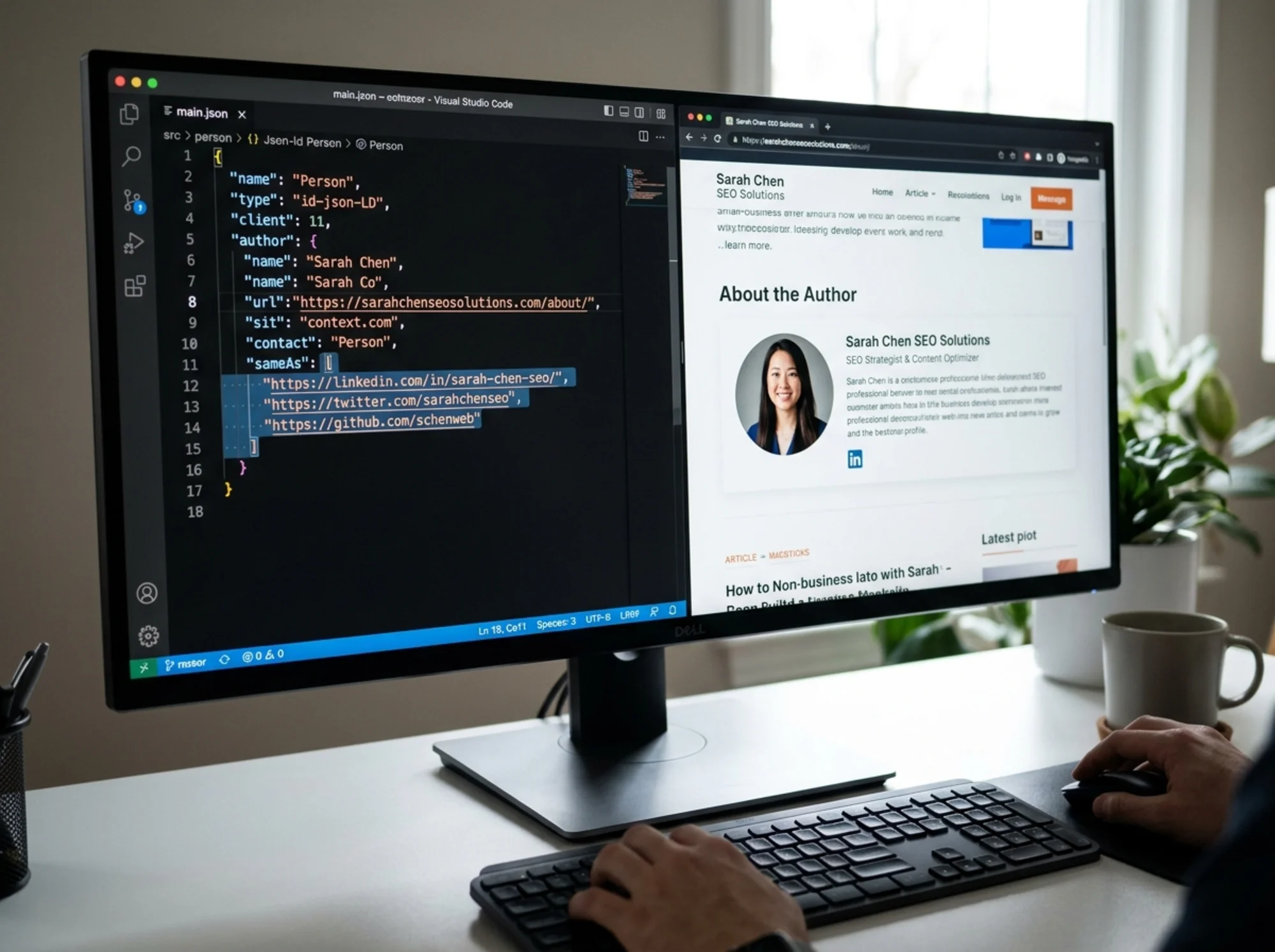
Google's structured data documentation goes further. For news, blog, and article content, Google supports the Article schema, which includes an author property. That property should be a Person object with name, URL, sameAs links to authoritative profiles like LinkedIn, and optionally job title and affiliation. This is the structured signal that makes your authorship machine-readable.
What AI Search Engines Look For
AI search engines work differently from traditional Google ranking. They retrieve candidate sources, reason over them, then cite the ones they think are most credible. Credibility, in this context, often comes down to a few quick checks:
- Is there a named human author?
- Does that author exist outside this single article? (LinkedIn, other publications, professional profiles)
- Is the claim consistent with what experts in the field generally say?
- Is the page dated, updated, and clearly attributed?
If you're a small business publisher, you can't easily replicate the brand recognition of large outlets. But you can give AI engines a clean, verifiable author trail. That's often the difference between being cited and being skipped.
The Anatomy of a Strong Author Bio
Use this as a checklist.
On the article:
- Full name (first and last, no nicknames)
- Real photo, ideally professional
- One-line credential ("Certified financial planner with 12 years advising small businesses")
- Published date and last updated date
- Link to a full author profile page
On the author profile page:
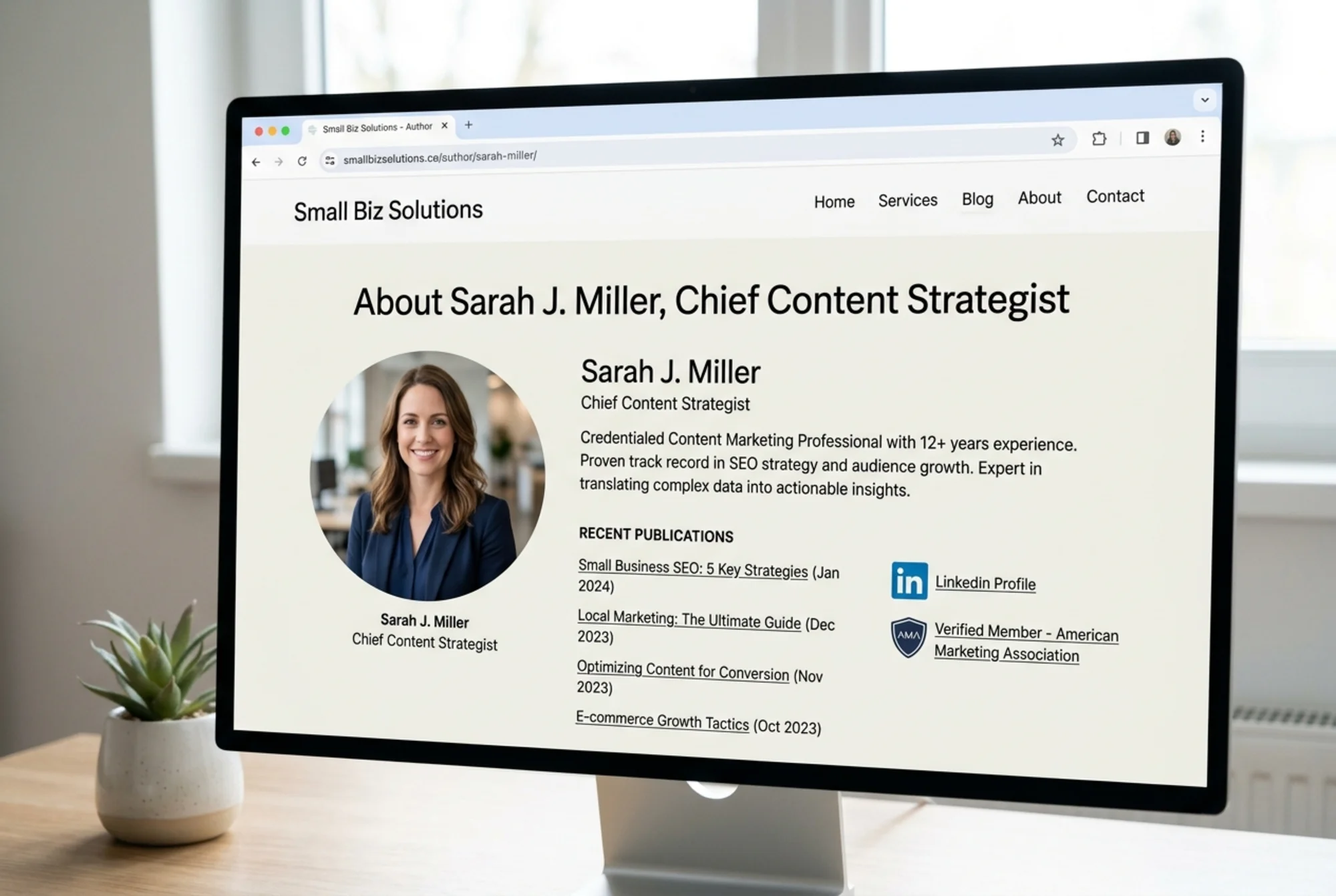
- Full biography (150-400 words)
- Photo
- Credentials, certifications, affiliations
- Links to external authoritative profiles (LinkedIn, professional association, other publications)
- A list of every article they've written on your site
- Contact method (email, social, or contact form)
In the page source (structured data):
Articleschema withauthorset as aPerson- The
Personobject includes name, url, sameAs (array of external profile URLs), and optionally jobTitle - The author URL points to the profile page on your site
A Walkthrough: Fixing a Real Small Business Blog
Say you run a bookkeeping service for restaurants. You publish two articles a month. Right now your byline says "By Admin" and the author block is empty.
Step 1: Decide on the real author. It's probably you. If multiple people contribute, give each one their own author identity. Don't combine humans into a fake persona, and don't attribute content to the company itself when a real person wrote it.
Step 2: Write your bio. Keep it specific and verifiable. Instead of "passionate about helping restaurants thrive," write: "Twelve years as a CPA serving independent restaurants in Austin. Member of the AICPA Restaurant and Food Service Industry group. Speaks regularly at the Texas Restaurant Association." Every sentence is a fact someone could check.
Step 3: Build the author profile page. Most CMS platforms (WordPress, Webflow, Ghost, Squarespace) have native author profile pages. Use them. The URL pattern is usually something like /author/your-name. Make sure the page renders publicly, lists your articles, and includes your photo and bio.
Step 4: Add structured data. Through your CMS, an SEO plugin, or by editing the template directly, add Article schema with the author property set to your full Person profile. Include sameAs links to LinkedIn, your professional association page, and any publication where you've been quoted.
Step 5: Verify the byline on each post. Replace "By Admin" with your real name. Add the photo. Link your name to the author page. Show the published date and last updated date.
Step 6: Check it. View a published article. Make sure the byline is present, the photo loads, the link to your author page works, and the page itself shows your bio plus the article list. Then run the page through Google's Rich Results Test to confirm the structured data is valid.
That's the whole fix. It usually takes one afternoon for a small site.
Mini-Checklist: A Bio AI Engines Will Take Seriously
- Full name (no first-name-only bylines)
- Professional photo
- At least one specific, verifiable credential
- At least one external link to a profile that confirms identity
- Author profile page that exists and is indexable
Personschema in the page source- Consistent name across your site, LinkedIn, and any external bylines
- Published and updated dates on each article
- Bio relates to the topic the article actually covers
Seven or more "yes" answers and you're in good shape. Four or fewer and you have meaningful work to do.
Common Mistakes to Avoid
Generic bios used on every article regardless of topic. If your bio says you're a marketing expert but the article is about tax deductions, the mismatch hurts credibility. Either narrow the bio or use different authors for different topic areas.
Fake author personas. Inventing names like "Jessica Smith, Senior Editor" when no Jessica exists is the fastest way to lose trust with both Google and AI engines. They cross-reference. They check LinkedIn. Don't do this.
Stock-photo headshots. AI image detection is good enough now that obviously generated or stock-licensed faces are easy to flag. Use a real photo of a real person.
Inconsistent names. "Sam Williams" on your site, "Samuel R. Williams" on LinkedIn, "S. Williams" on your professional association page. Pick one name. Use it everywhere.
Author pages with no actual content. A profile page that just lists "Author of 3 articles" with no bio, photo, or external links sends a worse signal than no author page at all.
How This Connects to Broader Site Health
Author bios are one piece of the trust signals search engines and AI models evaluate. They sit alongside page load speed, secure connections, schema markup across all content types, internal linking, and overall content depth. Web vital metrics like LCP, INP, and CLS still matter, and so does the basic question of whether your site loads reliably for the people you're trying to reach.
Author bios aren't a magic fix. They're a baseline. But unlike restructuring your Core Web Vitals or rewriting half your articles, fixing author bios is fast, cheap, and entirely within your control. It's one of the highest-leverage hours you can spend on a small business site this quarter.
A Word on Pen Names and Privacy
Some people have real reasons not to publish under their full legal name. That's fine. You can use a consistent pen name as long as the persona is real, has verifiable presence outside your site, and isn't used to fake credentials. The rule isn't "use your driver's license name." The rule is "be a real, consistent, verifiable person."
If you genuinely cannot attribute content to an individual (say, a company-authored editorial standard), at minimum attribute to a named editorial team with a team profile page that lists actual members.
Auditing What You Have
Before you start fixing things, look at what you have. Open three or four of your most-trafficked articles and check:
- Is there a byline?
- Does it have a photo?
- Does the name link to a real profile page?
- Is the structured data present? (Right-click, view source, search for
"@type": "Person") - Are the dates present and accurate?
If you want this checked automatically across your whole site, you can run a free audit on FreeSiteAudit. The tool flags missing author information, structured data gaps, and other E-E-A-T signal issues so you know exactly where to focus.
Run a Free Audit
Author bios are one of the easier wins for small business sites in 2026, but they're rarely the only fix needed. If you want a clear picture of where your site stands on author signals, structured data, performance, and content quality, run a free website audit with FreeSiteAudit. You'll get a prioritized list of fixes and a plain-English explanation of why each one matters.
The author bio fix takes an afternoon. The audit takes about a minute. Both are worth doing this week.
Sources
- https://developers.google.com/search/docs/fundamentals/creating-helpful-content
- https://developers.google.com/search/docs/appearance/structured-data/article
- https://web.dev/articles/vitals
Check your website for free
Get an instant score and your top 3 critical issues in under 60 seconds.
Get Your Free Audit →