Core Web Vitals for Wix Sites: What You Can Actually Fix
Practical guide for Wix site owners: which Core Web Vitals issues you can actually fix yourself, and which are baked into the platform you can't change.
# Core Web Vitals for Wix Sites: What You Can Actually Fix
If you run a Wix site and you've been told your Core Web Vitals need work, you've probably hit the frustrating truth: a lot of Wix's performance is decided by Wix itself. You can't open server configs, swap the rendering engine, or move to a faster CDN.
But you're not stuck. There's a real list of things you can fix on a Wix site that will move your scores in the right direction, and a list of things you can't. It's worth knowing which is which before you spend a Saturday trying to optimize something the platform won't let you change.
This guide walks through both lists in plain English, with the actual steps a non-developer can take inside the Wix editor.

What Core Web Vitals actually measure
Three metrics, simpler than the acronyms suggest:
- LCP (Largest Contentful Paint) — how long it takes for the biggest visible thing on your page to appear. Usually a hero image or banner. Target: under 2.5 seconds.
- CLS (Cumulative Layout Shift) — how much stuff jumps around as the page loads. Target: under 0.1.
- INP (Interaction to Next Paint) — how fast the page responds when someone taps a button or menu. Target: under 200 milliseconds.
These numbers are part of how Google ranks pages, but more importantly, they line up with what visitors actually feel. A slow, jumpy site loses sales.
The Wix reality check
Wix bundles editor, hosting, security, and CDN together. The tradeoff is that you don't get to touch most of the performance levers a developer on a custom-coded site would have.
What's mostly out of your hands on Wix:
- The base JavaScript bundle Wix loads on every page
- Server response time and TTFB
- Platform-level third-party scripts
- The exact way fonts and assets are served
- Server-side vs. client-side rendering decisions
That sounds discouraging until you realize the things you can control — image sizes, layout shifts, app bloat, overpacked pages — are also the things most likely to be broken on a typical Wix site.

The fixes that actually move the needle
1. Compress and size your images properly
The single biggest Core Web Vitals problem on Wix sites is uploaded images that are far too big. Someone takes a 4000×3000 photo on their phone, drags it into a hero section, and Wix dutifully serves several megabytes of image data on every page view.
Wix does compress images automatically, but it can only do so much with a giant source file. The fix:
- Resize to the actual display dimensions (a hero that shows at 1600px wide doesn't need a 4000px source)
- Use JPEG for photos, PNG only when you need transparency
- Aim for under 200KB per hero image, under 100KB for thumbnails
- Compress before upload using a free tool like Squoosh or TinyPNG
A quick mini-checklist for every page:
- [ ] Hero image under 200KB
- [ ] No image wider than 2000px source
- [ ] All decorative images compressed
- [ ] Logo is an SVG or under 30KB PNG
This one change rescues more LCP scores than anything else on small business Wix sites.
2. Turn off the Wix apps you're not using
The App Market is great for adding features, but every installed app loads code on your site — often on every page, not just the one you use it on. Booking widgets, chatbots, popup builders, social feeds, review collectors: they all add weight.
Open your dashboard, go to Manage Apps, and ruthlessly remove anything you're not actively using. A live chat widget you installed six months ago and never check is hurting your INP scores right now.
When you need a feature like email collection or a contact form, prefer Wix's native version over a third-party marketplace app. Native features tend to be lighter.
3. Fix the layout shift sins
CLS issues on Wix usually come from a few specific places:
- Images without dimensions set — make sure every image has explicit width and height, not "auto" sizing
- Web fonts swapping in — prefer the default Wix fonts, or limit yourself to one custom family
- Popups and notification bars — a newsletter bar that drops in three seconds after load will tank your CLS. Either show it immediately or trigger it on scroll, never on a delay
- Embedded social feeds — Instagram and TikTok embeds notoriously reflow the page when they finish loading. Move them below the fold or remove them
Walk through your homepage on your phone with a slow connection (throttle in Chrome DevTools, or just use weak coffee shop WiFi). If anything visibly jumps after the page seems loaded, you've found a CLS source.
4. Trim your homepage element count
Wix lets you stack section after section onto a page. I recently audited a site with 14 sections on the homepage, each with its own background image, animation, and CTA. The LCP was 7.2 seconds on mobile.
A faster homepage has:
- One clear hero section
- Three to five supporting sections
- One footer
- Maybe one secondary CTA
Move secondary content to dedicated pages. Your visitors weren't going to scroll through 14 sections anyway.
5. Disable animations on mobile
Wix's editor lets you add scroll animations, parallax effects, and hover transitions. They look great on a 27-inch monitor. On a mid-range Android in patchy reception, they make your site feel broken.
In the editor, go to each animated element and either remove the animation or set it to play only on desktop. INP scores improve immediately when the browser doesn't have to process animation work alongside user taps.
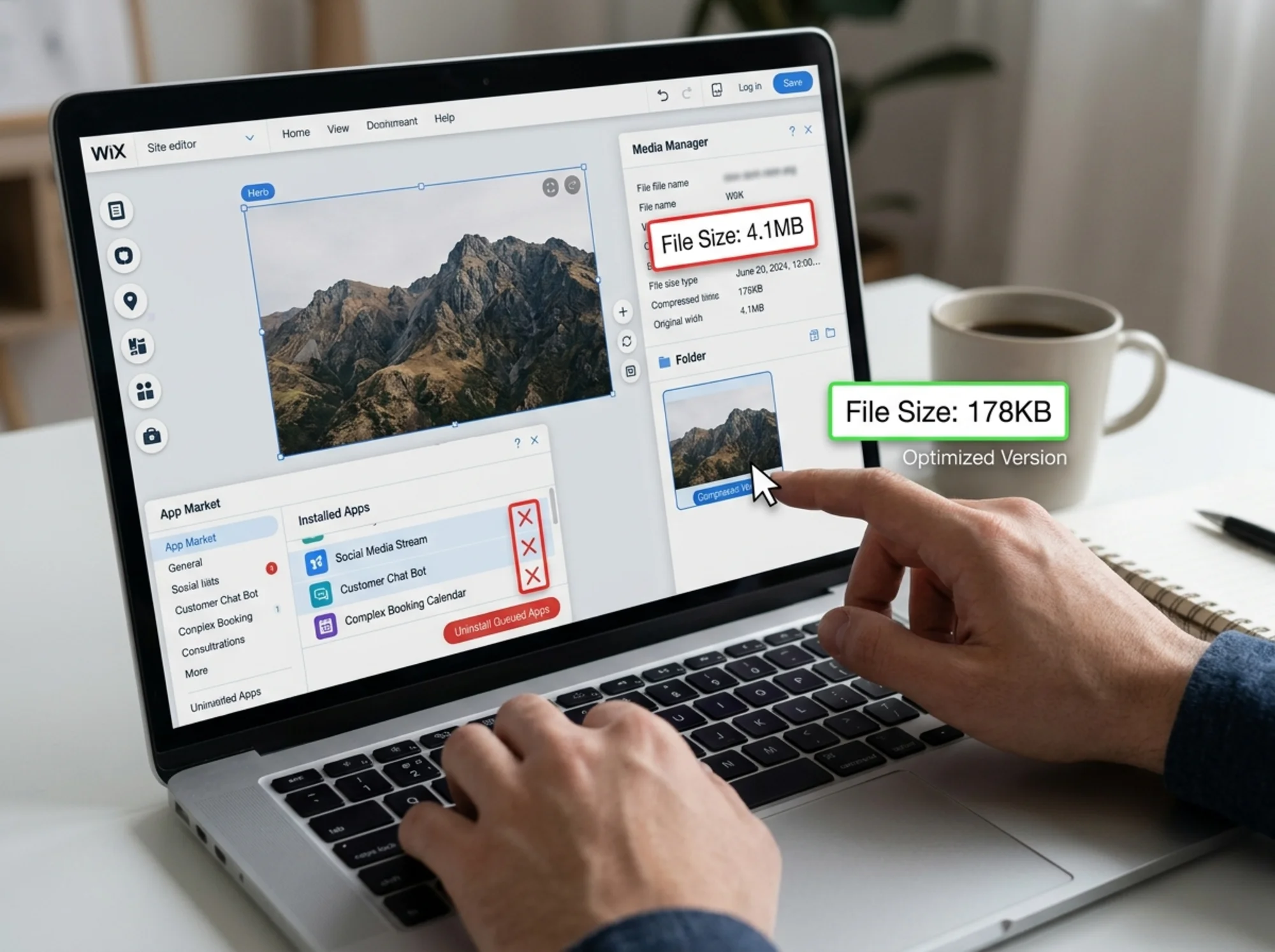
A walkthrough: fixing a Wix bakery's Core Web Vitals
Here's what this looks like in practice. A small bakery in Portland came to me with a Wix site scoring 31 on mobile PageSpeed Insights, with an LCP of 6.8 seconds and a CLS of 0.34. Here's what we did in one afternoon:
Step 1: Audit the hero image. The homepage hero was a 4.2MB photo of a chocolate cake. We resized it to 1800px wide, compressed it with Squoosh, and got it to 178KB. LCP dropped to 4.1 seconds immediately.
Step 2: Remove the social feed. An Instagram embed three sections down was causing a CLS of 0.21 by itself. We replaced it with three static photos linked to Instagram. CLS dropped to 0.13.
Step 3: Uninstall unused apps. A booking app from when she briefly considered offering classes, a forgotten chatbot, and a "spinning wheel" discount widget — all gone. Total JavaScript on her homepage dropped by about 40%.
Step 4: Kill the popup. A delayed newsletter popup that appeared after 5 seconds was hurting CLS and frustrating customers. We removed it and added a small inline signup in the footer instead.
Step 5: Simplify the homepage. Nine sections trimmed to four: hero, featured items, location and hours, contact.
Final scores after the cleanup: mobile PageSpeed 71, LCP 2.4 seconds, CLS 0.08. Not perfect — Wix's base JavaScript still has its costs — but solidly in Google's "good" range for two of three Core Web Vitals, and within striking distance on the third.
She didn't write a line of code.
What you actually can't fix on Wix
It's fair to be honest about the ceiling. Some performance issues simply aren't yours to solve:
- The Wix Velo runtime, if your site uses dynamic Wix features — it adds JavaScript you can't remove
- The default render-blocking resources Wix loads on every page
- TTFB and server response times, which depend on Wix's infrastructure
- Platform-level scripts for analytics, error tracking, and editor features
Wix has been steadily improving platform performance, and most professional Wix sites can reach acceptable Core Web Vitals scores if the owner does the work above. But if you've squeezed every drop out of these optimizations and you're still failing on a high-traffic site, you may eventually need to consider a platform with more headroom.
For most small business sites, the fixes above get you across the line.

A simple maintenance routine
Once you've done the initial cleanup, keeping your Wix site fast is mostly a matter of not adding new bloat. A monthly 15-minute check:
- [ ] Run your homepage through PageSpeed Insights
- [ ] Look at new images — are they oversized?
- [ ] Review any apps you've added — are you actually using them?
- [ ] Look for new popups, banners, or delayed elements that have crept in
- [ ] Test the site on your own phone in a weak-signal area
Most Wix sites that backslide on performance do so because someone added "just one more app" or "one quick popup" without realizing what it costs.
When to get a second opinion
If you've done all of the above and you're still seeing red on PageSpeed Insights, the issue might be something specific to your template, a Velo script, or an interaction between two apps that isn't easy to see from the editor.
A free audit can pinpoint exactly which images, which apps, and which sections are dragging your scores down. Run a free website audit with FreeSiteAudit and you'll get a prioritized list of fixes specific to your Wix site, including which ones are in your control and which are platform-level.
You can also dig into the specific metric hurting you most. We have detailed guides on fixing Largest Contentful Paint and stopping Cumulative Layout Shift that complement the Wix-specific steps above. For more general guidance on running a healthy small business website, our industry guides cover the broader picture.
The takeaway
Wix sites can pass Core Web Vitals. Most that don't are failing because of choices the owner made: uploading massive images, installing too many apps, stacking too many sections, and adding popups that interrupt the loading experience.
The platform sets the ceiling, but the floor is almost always in your hands.
Spend an afternoon on the fixes above. Compress your images, uninstall apps you don't use, trim your homepage, and stop the layout shifts. You'll feel the difference, your visitors will feel it, and Google will notice too.
Sources
Related Tools
Related Fixes
Check your website for free
Get an instant score and your top 3 critical issues in under 60 seconds.
Get Your Free Audit →