Duplicate Content Audit: How to Find and Fix It Without Breaking Your Site
A practical guide for small business owners to find duplicate content on their site, understand why it hurts SEO rankings, and fix it without breaking things.
# Duplicate Content Audit: How to Find and Fix It Without Breaking Your Site
If your small business website has plateaued for no obvious reason, duplicate content is one of the first things worth checking. It's quiet, common, and most site owners don't know they have it until they look.
This guide covers what duplicate content actually is, why Google cares, where it hides on small business sites, and how to fix it without breaking anything you've already built.

What Duplicate Content Actually Means
Duplicate content is when the same or substantially similar content appears on more than one URL, either across your own site or between your site and someone else's.
A few things that surprise people:
- It's not just copy-paste plagiarism. Most duplicate content is accidental and technical.
- Google does not have a "duplicate content penalty" the way people imagine. What happens is messier: Google picks one URL to rank and ignores the rest, often the wrong one.
- Two URLs serving the same page counts as duplicate content, even if a human would call them "the same page."
The practical result is the same. Your authority gets split across URLs, your crawl budget gets wasted, and the page Google chooses to rank is sometimes the one you didn't want.
Why Small Business Sites Get Hit Hardest
Enterprise sites have SEO teams watching for this. Small business sites usually don't, and the platforms they run on (Shopify, WordPress, Wix, Squarespace) generate duplicate URLs as a side effect of how they work.
Common culprits:
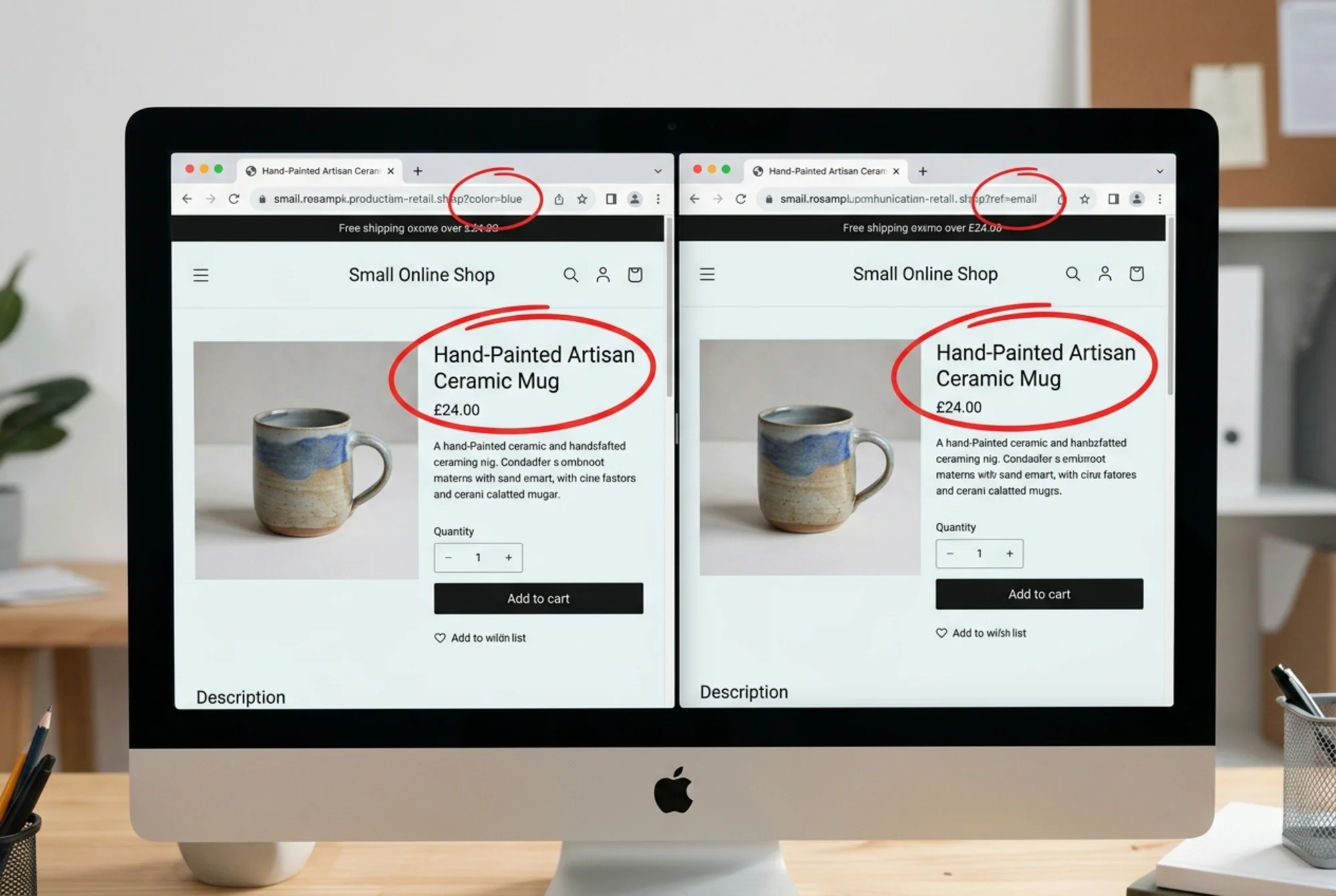
- Product variants that create one URL per color or size
- Category and tag pages that list the same products under different labels
- Print-friendly versions of articles at separate URLs
- HTTP and HTTPS versions both resolving
- www and non-www versions both resolving
- Trailing slashes treated as different URLs
- Tracking parameters from email campaigns, ads, and affiliates
- Session IDs appended to URLs
- Pagination where page 2 of a category repeats the page 1 intro
- Boilerplate location pages where only the city name changes
If you run an online store, a blog with categories, or a multi-location service business, you almost certainly have at least a few of these.
How Duplicate Content Actually Hurts You
Google's guidance on creating helpful content sets a clear bar: original, useful, people-first content. When two URLs serve essentially the same thing, none of them looks like the best version. Three concrete consequences:
1. Diluted ranking signals. If five URLs serve your product page and other sites link to three of them, your link equity splits five ways instead of pooling onto one strong page.
2. Wasted crawl budget. Google crawls a limited number of pages per visit. If half are duplicates, new pages you actually want indexed sit waiting.
3. The wrong page ranks. You wrote a great description on /products/blue-mug. Google ranked /products/blue-mug?ref=email-may instead, which has no internal links and looks abandoned. Click-through suffers.
The Five-Minute Manual Check
Before running any tools, do this quick sanity test. It catches the most common problems.
Check 1: Domain variants. Type each into your browser:
http://yoursite.comhttps://yoursite.comhttp://www.yoursite.comhttps://www.yoursite.com
All four should redirect to the same final URL. If any load independently, that's four versions of your homepage in Google's index.
Check 2: Trailing slashes. Try yoursite.com/about and yoursite.com/about/. One should redirect to the other.
Check 3: Site search in Google. Run site:yoursite.com and skim the first few pages. Look for the same title appearing more than once, URLs with ? parameters, and old pages you thought you'd deleted.
Check 4: Copy a sentence. Take a distinctive sentence from your homepage (not boilerplate), put it in quotes, and search Google. You should see your site, and ideally only your site. If other domains serve your exact text, you've been scraped or syndicated without a canonical pointing back.
Check 5: Title duplicates. In Google Search Console, go to Pages and look for clusters of URLs with the same title or H1. Duplicate titles almost always mean duplicate content underneath.
A Real Walkthrough: The Wedding Photographer
A wedding photographer in Austin builds a Squarespace site with location pages: "Austin Wedding Photographer," "Dallas Wedding Photographer," "San Antonio Wedding Photographer," "Houston Wedding Photographer."
Each page has the same 600-word intro, the same testimonial section, the same pricing table, and the same gallery. Only the city name changes, in three places.
What happens:
- Google sees four pages with 95% identical content
- Google picks one (often the oldest or most-linked) to rank
- The other three sit indexed but rank for nothing
- None rank well for the city-specific term because none looks genuinely local
The fix isn't to delete the location pages. It's to make each one actually distinct: real photos from real weddings in that city, a paragraph about venues the photographer has worked at locally, and testimonials from clients there. If you can't do that for all four, consolidate to one strong service-area page and use 301 redirects for the rest.
This same pattern affects plumbers, lawyers, dentists, and any service business with location pages. Google's helpful content guidelines explicitly call out thin, templated pages as a quality risk.
The Tools That Actually Help
You don't need enterprise software for this.
Google Search Console. The Pages report (formerly Coverage) shows "Duplicate, Google chose different canonical than user" and "Duplicate without user-selected canonical." Each entry is a duplicate Google has already detected.
A free site audit. Crawl your site and look at the URL list. If you have 50 products and the crawl returns 400 URLs, something is generating duplicates. Run a free audit at FreeSiteAudit to get a full URL inventory and a duplicate-content report in one pass.
Your CMS's URL list. WordPress, Shopify, and most platforms export all live URLs. Compare that count to what Google has indexed.
Screaming Frog (free up to 500 URLs). For small sites this is enough. It flags duplicate titles, meta descriptions, and near-duplicate content automatically.

The Fix Toolkit
Once you've found duplicates, there are four ways to handle them. Picking the right one matters.
1. Canonical Tags
A canonical tag tells Google "this page is a duplicate of that one; please credit the other one." Use it when:
- The duplicate URL needs to stay live for users (product variants, filtered category pages, tracking parameters)
- The content really is the same or near-identical
- You want to consolidate signals onto one preferred URL
Add this to the of the duplicate page:
html
Most CMS platforms have a field for this in page settings, or it can be set with an SEO plugin.
2. 301 Redirects
A 301 permanently sends users and search engines from one URL to another. Use it when:
- The duplicate URL doesn't need to exist anymore
- You're consolidating multiple similar pages into one
- You're fixing the HTTP/HTTPS or www/non-www variant problem
301s pass roughly all of the ranking signal to the destination. They're the cleanest fix when you don't need the old URL.
3. `noindex` Tag
This tells search engines not to include the page in the index. Use it for:
- Internal search results pages
- Filtered or sorted views of products that don't need to rank
- Thank-you pages, login pages, admin-adjacent pages
- Tag archives that just duplicate category content
Add to the page's :
html
The follow part lets Google keep crawling links on the page even though it won't index it.
4. Make the Pages Different
Sometimes the right answer isn't technical. If two pages should both exist and both rank, rewrite them to be genuinely distinct. Different angles, examples, audiences. This is the fix for thin location pages, near-duplicate blog posts, and product pages sharing the same manufacturer description.
A Checklist You Can Run This Week
Work through this in one sitting:
- [ ] Confirm only one domain variant resolves (HTTPS plus your chosen www preference)
- [ ] Check trailing-slash behavior is consistent
- [ ] Open Google Search Console → Pages → review every "duplicate" status
- [ ] Run
site:yoursite.comand scroll five pages deep - [ ] Export your CMS URL list and compare count to Google's indexed count
- [ ] Audit your top 10 traffic pages: do they have self-referencing canonical tags?
- [ ] Check product pages for parameter duplicates (
?color=,?ref=,?utm_) - [ ] Review category and tag pages for near-duplicates
- [ ] Identify location pages and check for templated content
- [ ] List every duplicate found, decide on canonical / 301 / noindex / rewrite, and assign each one
Things to Avoid While Fixing
A few ways well-meaning fixes go wrong:
Don't block duplicates with robots.txt. If you block a duplicate URL from being crawled, Google can't see the canonical tag pointing to your preferred version. The duplicate stays in the index without the signal you wanted to send. Use canonicals or noindex instead.
Don't 301 everything to your homepage. When you delete old pages, redirect them to the most relevant remaining page. Bulk homepage redirects look like a soft 404 to Google and pass almost no value.
Don't change URLs without redirects. If you rename /blog/old-title to /blog/new-title, set up a 301 from the old URL. External links and existing rankings need the redirect immediately.
Don't forget structured data. If you have Article schema on duplicate pages, the duplicate signal extends to your structured data too. Google's Article structured data guidance assumes one canonical version per piece of content. Keep your schema aligned with your canonical URL choices.
What "Fixed" Looks Like
You'll know the fix worked when, over the following four to eight weeks:
- "Duplicate" categories in Search Console shrink
- Your indexed page count starts matching your actual page count
- The URLs you want to rank are the ones showing up in search results
- Click-through rate on target pages ticks up because they're getting the impressions instead of orphan duplicates
Duplicate content fixes are not instant. Google has to recrawl, re-evaluate, and reconsolidate signals. Check progress monthly, not daily.

Where This Fits in the Bigger Picture
Duplicate content sits inside a broader site-health story. Core Web Vitals cover the performance side, helpful content guidelines cover the quality side, and duplicate content is the technical hygiene that lets your good content actually surface for the right query.
If you're running an ecommerce site, this is worth tackling early because product catalogs scale duplicates fast. A clean canonical strategy on day one saves months of cleanup later.
Run an Audit and Get a Real List
If you'd rather not crawl your site by hand, FreeSiteAudit will scan it in under two minutes and return a categorized list of duplicate URLs, missing canonicals, redirect chains, and the other technical SEO issues that quietly drain traffic. No signup wall, no credit card, just a report you can act on.
The hardest part of duplicate content isn't fixing it. It's knowing it's there. Once you can see the list, the fixes are mostly an afternoon of focused work with a CMS tab open. The traffic that comes back is content you already wrote, finally getting credit on the URL you wanted in the first place.
Sources
Check your website for free
Get an instant score and your top 3 critical issues in under 60 seconds.
Get Your Free Audit →