First Input Delay vs INP: What Changed and Why It Matters for Your Website
Google replaced First Input Delay with Interaction to Next Paint (INP) in March 2024. Here's what changed and how to fix slow interactions on your site.
# First Input Delay vs INP: What Changed and Why It Matters for Your Website
If you've ever tapped a button on a website and watched nothing happen for a second or two, you already understand the problem Google is trying to measure. The question is: how do you measure that frustration in a way that's fair and actionable?
For years, Google's answer was a metric called First Input Delay (FID). In March 2024, they replaced it with Interaction to Next Paint (INP). If you run a small business website, this isn't just technical trivia. It changes which of your pages Google considers "good," and it can quietly drag down rankings if your site has interactive elements that lag.
This article explains what changed, why it changed, and what to do about it.

The short version
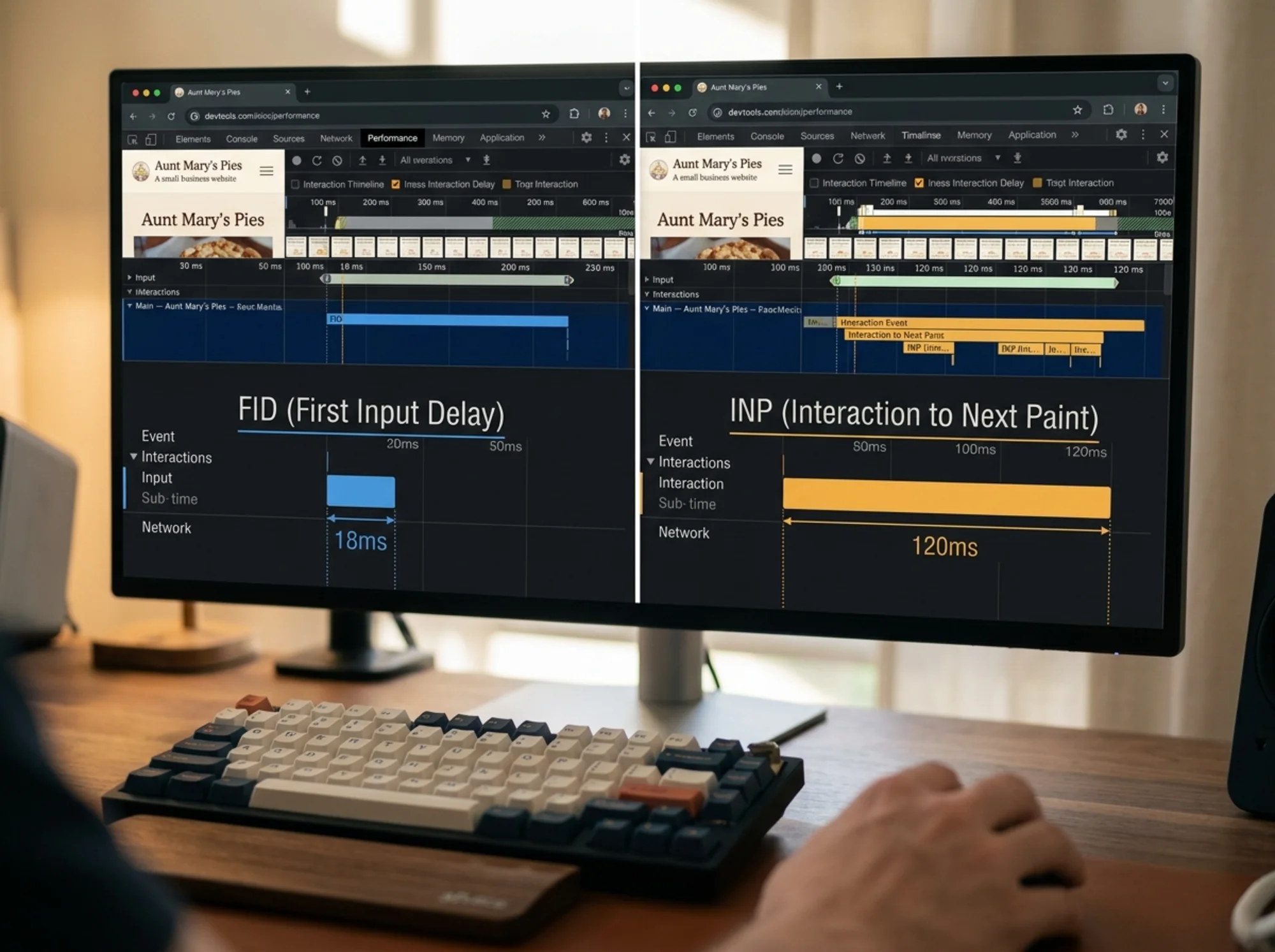
- FID measured how long your site took to respond to the very first click, tap, or key press.
- INP measures how long your site takes to respond to every interaction during a visit, and reports the slowest one (roughly).
- INP is harder to pass than FID. Many sites that scored green on FID are now yellow or red on INP.
- INP is part of Core Web Vitals, which are a real ranking signal.
If you only have 30 seconds, the takeaway is this: check your INP score, and if any of your interactive elements (menus, filters, forms, "Add to Cart" buttons) feel laggy on mobile, that's where your fix lives.
Why FID needed to be replaced
FID was a reasonable first attempt, but it had a flaw that quietly made every site look better than it really was.
It only measured the first interaction. So if a visitor landed on your homepage, tapped the menu (fast), then tried to filter products (slow), open a chat widget (slow), and submit a contact form (slow), FID would only report the menu tap. The other three painful moments were invisible.
It also only measured the delay before processing started, not how long the whole interaction took to show a visual response. A button could "respond" instantly in FID's eyes, then spend another 500 milliseconds running JavaScript before anything changed on screen. From the user's point of view, the site was frozen. From FID's point of view, everything was fine.
INP fixes both problems. It looks at every interaction on the page, measures the full time from input to the next visual update, and reports the worst (or near-worst) experience the user had.
What counts as an "interaction"
INP tracks three kinds of events:
- Clicks (mouse or touch)
- Taps (on touchscreens)
- Key presses (typing into forms, hitting Enter)
Scrolling and hovering don't count. Neither does the initial page load. INP is specifically about how snappy your site feels once someone starts using it.
The thresholds you need to know
Google sets three bands for INP:
- Good: 200 milliseconds or less
- Needs improvement: 200 to 500 milliseconds
- Poor: over 500 milliseconds
For comparison, FID's "good" threshold was 100 milliseconds. INP looks more lenient on paper, but in practice, hitting 200ms across every interaction is harder than hitting 100ms on a single event.
A useful mental model: if someone taps a button and nothing visually changes for half a second or more, you're in the poor zone. That's the kind of lag that makes people assume your site is broken and leave.
Why this matters for small business sites
Three reasons.
First, ranking. Core Web Vitals are part of Google's page experience signals. They're not the biggest ranking factor, but for competitive local searches where two businesses look equally relevant, the faster, more responsive site has an edge.
Second, conversion. If your "Book Now" or "Add to Cart" button takes 400ms to respond, a meaningful slice of visitors will tap it twice (creating duplicate submissions), assume it's broken, or just bounce. INP is measuring the exact moments where you lose customers.
Third, mobile reality. INP problems are almost always worse on mobile. Phones have less processing power, slower networks, and users who are more impatient. If you only test on desktop, you'll think your site is fine while half your visitors are watching it stutter.

Where INP problems usually hide
Say you run a small online shop. Your homepage scores green on every metric. Then you check INP and it's red. Here's where the lag is almost certainly coming from:
Product filters. A visitor taps "Filter by price" or "Size: Medium." Behind the scenes, your site runs JavaScript to update the grid, fetch data, and re-render. If that blocks the main thread for 400ms, INP records it.
Add to Cart buttons. Many platforms run analytics, abandoned-cart scripts, upsell logic, and inventory checks all at once when someone taps Add to Cart. They pile up.
Search dropdowns. Type one letter into a search box. If the dropdown takes more than 200ms to update after each keystroke, that's an INP failure waiting to be measured.
Accordion FAQs. Tapping a question to expand the answer sounds simple, but many themes load animations, fire trackers, and re-layout the page. On a slow phone, that adds up.
Chat widgets and popups. Third-party chat widgets are common INP culprits because they inject heavy JavaScript that runs on user input.
If your site has any of these, you have an INP story to tell.
How to check your INP score
You have three free options.
PageSpeed Insights. Plug your URL into pagespeed.web.dev. Scroll past the lab data to the "Core Web Vitals Assessment" section. That's real-world data from actual Chrome users (called field data), and it includes INP. If you don't have enough traffic, you'll only see lab estimates, which are less reliable but still useful.
Google Search Console. Under "Core Web Vitals" in the left menu, you'll see which URLs are flagged as poor or needs improvement. This is the same data Google uses for ranking, so it's the one to trust.
Chrome DevTools. Right-click, Inspect, Performance tab. Record an interaction and see exactly which scripts are blocking. This is the most direct way to find the cause.
You can also run a free Core Web Vitals check to get a non-technical summary of where your site stands and what's hurting your score.
A short checklist for fixing INP
Most INP problems come from a handful of fixable causes.
- Audit your third-party scripts. Every chat widget, analytics tag, A/B test, and tracking pixel runs JavaScript on your page. Remove the ones you don't actively use. This is usually the single highest-impact fix.
- Defer non-essential JavaScript. If a script doesn't need to run during the first few seconds, mark it
asyncordeferso it doesn't block interactions. Most platforms have a setting or plugin for this. - Break up long tasks. Long-running functions hold the main thread hostage. If you have custom code, ask your developer to split heavy work into smaller chunks (the technical term is "yielding" to the main thread).
- Avoid loading entire libraries for one feature. A common pattern: a site loads a 200KB animation library to fade in one button. Replace with CSS or a smaller library.
- Test on a real, mid-range phone. Not your latest iPhone. A three-year-old Android on a slow connection is what most of your visitors are using.
- Use platform-native features where possible. Native HTML controls (real
andelements) are dramatically faster than custom JavaScript widgets. - Lazy-load heavy components. A cart drawer or product quick-view doesn't need to be loaded until someone interacts with it.
If you're on Shopify, WordPress, Wix, or Squarespace, most of these fixes are settings or plugin choices, not code changes. The hard part is knowing which ones to flip.
A real scenario
Picture a small online clothing shop. Mobile traffic is 70% of visits. INP is 620ms. Conversion rate is mediocre. The owner doesn't know why.
A quick audit shows the homepage loads a chat widget, a wishlist plugin, an upsell popup, a quiz funnel, an analytics suite, a retargeting pixel, and a reviews widget. Every one injects JavaScript that runs on user input.
The owner pauses three of them (the wishlist plugin and quiz funnel they weren't actively promoting, the reviews widget they didn't need on the homepage). INP drops to 240ms. Two weeks later, mobile conversion improves noticeably.
This is the typical pattern: INP problems aren't caused by one big thing. They're caused by a stack of small things that nobody audited because each one seemed fine on its own. See common fixes for slow interaction response for more.
If you're in e-commerce
E-commerce sites are INP magnets because they have more interactive surfaces than typical sites: filters, sorts, variant pickers, quantity steppers, cart updates, search, account flows. Each is an interaction Google can measure.
Prioritize testing the product listing page (with filters applied) and the cart and checkout flow specifically. Those are where INP failures hit revenue directly. Our notes on e-commerce performance go deeper on this.
If you run a service or local business site
Your INP risks are usually concentrated in three places: the contact form, the booking widget, and the chat widget. Test all three on a real mobile device. If any lag visibly after a tap, that's your fix.
A surprising number of local business sites lose leads not because the form is broken, but because it's slow enough that visitors give up before submitting.

What you don't need to do
- Chase a perfect 0ms score. Under 200ms is the goal. Going from 180ms to 80ms is not worth the effort.
- Remove every third-party tool. Remove the ones you aren't using; load the rest more carefully.
- Migrate platforms. Most INP issues can be fixed on whatever platform you're already on.
- Panic about ranking impact overnight. Core Web Vitals are a tiebreaker, not a primary signal. Fix INP because it affects user experience and conversion; the SEO benefit follows.
The bigger picture
The move from FID to INP reflects how the web has evolved. Sites used to be mostly text and images, where the only "interactive" moment was a single click. Modern sites are constantly responsive: every tap, type, and swipe triggers JavaScript. Measuring only the first interaction made less and less sense.
INP grades websites on how they actually feel to use, not how they feel for the first half-second. That's a higher bar, and it's the right one. Visitors don't grade your site on its first click. They grade it on the whole experience.
The good news for small business owners is that fixing INP usually pays off twice. You get a small SEO boost, and you get a meaningful conversion boost from a site that no longer makes customers second-guess whether the button they tapped actually worked.
Run a free check on your site
If you're not sure where your site stands, run a free audit. FreeSiteAudit checks your Core Web Vitals (including INP), flags the specific elements slowing your site down, and gives you a plain-English action list ranked by impact. No login wall, no credit card. Try it on your homepage and your most important product or service page.
Sources
Check your website for free
Get an instant score and your top 3 critical issues in under 60 seconds.
Get Your Free Audit →