How a Freelancer Used Site Audits to Land 3 New Clients in 60 Days
A plain-English breakdown of how one freelance web consultant turned free site audits into paid work, with the exact process, scripts, and findings used.
# How a Freelancer Used Site Audits to Land 3 New Clients in 60 Days
Most freelancers chase clients with cold emails that say something like, "I noticed your site could use some improvements." The owner deletes it. They've seen forty of those this month.
This is the story of a freelancer who did the opposite. Instead of vague pitches, she ran a real, evidence-based site audit on each prospect before reaching out. Then she shared the findings as a short PDF, attached one specific fix she would make first, and offered a 15-minute walk-through. In about two months, that approach turned into three paying clients: a local bakery, a small accounting firm, and a flower shop.
The story is composite — built from common patterns we see freelancers use — but every tactic is one you can copy this week.

Why audits beat cold pitches
A cold pitch asks a stranger to trust you. An audit shows them something they didn't know about their own business. That shift — from "trust me" to "look at this" — is the entire game.
When you send a prospect a one-page summary that says, "Your homepage takes 6.2 seconds to load on mobile, and the main product image is 4.1 MB, which is the biggest cause," you're not pitching. You're diagnosing. The owner now has a decision to make: ignore the diagnosis or do something about it.
If they do nothing, you've lost ten minutes. If they reply, you have a conversation that already centers on their actual site.
The kind of businesses she targeted
She didn't pitch enterprises. She picked small local businesses that:
- Ranked on page two or three of Google for an obvious local search
- Showed visible signs of neglect (outdated copyright, broken contact form, slow load)
- Had a real revenue model (they sold things, took bookings, or generated leads)
- Were small enough that the owner read their own email
A site with no issues is hard to pitch. A site with no money behind it can't pay you. The sweet spot is a real business with real problems and a real owner you can reach.
She built her list by searching her own city plus categories like "bakery," "accountant," "florist," "dentist," and "auto repair." Page two of Google was her hunting ground.
The audit process, step by step
Here is the actual sequence she used. The whole thing took 20 to 30 minutes per site.
1. Run an automated audit
She started with a free site audit tool to get the technical baseline in one pass. This surfaces:
- Page speed and Core Web Vitals scores
- Mobile responsiveness problems
- Missing meta descriptions and title tags
- Broken links and 404 errors
- Image weight and missing alt text
- Schema and structured data gaps
- HTTPS, redirects, and basic security signals
You can do this yourself with our free website audit tool. It produces a downloadable report you can excerpt for your pitch.
2. Check Core Web Vitals manually
The automated report gives you the scores. She also opened the site on a phone, throttled to slow 4G, to feel the experience. A video clip of a homepage hanging for five seconds is more persuasive than any chart.
Google's Web Vitals guidance gives three numbers worth memorizing: Largest Contentful Paint (LCP) under 2.5s, Interaction to Next Paint (INP) under 200ms, and Cumulative Layout Shift (CLS) under 0.1. If a site misses any of those on mobile, that's a concrete talking point. (See our Core Web Vitals fixes guide for the common culprits.)
3. Look at the helpful-content signals
Google's helpful content guidance is about whether pages actually help the person reading them. She'd scan the top three pages of each prospect and ask:
- Does the page answer the question someone would type to find it?
- Is there a clear next step (call, book, buy)?
- Does the copy sound like a real human wrote it for real customers?
- Are there obvious gaps (missing prices, missing hours, missing service descriptions)?
These are the things an audit tool can hint at but a human has to confirm.
4. Pick one fix to lead with
This is the part most freelancers skip. After collecting findings, she'd choose one issue to make the centerpiece of her outreach. Not five. Not a top-ten list. One.
Criteria:
- Visible impact (the owner can feel the difference after it's fixed)
- Easy to explain in one sentence
- Tied to revenue or visibility
- Something she could actually fix in a few hours
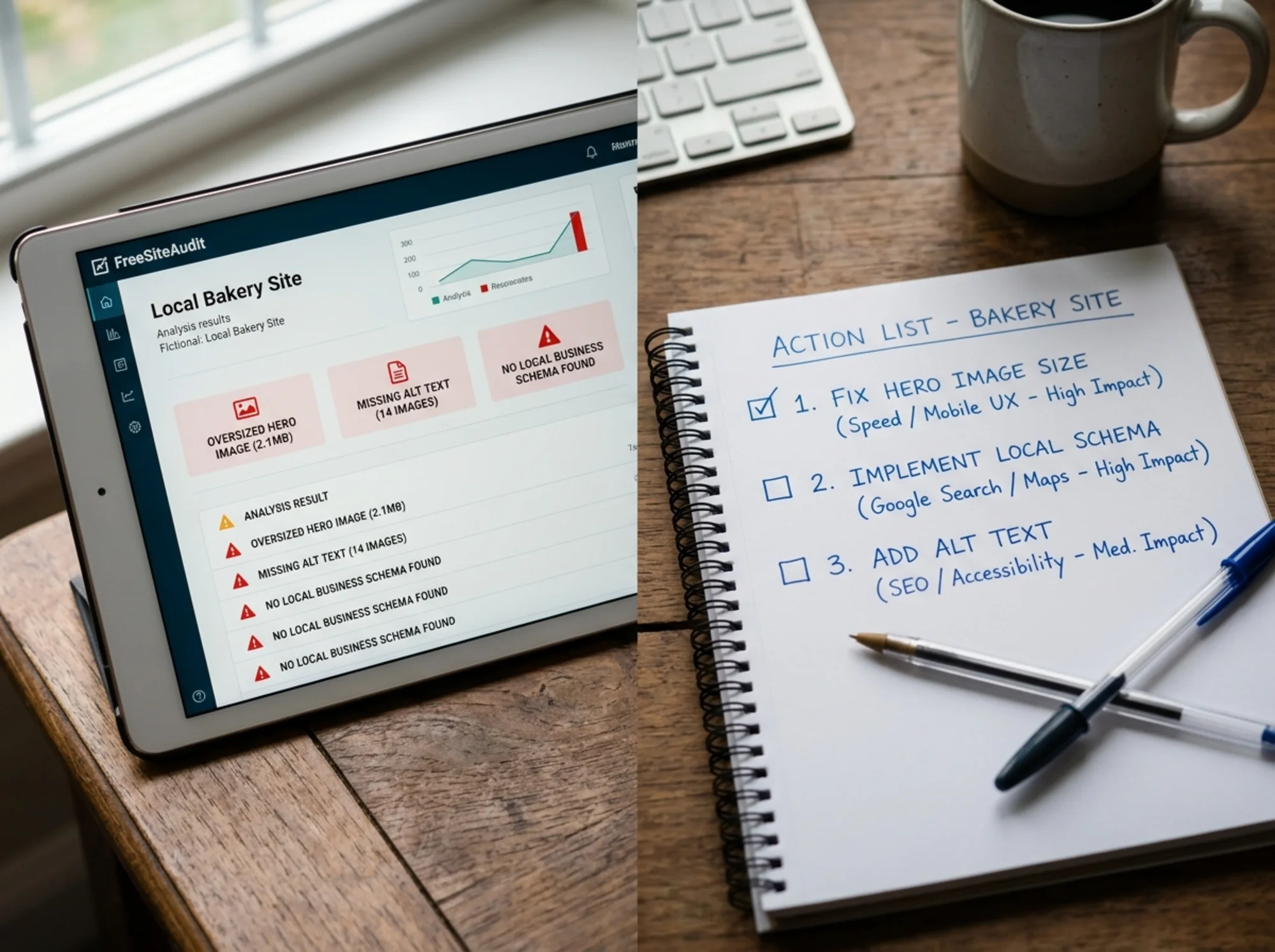
For the bakery, it was a 4 MB hero image killing mobile load. For the accountant, a contact form that didn't work in Safari. For the florist, no local business schema, which meant they weren't showing up in Google's local pack the way competitors were.

The pitch that actually worked
Once she had the audit and the lead fix, the email was short. Here's the template, with the bakery example filled in:
> Subject: Quick note about [Bakery Name]'s site
>
> Hi [Name],
>
> I ran a quick audit on your site this morning because I saw you on page 2 for "fresh bread [city]." There's one issue that's almost certainly costing you mobile customers: your homepage takes about 6 seconds to load on a phone, and the main bread photo is 4.1 MB.
>
> I made a one-page summary of what I found — happy to send it over. I can also fix that specific image issue in about an hour, no obligation, so you can see what a faster site feels like.
>
> Want me to send the PDF?
>
> — [Name]
Why this works:
- Specific opening line. She references the exact search and page rank. This is not a mass email.
- One concrete problem. Page speed plus an exact file size. Numbers anchor credibility.
- A small free offer. Fixing one image is low-effort but creates a moment where the owner sees results.
- No pricing in the first email. The goal is a reply, not a contract.
Out of 22 emails sent in the first month, she got 7 replies, 4 calls, and 2 paying clients. Month two, with a tighter list and refined copy, she got 5 replies and 1 more client out of 14 emails.
What the audits actually surfaced
Below is the kind of pattern she found over and over. None of these are exotic — they're the things small business sites get wrong because nobody's been paid to check.
| Issue | Why it matters | Typical fix time |
|---|---|---|
| Oversized hero images | Slow LCP, mobile bounce | 30–60 min |
| Missing alt text | Accessibility, image search | 1–2 hours |
| No meta descriptions | Lower click-through from search | 1–2 hours |
| Broken or hidden contact info | Lost leads | 30 min |
| Missing local business schema | Weaker local search presence | 1–2 hours |
| Unreadable mobile font sizes | Mobile bounce | 1 hour |
| No HTTPS or mixed content | Browser warnings, trust | 1–3 hours |
The point isn't to find every problem. It's to find a few real ones you can explain in plain English.
Bakery walkthrough
The bakery's audit produced a report with 31 flagged items. She didn't send 31. She sent three:
- Homepage LCP of 6.2s on mobile, driven by a 4.1 MB hero image
- The "Order Now" button on mobile sat below three scrolls of menu photos
- No schema markup meant Google didn't know the bakery's hours, address, or what they sold
In the discovery call, the owner mentioned mobile orders had dropped year-over-year. The audit gave her the story: "Mobile users are dropping off because the site feels broken on their phone, and Google is surfacing competitors because it understands their pages better than yours."
The project was $850 for the initial fix package, plus a $120/month maintenance retainer.
A mini-checklist for your own prospect audits
Twenty minutes per prospect, max.
Technical (use a free audit tool):
- LCP, INP, CLS scores on mobile
- Total page weight on the homepage
- Number of broken links
- Missing title tags or meta descriptions
- Pages without HTTPS
Content (look at the actual pages):
- Are the top three pages clearly written for a customer, not a search engine?
- Is there a clear primary action on each page?
- Are prices, hours, locations, and contact details easy to find?
- Does any page feel auto-generated, padded, or filler?
Local presence:
- Does the homepage have local business schema? (See Google's Article structured data reference for the related markup syntax.)
- Is the business name, address, and phone number consistent with the Google Business Profile?
- Are reviews surfaced anywhere on the site?
One lead-with finding:
- Pick the single most visible, explainable issue
- Tie it to a revenue or visibility outcome in plain language
- Be ready to fix it in under three hours if needed
Turning the audit into a paid engagement
The first call is not a sales call. It's a walk-through. She'd share her screen, open the PDF, and explain three findings in plain language. She never used words like "schema markup" without saying what it meant. She didn't read scores out loud — she translated them.
At the end she'd ask one question: "Of these three things, which one bothers you the most?"
The answer told her two things: what to scope first, and how seriously the owner took the problem. "Honestly, all of it" was a retainer conversation. "Fix the speed thing" was a project conversation.
She kept three packages ready:
- Quick fix — $450 to $900: address two or three findings, one round of revisions, no ongoing work
- Cleanup project — $1,200 to $2,500: address the full audit, install monitoring, hand off
- Ongoing retainer — $120 to $300/month: monthly mini-audit, monthly fix budget, monthly report
Most prospects who said yes started with the quick fix and graduated to the retainer after the first month. Once they saw their phone-load time drop or a Search Console impression climb, the monthly fee became easy to approve.
What to avoid
- Sending a 40-page report. Owners don't read it. Send a one-pager.
- Listing every issue. It overwhelms. Pick three.
- Leading with jargon. "Your CLS is 0.28" means nothing. "Your homepage jumps around while it loads, which makes people misclick" is the same finding in human language.
- Pretending the audit was custom when it was automated. Owners can smell it. Be honest: you ran an audit, here are the results, here's what they mean.
- Skipping the manual review. Automated tools miss context. A 30-second human look at the homepage often surfaces the real issue.

Three things to start this week
The smallest version of this playbook:
- Build a list of 20 prospects. Page two of Google for a category in your city. Real businesses, real owners.
- Run audits on five of them. Use our free website audit tool to get a baseline in minutes, then spend ten minutes per site doing a human review.
- Send three pitches. One concrete issue, one offer to fix it for free, one ask for a reply. Track what gets a response and refine from there.
You don't need a portfolio of forty sites to land your next three clients. You need three prospects whose problems you can describe better than they can.
Run your own audits in minutes
If you want to skip the manual checklist and get a structured report you can share with a prospect today, run a free audit on any site with FreeSiteAudit. It surfaces Core Web Vitals, content issues, technical problems, and prioritized fixes in a single page you can use directly in your outreach.
Pick your next prospect, run the audit, send one specific finding. That's the whole approach.
Sources
- Google Search Central — Creating helpful, reliable, people-first content: https://developers.google.com/search/docs/fundamentals/creating-helpful-content
- web.dev — Core Web Vitals: https://web.dev/articles/vitals
- Google Search Central — Article structured data: https://developers.google.com/search/docs/appearance/structured-data/article
Check your website for free
Get an instant score and your top 3 critical issues in under 60 seconds.
Get Your Free Audit →