How to Audit Your Blog for Keyword Cannibalization (Without Losing Your Mind)
A practical guide for small business owners to find and fix blog posts cannibalizing each other in Google search using Search Console and 301 redirects.
# How to Audit Your Blog for Keyword Cannibalization (Without Losing Your Mind)
You wrote a blog post about "how to choose a wedding photographer." It did okay. A year later, you wrote another one called "tips for picking the right wedding photographer." Now neither one ranks. Welcome to keyword cannibalization.
This is one of the most common, most fixable problems on small business blogs. It happens because we write what feels useful in the moment without checking what we already published. Google then sees two pages competing for the same search, can't decide which to favor, and ranks both of them poorly.
This guide walks you through finding cannibalization on your blog, deciding what to do about each instance, and fixing it without breaking anything. No jargon. No tools that cost $200 a month. Just the process.

What Keyword Cannibalization Actually Means
Cannibalization happens when two or more pages on your site target the same search query. Google picks one to rank, often switches between them, and frequently ranks both lower than a single consolidated page would.
A few things it is not:
- It is not when two pages mention the same keyword in passing.
- It is not when a category page and a blog post share a word.
- It is not when internal links use similar anchor text.
Real cannibalization is when the search intent of two pages overlaps. If someone searches "wedding photographer tips" and both your articles answer that exact question, you have a problem. If one answers that question and the other answers "wedding photographer pricing," you do not.
Google's guidance on helpful, people-first content makes this clear: pages should serve a distinct purpose for a real audience. Two pages serving the same purpose is a signal of low effort, not thoroughness.
Why Small Blogs Get Hit Harder
A blog with 500 posts often has enough authority that cannibalization just costs a few positions. A blog with 30 posts can lose the ranking entirely. Here is why:
- Limited link equity. Internal links are your votes for which page matters. Split them across two competing posts and neither accumulates enough authority to rank.
- Confused signals. Google relies on title tags, headings, and on-page text to figure out what a page is about. When two posts use overlapping language, it cannot pick a winner confidently.
- Owner fatigue. Small operators rarely have time to re-audit old content, so duplicates pile up year after year.
The good news: fixing this on a small blog is faster than on a huge one. Most owners can clean up their entire archive in an afternoon.
Step 1: List Every Post on Your Blog
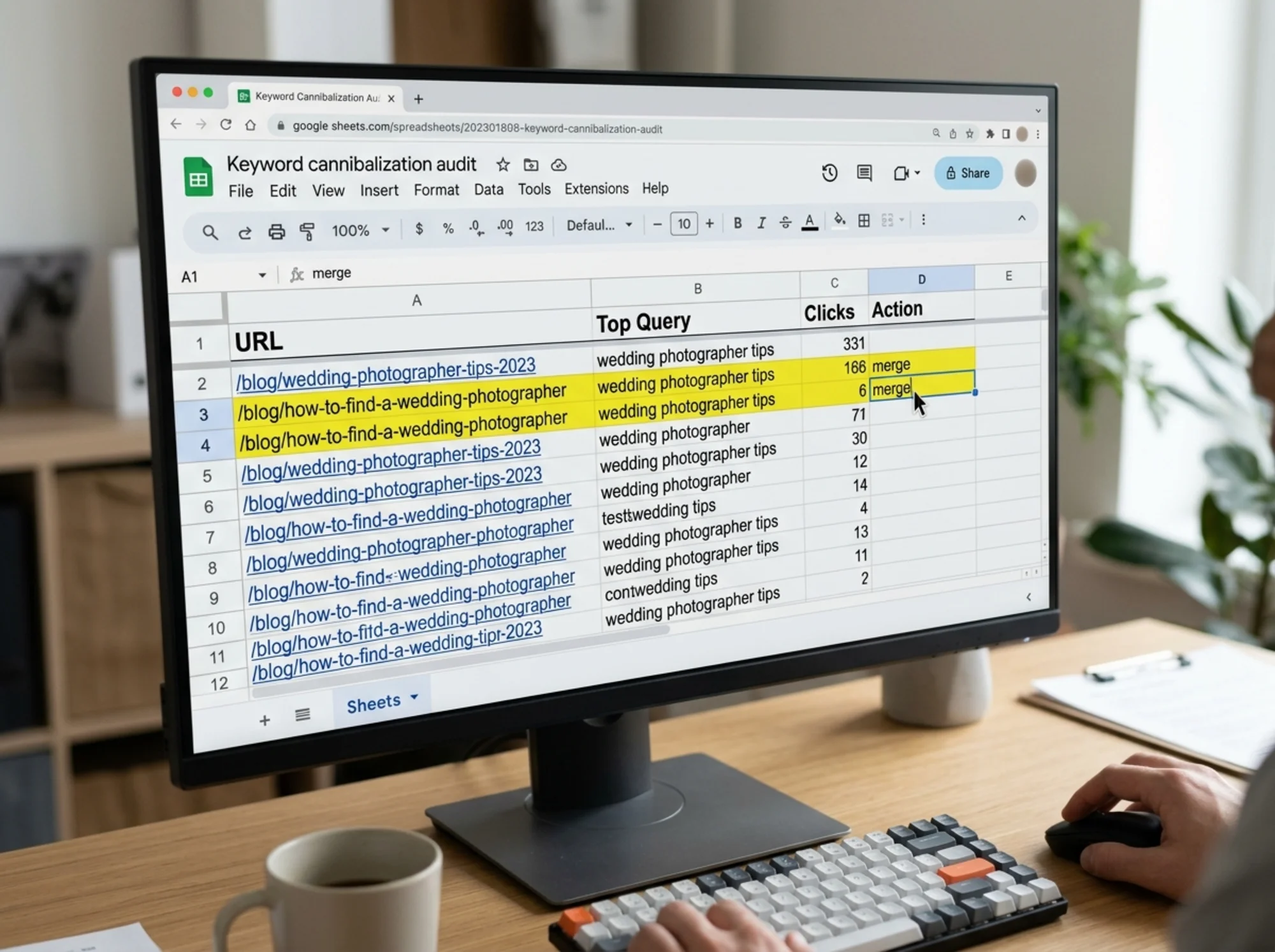
You need one place to see everything. A spreadsheet works fine. Create columns for:
URL | Title | Publish date | Primary keyword | Top query (from Search Console) | Clicks (last 90 days) | Notes
Pull your URLs from your sitemap, usually at /sitemap.xml or /sitemap_index.xml. Copy them into the first column. If you have more than 200 posts, focus on the most recent two years first.
Then fill in the publish date and title from your CMS. Leave the keyword columns blank for now.
Step 2: Pull Your Real Search Data
Guessing what each post ranks for is a mistake. You need the actual queries Google is showing it for.
Open Google Search Console. Go to Performance > Search results. Set the date range to the last three to six months. Then:
- Filter by Page and paste in the URL of one blog post.
- Look at the Queries tab.
- Note the top one to three queries that drive impressions and clicks.
Copy those into your spreadsheet. Repeat for each post. On a 30-post blog this takes about 45 minutes. It is the most valuable 45 minutes you will spend on SEO this quarter.
If a post has no impressions at all for six months, mark it. Those are candidates for deletion or major rewrites, not cannibalization fixes.

Step 3: Sort Your Sheet and Hunt for Overlap
Sort the spreadsheet by your "Top query" column. Duplicates and near-duplicates will now sit next to each other.
Look for three patterns:
- Identical queries. Two posts both show "wedding photographer tips" as their top query. Clear cannibalization.
- Near-identical queries. One post ranks for "how to choose a wedding photographer," another for "choosing a wedding photographer." Same intent. Google often treats them as the same query.
- Subset queries. One post ranks for "wedding photographer," another for "wedding photographer Chicago." If your post is about Chicago specifically, the general post may be eating its rankings.
For each pair, do a quick manual check. Open both posts in tabs. Read the first paragraph and the headings. Ask yourself: "If I landed on this from search, would I be looking for the same information on both pages?" If yes, you have cannibalization.
A Mini-Checklist for Spotting Real Overlap
- [ ] Same primary query, or close paraphrases of each other
- [ ] Same audience and same stage of buying intent
- [ ] More than 30 percent overlap in subheadings
- [ ] Both pages get impressions for the shared query
Hit three or more and the pair needs action.
Step 4: Decide What to Do With Each Pair
You have four options. Pick one per pair.
Option A: Merge into one stronger post. Right call most of the time. Take the better-performing post (more clicks, better backlinks, stronger writing) and fold the best material from the weaker one into it. Then 301-redirect the weaker URL to the stronger one. The combined page usually outranks both originals within a month or two.
Option B: Differentiate them. If both posts have real, distinct value but happen to use overlapping titles, rewrite one to target a clearly different query. Split "wedding photographer tips" into one post about choosing a photographer and another about briefing them before the day.
Option C: Delete the weaker one with a redirect. If one post is thin, outdated, and adds no unique value, redirect it to the stronger post and remove it. Do not just delete. A 404 throws away whatever backlinks and traffic the old URL had.
Option D: Leave it alone. Sometimes two posts both rank well for different positions on the same query, and consolidating would risk losing one of those positions. Rare on small blogs, but worth checking. If your weaker post is on page one already, do not touch it.
A Real Walkthrough
Say you run a small accounting firm's blog. You have:
- A 2022 post titled "How to Prepare for Tax Season as a Freelancer" — 480 clicks last year
- A 2024 post titled "Freelancer Tax Tips for 2024" — 90 clicks last year
- Both rank in positions 8 to 14 for "freelancer tax preparation tips"
The 2022 post is winning, but barely. The 2024 post has fresher numbers and a better deductions section. Action: pull the deductions section and the updated tax brackets out of the 2024 post, merge them into the 2022 post, rename the 2022 post to "Freelancer Tax Preparation: A 2025 Guide," then 301-redirect the 2024 URL to the 2022 URL.
That one merge often moves a page from position 10 to position 4 or 5. Compound that across your blog and you double or triple organic traffic without writing new content.
Step 5: Execute the Fixes Without Breaking Your Site
Three rules will save you from accidents.
Always use 301 redirects, never 302s. A 301 tells Google the move is permanent and passes ranking signals to the new URL. A 302 says "temporary" and Google holds the old URL in its index. Most CMS plugins default to 301, but confirm in the settings.
Update internal links before publishing the redirect. Search your site for the old URL and replace those links with the new one. Redirects work, but direct links are cleaner and slightly faster for users. Most CMS platforms have a find-and-replace plugin that handles this in one pass.
Keep a redirect log. Open a separate sheet with columns: Old URL, New URL, Date redirected. You will thank yourself a year from now when you cannot remember whether a page was deleted or moved.
After you publish a merge, resubmit the surviving URL in Search Console using the URL Inspection tool and click "Request Indexing." Google usually re-crawls within a few days.
Step 6: Prevent It From Happening Again
Cannibalization is a workflow problem more than a writing problem. Fix it by adding one step before you publish any new blog post.
Before writing, do this 10-minute check:
- Search
site:yourdomain.com [your keyword]in Google. See what already ranks. - If a strong existing post already targets that keyword, either update that post instead of writing a new one, or shift your angle to a clearly different query.
- Note the new post's primary keyword in a master content sheet so future-you can see it next time.
A simple content calendar with "primary keyword" as a column prevents 90 percent of future cannibalization. It is one of those small, boring habits that pays off for years.
What About Schema and Page Experience?
Two related things often come up when people audit blogs, so a quick note on each.
Article schema helps Google understand a blog post's metadata: author, publish date, headline. It does not cause or fix cannibalization, but it does help Google attribute the right post to the right query when you have similar titles. If your CMS does not add Article structured data automatically, most SEO plugins handle it. Google's documentation on the Article markup spells out the required and recommended properties.
Core Web Vitals — loading, interactivity, and layout stability — also do not directly cause cannibalization. But a slow, janky duplicate post is less likely to be the one Google picks when it has to choose between two competing pages. Cleaning up your blog often means deleting the slower duplicates, which improves your average page experience as a side effect.

When to Run This Audit
For most small business blogs, twice a year is enough. Schedule it for the start of January and the start of July. Block two hours on the calendar. Pull the spreadsheet, refresh the Search Console data, and run through any new overlaps.
Also run it after any major content sprint. If you publish 10 posts in a month, you almost certainly created some overlap without realizing it.
A Quick Summary You Can Actually Use
- List every blog post in a spreadsheet.
- Pull the top queries for each from Search Console.
- Sort by query and look for overlap.
- For each cannibalized pair, pick: merge, differentiate, redirect, or leave alone.
- Use 301 redirects, update internal links, log everything.
- Add a 10-minute keyword check to your pre-publish workflow.
That is the entire process. Not glamorous, but the traffic gains are real and almost immediate.
Try a Free Audit
If you want a faster way to spot cannibalization, duplicate titles, thin content, and other crawlable issues across your whole blog, run a free website audit with FreeSiteAudit. It scans your site, flags overlapping pages, and gives you a prioritized checklist of fixes you can work through this weekend. No credit card required for the free scan. For deeper guidance on cleanup, see our notes on fixing duplicate content and SEO basics for small business sites.
Sources
Check your website for free
Get an instant score and your top 3 critical issues in under 60 seconds.
Get Your Free Audit →