How to Fix Orphan Pages That Google Isn't Indexing
A plain-English guide to finding orphan pages on your website, understanding why Google ignores them, and fixing them with internal links and sitemaps.
# How to Fix Orphan Pages That Google Isn't Indexing
You spent hours writing that service page. Or that case study. Or that "about our process" page you were proud of. Months later, you check Google and it's nowhere. Not buried on page five. Not anywhere. Google doesn't seem to know it exists.
There's a good chance it's an orphan page.
Orphan pages exist on your server and have a URL, but no other page on your site links to them. They're invisible to anyone walking through your site, and often invisible to Google too. For a small business, every page should be doing a job: attracting customers, ranking for a keyword, answering a question. An orphan page does none of that.
This guide walks you through what orphan pages are, why Google ignores them, how to find yours, and how to fix them in a weekend without hiring an agency.

What an orphan page actually is
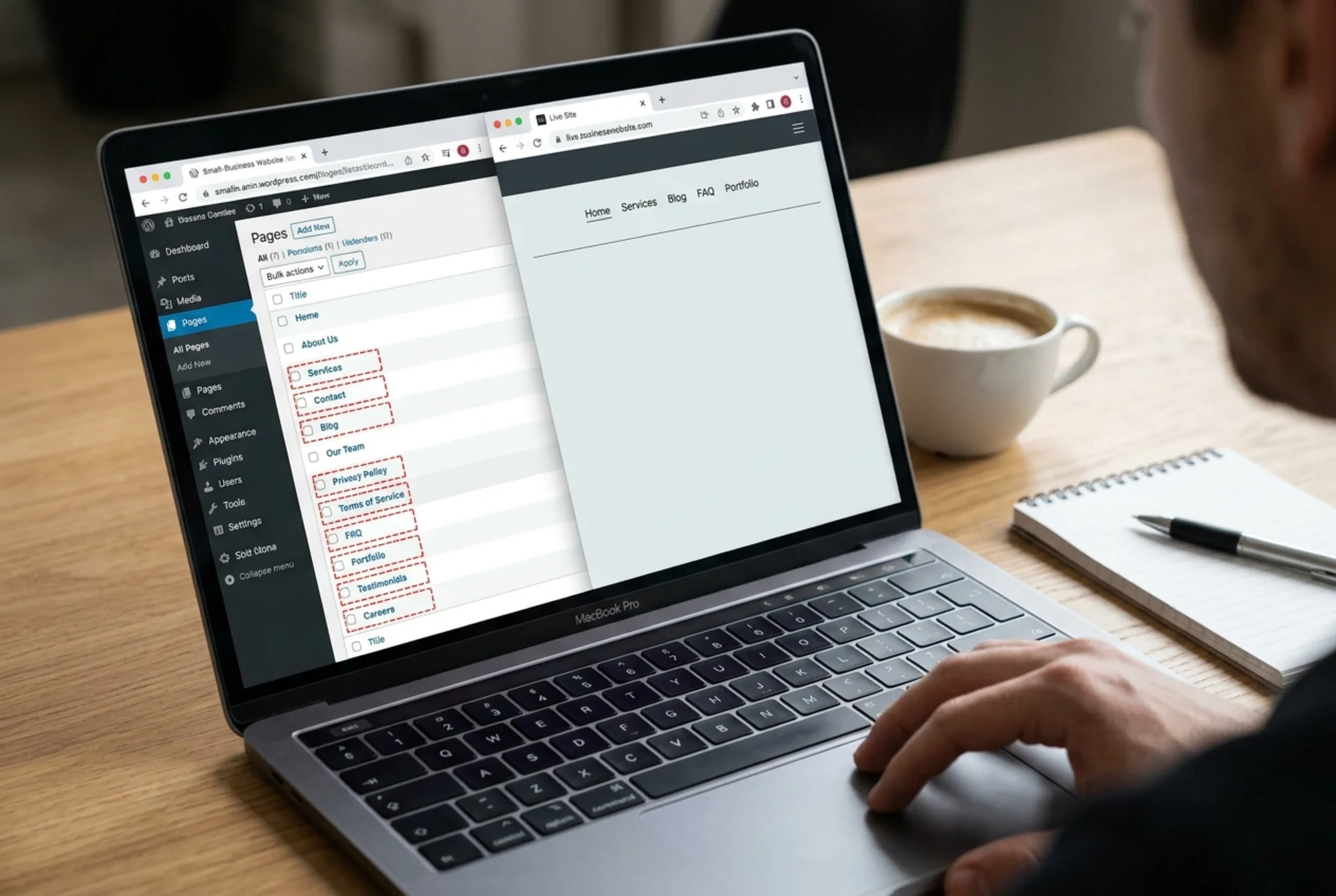
An orphan page has zero internal links pointing to it. No menu item, no footer link, no link from a blog post, no link from your homepage. The only way to reach it is to type the URL directly or click a link from somewhere outside your site.
Think of your site like a city: pages are buildings, internal links are the roads between them. An orphan is a building with no roads. You can find it if someone hands you GPS coordinates, but nobody stumbles across it.
Common ways orphan pages get created:
- You launched a campaign landing page and removed the links pointing to it after the campaign ended.
- You redesigned your navigation and dropped old pages from the menu without redirecting them.
- You imported pages from an old site during a migration but never wired them into the new structure.
- You created a "thank you" or confirmation page that's only reached after a form submission.
- You wrote blog posts in batches and never linked older posts from newer ones.
- A contractor added pages through the CMS without touching the navigation.
Some orphans are intentional: thank-you pages after checkout, members-only resources, unlisted promo pages for an email list. Those are fine. The problem is the unintentional ones, especially pages you actually want to rank.
Why Google often ignores orphan pages
Google discovers pages two main ways: by crawling links and by reading your XML sitemap. If a page has no internal links and isn't in your sitemap, Google has nothing pointing it toward that URL.
When other pages on your site link to a page, you're voting for it. You're saying "this is part of what we do, it belongs here, it's relevant to this topic." A page with zero internal links has zero votes. Google sees a page that even the site owner doesn't seem to care about, and treats it accordingly.
Google's guidance on creating helpful content emphasizes that pages should serve a clear purpose within a site and be genuinely useful to visitors. An orphan, by definition, isn't part of any user journey on your site. That's a quality signal, and not a good one.
A page can still get indexed if it's in your sitemap or if external sites link to it. But indexed doesn't mean ranking. An orphan that's indexed but has no internal links almost never ranks for competitive terms because it lacks the contextual signals Google uses to understand what the page is about and how it fits with the rest of your site.
How to find orphan pages on your site
You can't fix what you can't find. Use at least two of these three methods to be thorough.
Method 1: Compare your sitemap to your crawl. Crawl your site with a tool that follows internal links, then compare that list to the URLs in your XML sitemap. Any URL in your sitemap that didn't show up in the crawl is an orphan, because the crawler couldn't reach it from links and neither can a visitor.
Method 2: Compare your full URL list to your crawl. Pull every URL your CMS knows about. In WordPress, that's everything in Posts, Pages, and custom post types. In Shopify, it's products, collections, and pages. In Webflow, it's CMS items and static pages. Anything in the CMS but not in your crawl is an orphan.
Method 3: Check Google Search Console. Open the Pages report and look for "Discovered - currently not indexed" or pages with impressions but very few clicks. Cross-reference with your crawl to confirm which are orphans.
If running a crawl sounds intimidating, you can run a free website audit and we'll flag pages that look orphaned along with other indexing issues.
A real example: the bakery problem
A local bakery owner has a website with these pages in the main navigation: Home, Menu, Order Online, About, Contact. She also has, sitting on her server:
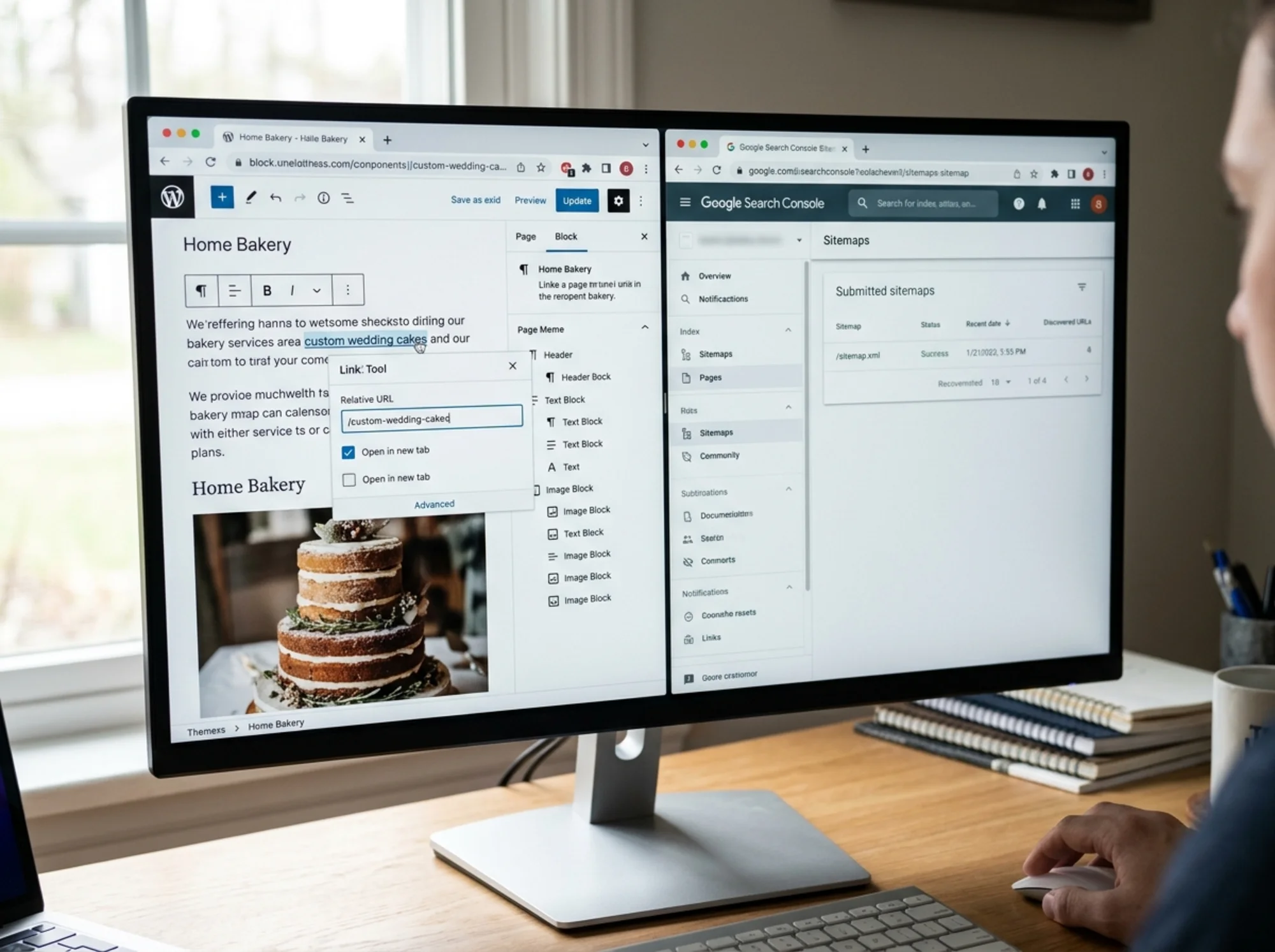
- /custom-wedding-cakes
- /corporate-catering
- /gluten-free-options
- /birthday-cake-gallery
- /kids-baking-classes
None of those are in the menu. None are linked from the homepage. Her older blog posts link to the homepage and the menu, but not to these service pages. They're orphans.
When someone Googles "wedding cakes near [her town]," a competitor ranks. Her page exists. Her page is actually better. Her page is invisible to Google.
Here's what she does:
- Adds Custom Wedding Cakes and Corporate Catering to the main menu under a new "Services" dropdown.
- Updates the About page to mention gluten-free options with a link to the gluten-free page.
- Edits three older blog posts to link to relevant service pages where the topic comes up naturally.
- Adds a "Popular pages" block to the footer linking to all five.
- Submits an updated sitemap in Google Search Console.
Within six to eight weeks, four of those five pages appear in search results. Two start ranking on page one for local searches. The wedding cake inquiries start coming in.
That's the workflow. Find the orphans, give them links, tell Google.
The fix: a step-by-step playbook
Work through your orphan list one page at a time. For each page, decide whether to keep it, kill it, or redirect it.
Step 1: Decide if the page should exist. Some orphans should just be deleted. If a page is outdated, redundant, or was never useful, delete it and return a 410. Google will drop it from the index and stop spending crawl budget on it. If the content duplicates a better page, 301 redirect it. If it's worth keeping, move on.
Step 2: Give it a home in your site structure. Where does this page logically fit? A wedding cake page belongs under Services. A blog post belongs in your blog index. A customer story belongs in Case Studies. Decide where it lives, then make sure the parent page links to it. Don't stuff it into a generic "More" dropdown; place it where a visitor actually looking for that information would look.
Step 3: Add contextual internal links. This is where most people stop too early. One link from the navigation isn't enough. The page should be linked from at least two or three other pages, ideally topically related ones.
A wedding cake page should be linked from:
- The main Services or Menu page
- Any blog post about weddings, custom orders, or event catering
- The contact page (in a "We also offer" section)
- A testimonials page that mentions wedding orders
Anchor text matters. Use descriptive phrases like "custom wedding cakes" rather than "click here." Google reads anchor text as a strong signal about what the linked page is about. For a deeper walkthrough, see our guide on internal linking fixes.
Step 4: Update your XML sitemap. Make sure the previously orphaned page is in your sitemap. If it's auto-generated by your CMS, this is probably already done. If it's manual, add it. Then submit the updated sitemap in Search Console under Sitemaps and request indexing for specific URLs through URL Inspection. If your sitemap is a mess, our XML sitemap fix guide covers how to clean it up.
Step 5: Give Google time. Once you've added internal links and updated your sitemap, Google still needs to crawl the page, evaluate it, and decide where to rank it. That typically takes a few days to a few weeks for a small site. Don't keep tweaking. Check Search Console after two to three weeks to see if the page is indexed and picking up impressions.
A mini-checklist for every page
Before you publish any new page, run through this list. It prevents orphans before they happen.
- Is this page linked from at least one navigation menu or category page?
- Is it linked from at least one other content page where the topic comes up naturally?
- Does the anchor text describe what the page is about?
- Is the page in your XML sitemap?
- Does the page itself link out to one or two related pages on your site?
- Does the URL match the page topic?
Yes to all six and the page has a fighting chance of being found and ranked. If you're also publishing articles, Article structured data and solid Core Web Vitals reinforce the quality signal Google reads from a well-linked page.
Common mistakes to avoid
Stuffing every orphan into the footer. A footer link is weak. It's better than nothing, but a page with only a footer link is barely better off than an orphan. Get it into a contextual spot in your main content too.
Generic anchor text. Linking to your wedding cakes page with "learn more" tells Google almost nothing. Use the actual topic.
Forgetting about category and tag pages. On a blog, category and tag archives are often orphans themselves. If you tag posts but never link the tag pages, those tags are doing nothing for you.
Treating the sitemap as a substitute for internal links. A sitemap helps Google discover URLs. It doesn't help Google understand which pages are important. Internal links do that. You need both.
Re-orphaning pages during a redesign. Every time you change navigation or themes, do a fresh check. Pages that were properly linked last year might be orphans now.
When orphan pages are actually fine
Not every orphan needs fixing. Keep these intentionally disconnected:
- Thank-you pages after form submissions or purchases
- Unlisted promo pages for specific email campaigns
- Members-only or paywalled content
- Legal pages you don't want indexed (in which case, also add noindex)
- A/B test variants
Make sure these have noindex tags if you don't want them in Google. An orphan that's still indexable can cause confusion if someone links to it externally.

What you'll see after fixing orphans
The payoff is usually not subtle. Pages that were sitting on your server doing nothing start appearing in search results. You get impressions for keywords you didn't know you were ranking for. Some of those impressions turn into clicks, and some clicks turn into customers.
The other thing that happens, which surprises people: your stronger pages get stronger too. When you add internal links from your homepage and blog posts to your service pages, you pass relevance signals around your site. The structure gets more coherent. Google understands your business more clearly. Rankings improve across pages you weren't even directly working on.
For small businesses, this is one of the highest-leverage SEO tasks you can do. It costs nothing. It doesn't require new content. It just connects what you already have.
Where to start this week
If you have a free hour, do this:
- Open your main menu and list every page linked from it.
- Open your CMS and list every page that exists.
- Compare the two lists. Anything in the CMS but not reachable from the menu is a candidate.
- Pick the three pages you most want customers to find.
- Add at least two internal links to each, from relevant pages.
You don't need to fix every orphan in one sitting. Fix the three that matter most, watch what happens over the next month, and work through the rest.
If you'd rather have a tool do the discovery for you, run a free website audit with FreeSiteAudit. It'll flag orphan pages, broken internal links, sitemap issues, and other indexing problems in one report, so you know exactly what to tackle first.
Most small business sites have at least a handful of orphan pages. The ones that fix them tend to pull ahead of competitors who never noticed.
Sources
Check your website for free
Get an instant score and your top 3 critical issues in under 60 seconds.
Get Your Free Audit →