HTTP/3 and Your Website: Do You Need to Upgrade?
A plain-English HTTP/3 guide for small business owners: what it actually does, when upgrading helps your site, how to check protocol, and what to fix first.
# HTTP/3 and Your Website: Do You Need to Upgrade?
If you run a small business website, you have probably seen "HTTP/3" pop up somewhere — a checkbox in your hosting panel, a Cloudflare setting, or a freelancer pitching a "performance upgrade."
Here is the honest answer: HTTP/3 is real, it helps in specific situations, and for most small business sites turning it on is a five-second job you should probably do. It is not the silver bullet some people make it out to be.
This guide explains what HTTP/3 actually is, who benefits, how to check if your site already uses it, and what to do if it does not. No jargon dumps, no hype.

What HTTP/3 actually is (in one paragraph)
HTTP is the language your browser and your web server use to talk to each other. Every time someone visits your site, their browser asks for your homepage, images, fonts, and scripts using HTTP. There have been three major versions: HTTP/1.1 (1990s), HTTP/2 (2015), and HTTP/3 (finalized in 2022). The big change in HTTP/3 is that it stops using TCP — the older transport layer — and uses a newer one called QUIC, built on UDP. The practical result: faster connection setup, fewer stalls when a packet gets lost, and better performance on flaky mobile networks.
That is the entire technical story you need. The rest of this article is about whether that practical result matters for your business.
Who actually benefits from HTTP/3?
Not all sites get the same lift. HTTP/3 helps the most when:
- Many of your visitors are on mobile networks. Spotty 4G, cafe Wi-Fi, hotel Wi-Fi, transit, and crowded conference Wi-Fi see the biggest improvements.
- Your site has many small resources. Lots of images, icons, fonts, and scripts benefit because HTTP/3 handles parallel downloads more gracefully when the network is unstable.
- You serve customers in regions with weaker infrastructure. Higher packet loss means more upside.
- Your visitors are far from your servers. Longer round trips mean bigger wins from faster connection setup.
HTTP/3 helps less when:
- Your visitors are almost all on solid home or office broadband.
- Your site is a small static brochure.
- You are already on a fast CDN and your real bottleneck is elsewhere — huge images, slow database queries, bloated JavaScript.
Example: a florist whose customers place orders from their phones during commutes, weddings, and venue walkthroughs has more to gain than an accountant whose clients book consultations from their desks.
The honest impact on real metrics
The Core Web Vitals — Largest Contentful Paint, Interaction to Next Paint, and Cumulative Layout Shift — are how Google evaluates user-experienced speed. HTTP/3 mostly helps LCP, and only when the network was the bottleneck. If your LCP is 5 seconds because your hero image is a 3 MB JPEG, HTTP/3 will not save you. Compress the image first.
HTTP/3 is one layer of the cake. It helps. It is not the cake.

How to check if your site already uses HTTP/3
Before you upgrade anything, find out what you have. Three quick ways.
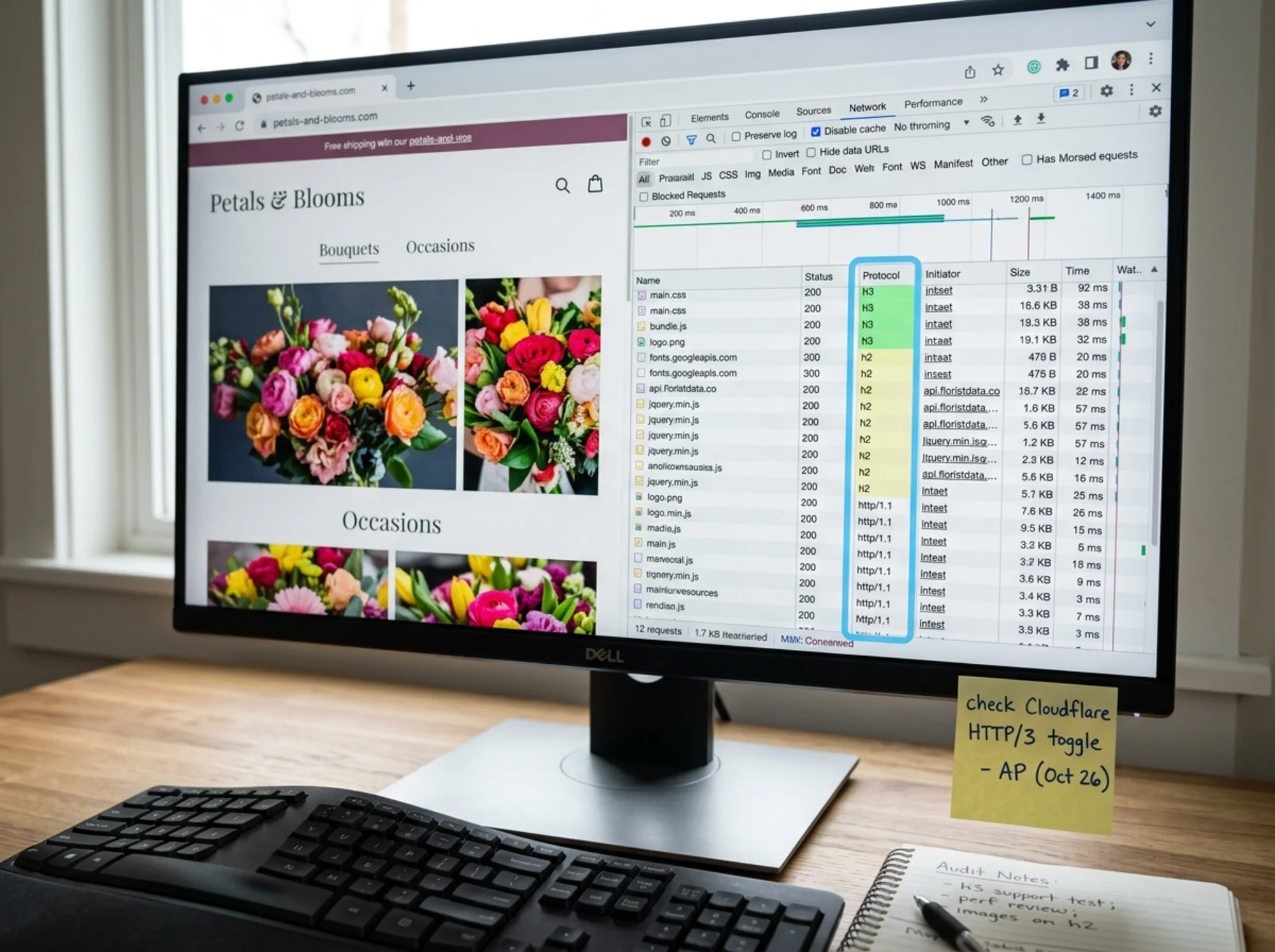
Method 1: Browser DevTools (30 seconds)
- Open your site in Chrome or Edge.
- Right-click anywhere and choose Inspect.
- Click the Network tab.
- Reload the page.
- Right-click any column header and enable the Protocol column.
- Look at the values:
h2(HTTP/2),http/1.1, orh3(HTTP/3).
If most rows say h3, you are already on it. If you only see h2 or http/1.1, you are not.
Method 2: A public checker
Plug your domain into any HTTP/3 checker (search "HTTP/3 check"). Yes or no in two seconds. Use this if DevTools feels intimidating.
Method 3: Run a full audit
A site audit shows protocol use alongside everything else that affects performance — image weight, render-blocking scripts, missing compression, server response times. Protocol upgrades only matter in context. You can run a free website audit with FreeSiteAudit to see the full picture.
What to do based on what you find
Scenario A: You are already on HTTP/3
You are done with the main task. This usually happens automatically if you use:
- Cloudflare (free plan and up)
- Fastly
- AWS CloudFront
- Vercel, Netlify, or similar modern hosts
- Recent versions of Shopify and Squarespace
- Most managed WordPress hosts that ship Cloudflare or LiteSpeed
Move on to bigger wins: image compression, font optimization, and reducing JavaScript.
Scenario B: You are on HTTP/2 only
The most common case. The fix usually takes one of three forms.
If you use Cloudflare (free or paid):
- Log into your Cloudflare dashboard.
- Choose your domain.
- Go to Network.
- Turn on the HTTP/3 (with QUIC) toggle.
- Save. Wait a few minutes. Re-check with DevTools.
If your host has a panel with an HTTP/3 toggle (LiteSpeed, some cPanel installs): flip it. Same idea.
If your host does not support HTTP/3 at all: put Cloudflare's free plan in front of your domain. It is the cheapest way to get HTTP/3, a real CDN, and basic security at once.
Scenario C: You are still on HTTP/1.1
This is a red flag. HTTP/2 has been the default for years. If you are on HTTP/1.1, your hosting is probably old, your TLS configuration may also be outdated, and you are leaving easier performance wins on the floor. Move to a CDN or modern host first — HTTP/3 will come with it.
A realistic walkthrough: a small bakery's site
Imagine a bakery owner named Priya. Her site runs on WordPress on a budget shared host, and most of her traffic comes from people on phones searching "birthday cake near me." Her LCP on mobile is 4.1 seconds. She wants to know if HTTP/3 will help.
Step 1: Audit. The report shows:
- LCP: 4.1s on mobile
- Hero image: 2.4 MB unoptimized PNG
- Render-blocking scripts: three
- Protocol: HTTP/1.1
- No CDN
Step 2: Read the priorities. The audit ranks fixes by impact. The 2.4 MB hero image is #1. Render-blocking scripts are #2. The protocol upgrade is further down, because compressing the hero image alone will likely cut a full second off LCP.
Step 3: Do the easy stuff first. She replaces the PNG with a 180 KB WebP. LCP drops to 3.0s.
Step 4: Add Cloudflare. She sets up the free Cloudflare plan, which routes traffic through their CDN and serves over HTTP/3 by default. LCP drops to 2.2s — a mix of CDN caching, HTTP/3, and Brotli compression. The HTTP/3 share is real but not the headline; the CDN and image fix did more.
Step 5: Defer scripts. She defers two of the three render-blocking scripts. LCP drops to 1.8s, comfortably in the "good" range for Core Web Vitals.
The order matters. If Priya had only flipped on HTTP/3 without fixing the image, she might have saved 200ms and concluded "HTTP/3 is a scam." It is not a scam. It just is not magic.
Mini-checklist: before you bother with HTTP/3
If any of these are unresolved, fix them before — or at the same time as — your HTTP/3 upgrade.
- [ ] Hero and above-the-fold images compressed and served as WebP or AVIF
- [ ] Total page weight under 2 MB on mobile
- [ ] No non-essential render-blocking scripts in
- [ ] HTTPS enabled with a modern TLS version
- [ ] A real CDN in front of your origin
- ] Server response time (TTFB) under 600ms — see [reduce time to first byte
- [ ] Caching headers configured for static assets
Check all those boxes, then flip on HTTP/3 and squeeze out the last few hundred milliseconds.
Common myths worth squashing
"HTTP/3 will fix my slow site." It will not. It improves the transport layer. If your site is slow because of unoptimized images, bloated themes, or a slow database, HTTP/3 cannot help.
"HTTP/3 is risky to enable." It is not. Browsers fall back automatically to HTTP/2 if HTTP/3 fails. Worst case, a visitor on an unusual network uses HTTP/2 instead.
"My visitors are not on HTTP/3-capable browsers." They probably are. Recent versions of Chrome, Edge, Firefox, and Safari all support it, including the mobile builds.
"HTTP/3 hurts SEO if you do not have it." It does not. Google ranks pages on the user experience they deliver, not the protocol number. Speed matters; the protocol behind the speed is your business.
What to ask your developer or host
If you do not manage your site yourself, send this short message to whoever does:
> "Hi — can you confirm whether our site serves over HTTP/3? If not, can you turn it on, either at our CDN or our origin? Also, can you run a quick audit of mobile performance so I can see Core Web Vitals?"
That is enough. A competent developer or host can answer in a few minutes.

A note on mobile users and conversions
For most small businesses, more than half of traffic now comes from phones. Many of those visits happen on imperfect networks — in cars, at events, on public Wi-Fi, in basements with two bars of signal. HTTP/3 was designed for exactly that environment. Even if the average improvement is modest, the improvement at the bad end of the network distribution can be large.
If your business depends on mobile conversions — a roofer getting a form fill from someone standing in their yard, a caterer getting a quote from a wedding venue with bad Wi-Fi, a restaurant getting a reservation from someone walking down the street — those marginal customers on weak networks are exactly the ones HTTP/3 helps you keep.
This is also where general mobile work pays off. See improve mobile performance for the broader set of fixes that pair well with an HTTP/3 upgrade.
So, do you need to upgrade?
The short version:
- Already on HTTP/3? Great. Spend your energy on images, fonts, scripts, and content.
- On HTTP/2 with a CDN or modern host? Flip the toggle. Five-second job, no real downside.
- On HTTP/1.1 or no CDN? The upgrade you need is bigger than HTTP/3. Get a CDN or move to a modern host. HTTP/3 will come along for the ride.
- Site fundamentally slow for non-network reasons? Fix those first. HTTP/3 is the polish, not the paint.
The important thing is knowing which bucket you are in. Guessing is what leads small business owners to pay for a "performance plan" that just enables HTTP/3 and changes nothing else.
Run a real audit before you change anything
The fastest way to find out which bucket you are in — and what would actually move the needle — is to run an audit. You will see your protocol, your Core Web Vitals, your image and script weight, and a prioritized list of fixes ranked by impact, not hype.
Run a free website audit with FreeSiteAudit and get a clear, plain-English report in a couple of minutes. If HTTP/3 is your real bottleneck, the report will say so. If it is your hero image, your fonts, or your old hosting, it will say that instead — and tell you what to do next.
Speed is one of the few investments in your website that pays off on every visit, on every device, forever. HTTP/3 is a small piece of that. Worth doing? Yes. Worth obsessing over? Only after the bigger work is done.
Sources
- Core Web Vitals overview: https://web.dev/articles/vitals
- Google Search: Creating helpful, reliable, people-first content: https://developers.google.com/search/docs/fundamentals/creating-helpful-content
Check your website for free
Get an instant score and your top 3 critical issues in under 60 seconds.
Get Your Free Audit →