Image Audit: WebP, AVIF, and Next-Gen Format Migration Guide
A practical guide to auditing your site's images and migrating to WebP and AVIF formats. Cut page weight, fix slow LCP, and ship without breaking anything.
# Image Audit: WebP, AVIF, and Next-Gen Format Migration Guide
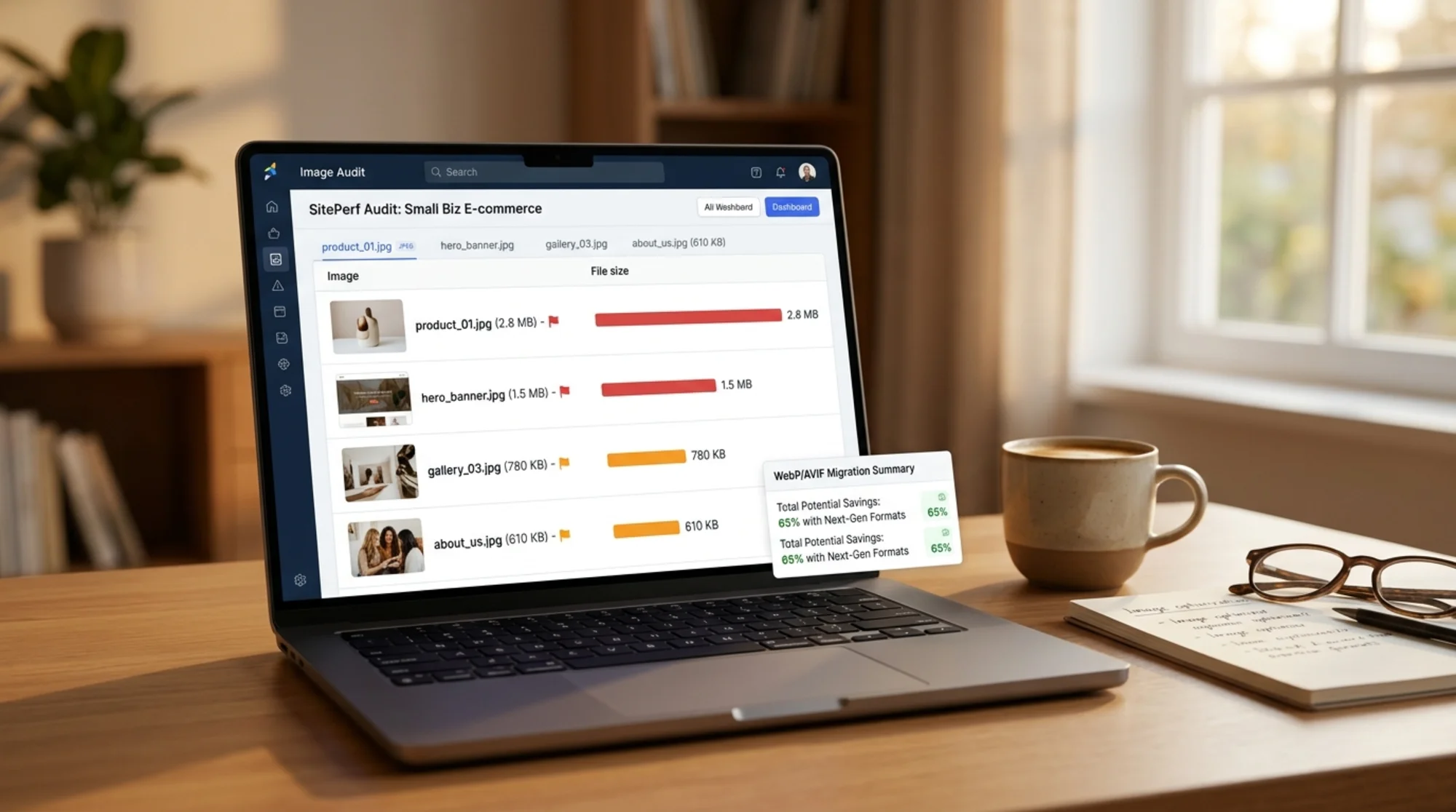
Most small business websites are slow because of images. Not code. Not hosting. Images. You upload a photo from your phone, drop it onto your homepage, and ship it. That single 4MB JPEG of your storefront just doubled your page weight and pushed your Largest Contentful Paint past three seconds.
This guide walks you through auditing your images, understanding what WebP and AVIF actually do, and migrating without breaking your site. No jargon. No tooling deep-dives you'll never finish. Just the work that moves the needle.
Why this matters for small business sites
Google measures three things called Core Web Vitals. The one images affect most is Largest Contentful Paint (LCP) — how long the biggest visible thing on your page takes to render. For most small business sites, that "biggest visible thing" is a hero image, a product photo, or a banner.
When LCP is over 2.5 seconds, you're in the yellow zone. Over 4 seconds, you're in the red. Slow LCP correlates with bounce, lower conversion, and worse ranking on competitive queries.
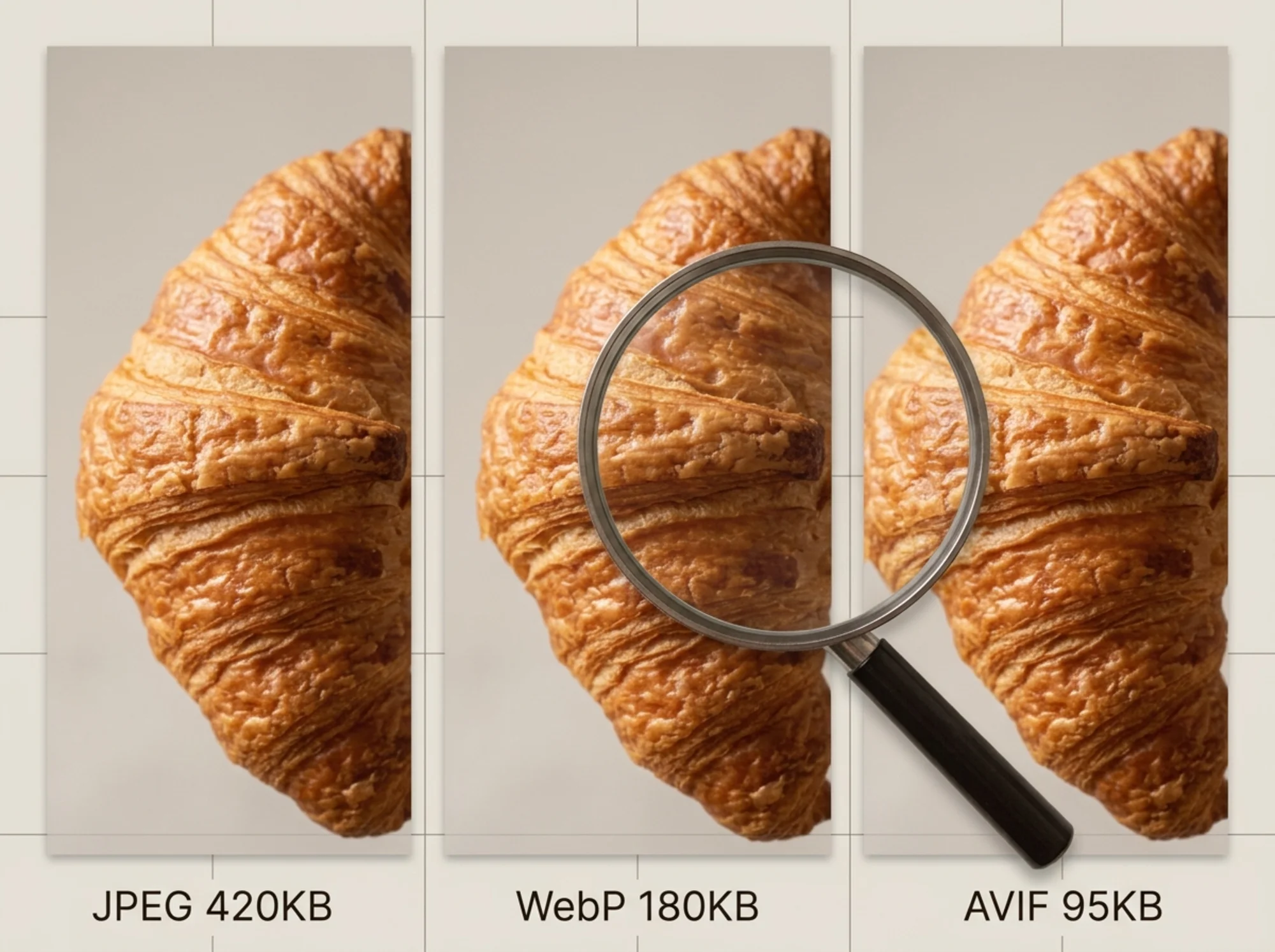
Modern image formats — WebP and AVIF — give you the same picture at 25% to 50% the file size of a JPEG or PNG. That's the entire pitch. Smaller file, same quality, faster page.
What's actually in your image folder right now
Before you migrate anything, you need to know what you have. Most small business sites fall into one of three buckets:
- The phone uploader. Everything is a 3000×4000 pixel JPEG straight from a phone camera, scaled down by CSS to display at 600 pixels wide.
- The Photoshop saver. Images were exported "Save for Web" in 2015 and never touched again. Decent compression, wrong format for 2026.
- The page builder mess. A WordPress theme or Wix template auto-generated five sizes of each image, half of which are PNGs that should be JPEGs.
Pick the bucket that sounds like you. The fix path is different for each.
The five-minute image audit
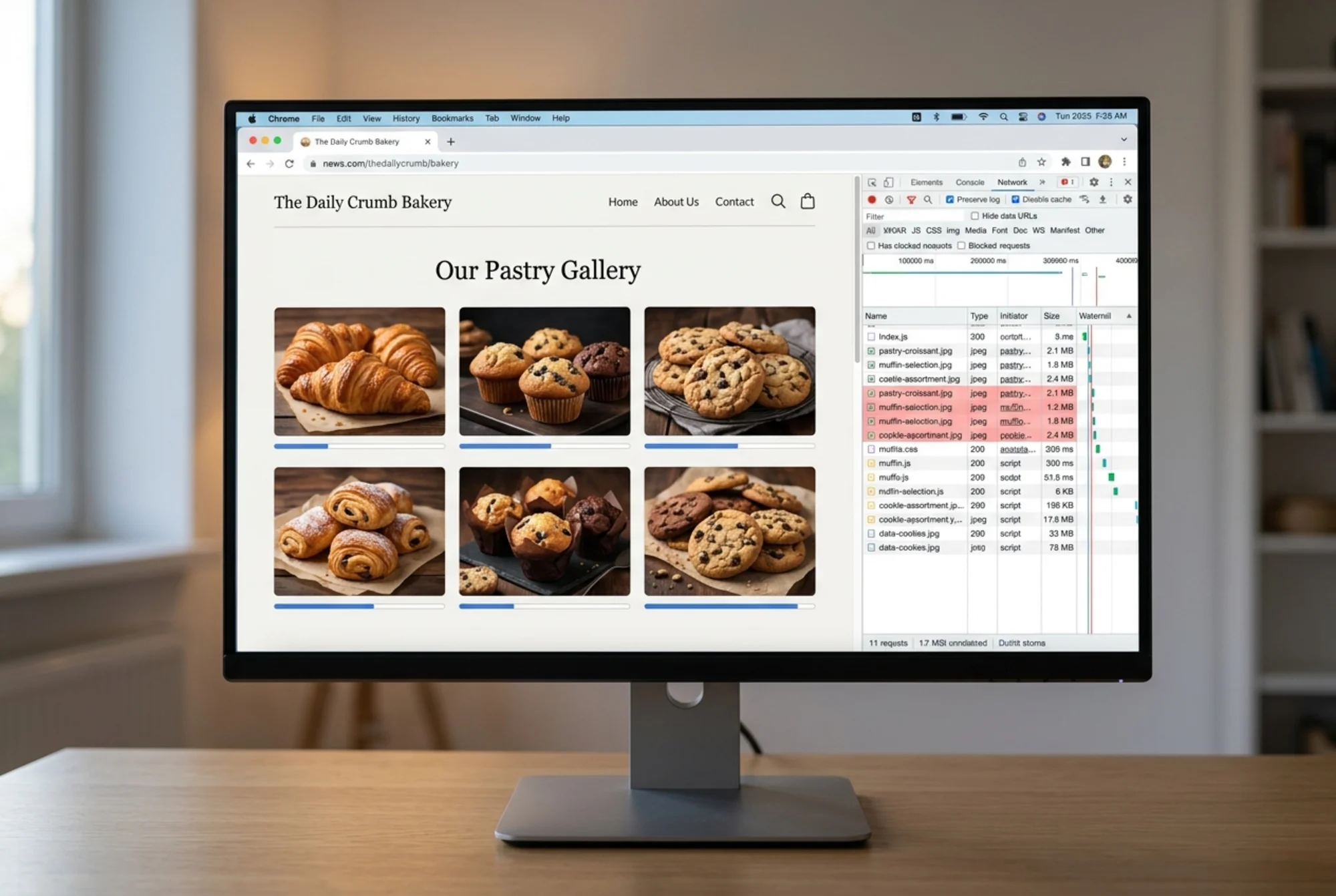
You don't need a paid tool to start. Open your homepage in Chrome, right-click anywhere, choose Inspect, click the Network tab, filter by Img, and reload the page.
You'll see every image, its format, and its file size. Look for:
- Anything over 200KB. That's your priority list.
- Anything served as PNG that isn't a logo or transparent graphic. PNGs are huge and almost never needed for photos.
- Anything served at 2x or 3x the display size. A 2400-pixel-wide image rendered in a 600-pixel slot wastes bandwidth.
- Format column showing JPEG or PNG everywhere. If you don't see WebP or AVIF anywhere, you have headroom.
Write down the worst five offenders. That's your starting list.
Or skip the manual work and let our free image audit tool crawl your site and flag every oversized, wrong-format, or unscaled image automatically. It also catches the ones you can't see from the homepage — product pages, blog post hero images, archived pages.
WebP versus AVIF versus JPEG: what to use when
Here's the short version, no benchmarks to memorize:
- JPEG: Use only as a fallback for the tiny number of users on browsers that don't support WebP. In 2026, that's effectively no one outside very old devices.
- PNG: Use only for logos, icons, and graphics with transparency or sharp edges. Never for photos.
- WebP: The safe default. Universal browser support. Usually 25–35% smaller than equivalent JPEG. Most page builders, WordPress plugins, and CDNs handle it natively now.
- AVIF: The newer format. Typically 40–50% smaller than JPEG at the same quality. Slightly slower to encode and occasionally finicky at very low quality settings, but supported in all modern browsers.
Practical recommendation: WebP everywhere as the baseline. AVIF for hero images and product photos where the size win really matters. Don't agonize over the choice for a 30KB blog post thumbnail.
A real walkthrough: the local bakery
Let's run through this with a concrete example. Say you run a neighborhood bakery and your homepage has:
- A hero image of your storefront (currently a 3.2MB JPEG at 4032×3024)
- Six product photos in a gallery (each around 1.5MB, JPEG)
- A "meet the team" photo (1.1MB PNG, which is the wrong format)
- A logo (45KB PNG, which is fine)
Total page weight from images: roughly 13MB. LCP is probably 4–5 seconds on mobile. Here's the fix sequence.
Step 1: Resize first, then convert.
The hero image at 4032 pixels wide is overkill. Even a Retina display rendering it at full width tops out around 2400 pixels. Resize to 2400 wide, then again to 1200 wide for mobile. You'll serve the right one with a srcset (more on that in a minute).
Step 2: Convert to WebP and AVIF.
There are three reasonable paths:
- WordPress users: Install a plugin like ShortPixel, Imagify, or the free Converter for Media. They auto-generate WebP versions on upload and serve them via your existing image tags.
- Shopify, Squarespace, Wix users: Modern themes already serve WebP automatically. Check by viewing the page source — if you see
.webpURLs, you're already covered. If not, look in your theme settings for "image optimization" or upgrade your template. - Static site or custom HTML: Use Squoosh.app or a command-line tool like
cwebpandavifenc. Batch-convert your folder, then update your image tags.
Step 3: Use the
If you're hand-coding, your hero image goes from this:
html

To this:
html
width="2400" height="1600" loading="eager">
The browser picks the best format it supports. The JPEG is the fallback for ancient browsers, and including width and height prevents layout shift.
Step 4: Lazy-load anything below the fold.
Add loading="lazy" to images that aren't visible when the page first loads. Your six gallery photos? All lazy. Your team photo near the bottom? Lazy. Your hero image at the top? Not lazy — that's your LCP element and lazy-loading it will hurt your score.
After these four steps, the bakery page weight drops from 13MB to roughly 1.2MB. LCP drops from 4.5 seconds to under 1.5. Same images. Same quality. The customer sees the storefront in a third of the time.
Common mistakes that waste the migration
A few things go wrong even when people do the work:
- Converting without resizing. A 4000-pixel WebP is still a huge file. Resize first, convert second.
- Forgetting alt text during the swap. When you replace images, you sometimes lose the alt attributes. That hurts accessibility and SEO. Audit alt text after migration.
- Serving AVIF without a fallback. A small percentage of email clients, older browser embeds, and screenshot tools choke on AVIF. Always include a WebP or JPEG fallback in a
- Re-compressing already-compressed images. Save a JPEG, then save it again at 80% quality, then convert to WebP — you've baked in compression artifacts. Always convert from the original.
- Skipping the CDN. If you've done all this and you're still serving images from a single origin server in another country, you've left half the speed gains on the table. Cloudflare, Bunny, or your hosting provider's built-in CDN takes minutes to enable.
A mini-checklist you can actually finish today
- [ ] Run a page-weight audit on your homepage and top three traffic pages
- [ ] Identify the five biggest image files
- [ ] Resize anything wider than 2400 pixels down to 2400 (hero) or 1200 (everything else)
- [ ] Convert JPEGs and PNG photos to WebP — keep originals
- [ ] Add AVIF versions for the hero and any product photos that drive revenue
- [ ] Add
widthandheightattributes to every - [ ] Add
loading="lazy"to images below the fold - [ ] Re-test LCP after deploying — confirm it's under 2.5 seconds on mobile

What the migration is worth
For a small business doing modest traffic, halving page weight from images doesn't show up in vanity metrics. It shows up in:
- Faster perceived load time on mobile, where most of your traffic actually lives
- Better rankings for competitive local queries where Google factors in Core Web Vitals
- Lower bounce rate on product and pricing pages
- Smaller bandwidth bills if you're on a metered hosting plan
- Less customer frustration on slow rural or international connections
You won't get a press release out of it. You'll just stop losing the people who would have bounced.
When to fix this yourself versus hire it out
If your site is on Shopify, Squarespace, Wix, or a modern WordPress theme, this is a one-afternoon job for someone non-technical. Install one plugin or flip one setting, then re-test.
If you have a custom-coded site, a legacy WordPress install with a builder like Divi or Elementor stuffed with images, or an ecommerce catalog with thousands of product photos, hand this to a developer. Brief them with: "Audit all images, resize to max 2400px wide, serve WebP with AVIF for hero and product images, add width/height to every tag, lazy-load below the fold." That brief is enough for any competent freelancer to scope the work.
For ecommerce specifically — where product images drive conversion and you may have thousands of SKUs — see our ecommerce site optimization notes for the catalog-scale version of this work.
Run a free audit and see your numbers
You can guess at what your worst images are, or you can see them in a list. Run a free FreeSiteAudit scan and we'll flag every oversized image, every wrong-format file, every missing width/height attribute, and give you a sorted priority list. The report is free, no card required, and takes about 90 seconds.
If you already have your audit and want a step-by-step walkthrough of the conversion itself, our convert to WebP fix guide covers it for the most common platforms.
Images are the cheapest, highest-leverage speed fix on most small business sites. The format change alone is rarely the bottleneck — the workflow change is. Once you stop uploading raw camera files and start running everything through a resize-and-convert step, you'll never go back.
Sources
Check your website for free
Get an instant score and your top 3 critical issues in under 60 seconds.
Get Your Free Audit →