React SPA vs Server-Rendered Pages: What It Means for SEO
If your React site renders content in the browser instead of on the server, Google may struggle to index it. Here's what small business owners need to know.
# React SPA vs Server-Rendered Pages: What It Means for SEO
If you hired a developer or used a modern template to build your website, there's a good chance it was built with React. React is one of the most popular tools for building websites right now — and for good reason. It makes building interactive, fast-feeling apps much easier.
But React comes in two very different flavors when it comes to how pages get built and delivered. That difference has a direct impact on whether Google can find and rank your content.
This article explains what those two approaches are, why it matters for SEO, and what to do if you're a small business owner who isn't a developer.
Two Ways a Page Can Get Built

When you visit a website, something has to turn code into the readable page you see. There are two main approaches to how and where that work happens.
Server-Side Rendering (SSR) and Static Site Generation (SSG)
With server-rendered pages — and modern equivalents like Next.js with SSR or SSG — your server does the heavy lifting before sending anything to your browser. By the time the page arrives, the HTML already contains your full text, headings, images, and structured data.
This is how most websites worked for the first 25 years of the web: a request comes in, the server builds a complete page, and sends it back. Static site generation is a variation where pages are pre-built at deploy time rather than on each request. Either way, when Google's crawler visits your URL, it receives a fully-formed HTML document it can read immediately.
Think of it like receiving a fully printed book in the mail versus receiving a kit with instructions to assemble the book yourself. Server-rendering mails Google the finished book. Client-side rendering mails Google the kit and hopes it has time to put it together.
Client-Side Rendering (CSR) — the React SPA Approach
A single-page application (SPA) works differently. The server sends a nearly empty HTML file — often just a and a bundle of JavaScript. The browser then downloads and runs that JavaScript, which then builds the actual page content you see.
From a user's perspective, this can feel snappy after the initial load. Once the JavaScript is downloaded and cached, navigating between pages can feel near-instant because there are no additional server round-trips. That's the appeal. From Google's perspective, however, it creates a problem that can silently suppress your search rankings for weeks or months without you realizing it.
Why This Creates an SEO Problem

Google's crawler — Googlebot — works by fetching URLs and reading their HTML. It's gotten better at running JavaScript over the years, but it still doesn't work the same way your browser does.
Here's what happens when Googlebot visits a React SPA:
- It fetches the URL and receives a bare HTML shell
- It may attempt to run the JavaScript to render the page
- JavaScript rendering gets added to a processing queue — this can take days to weeks
- If rendering succeeds, Google reads the content; if not, it indexes an empty or partial page
Google has confirmed this two-wave crawling behavior publicly. The first wave reads raw HTML. JavaScript rendering happens later, in a separate queue, at lower priority. During that gap — which can be substantial — your pages either don't appear in search results or appear with missing content.
For a small business with a blog, services directory, product catalog, or location pages, this means potentially leaving large amounts of indexable content invisible to search engines. You could be publishing high-quality content every week and watching your organic traffic stay flat, with no obvious explanation in your analytics — because the issue is upstream, at the crawling stage, before any ranking signals even come into play.
Common Symptoms Your Site Has a Rendering Problem
You don't always need developer access to notice the warning signs. These patterns in Google Search Console often point to a JavaScript rendering issue:
- "Discovered — currently not indexed" status on many URLs. Google found the links but hasn't indexed the pages.
- "Crawled — currently not indexed" on content you know is valuable. Google visited but didn't see enough to index.
- Pages missing from
site:yourdomain.comresults even though they've been live for months. - Impressions in Search Console are far lower than the number of pages you have published.
- Rich results failing in the Rich Results Test for pages where you know structured data is in place.
Any one of these could have other causes, but a pattern of all of them together on a React site is a strong signal the rendering gap is the culprit.
The "View Source" Test
Here's a quick way to check where your site falls.
Open your website in Chrome, right-click anywhere, and choose "View Page Source." Look at the raw HTML.
- If you see your actual content — headlines, paragraphs, image alt text — your pages are likely server-rendered and Google can read them easily.
- If you see mostly empty tags, script references, and a lone — your site is client-side rendered and Google may struggle to index it.
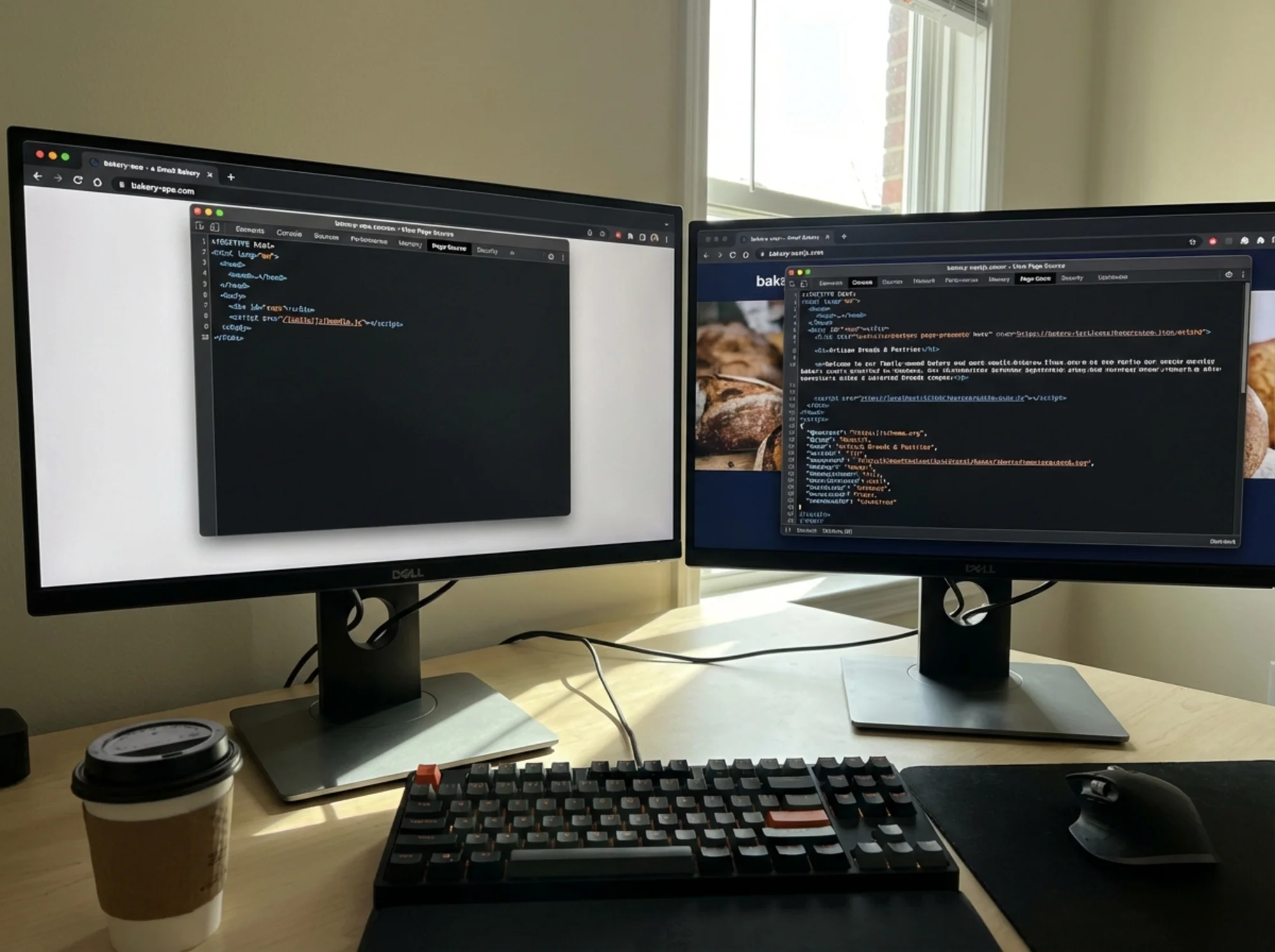
Developer tools "View Source" panel open on a React SPA showing only a bare HTML shell with a single div id="root" and no readable text content, contrasted with a Next.js page source showing full headings, paragraphs, and structured data visible in the raw HTML This test takes 30 seconds and doesn't require any technical knowledge. If you're unsure what you're looking at, copy a small section of the source and ask your developer to explain it.
What This Looks Like in Practice
Let's say you run a specialty coffee roasting business. Your developer built the site as a pure React SPA. Your homepage, "Our Roasts" page, and blog all live in this SPA.
What Google sees when it crawls your homepage:
html
Blue Ridge Coffee Roasters No product names. No descriptions. No headings. No structured data. If Google never successfully renders that JavaScript, your "Our Roasts" page won't appear when someone searches "buy small-batch Ethiopian coffee online" — even if you've written great content.
The same page, server-rendered:
html
Ethiopian Yirgacheffe Coffee | Blue Ridge Coffee Roasters Ethiopian Yirgacheffe — Light Roast
Notes of bergamot, lemon zest, and jasmine. Sourced directly from the Gedeo Zone cooperative.
Google crawls this, reads it immediately, and knows exactly what the page is about. It can rank it for relevant searches on the first crawl. The same content, the same developer effort, the same hosting cost — but dramatically different search visibility depending purely on how rendering is configured.
This scenario plays out across industries. A law firm's practice area pages. A contractor's project gallery. A boutique's product catalog. A restaurant's event calendar. In each case, the content exists — but if it's locked inside a JavaScript bundle, Google either can't see it or sees it much later than it should.
Core Web Vitals and the Speed Factor
Beyond indexability, client-side rendering tends to hurt your Core Web Vitals — Google's set of performance signals that factor into rankings.
The key metric is Largest Contentful Paint (LCP): how long it takes the biggest visible piece of content to appear. On a React SPA, LCP is delayed because the browser has to download and execute JavaScript before rendering anything. The sequence looks like this: browser requests page → receives empty HTML → downloads JavaScript bundle (often several hundred kilobytes) → parses and executes the bundle → React renders the component tree → content finally appears on screen. Each of those steps adds latency.
On a server-rendered page, content arrives already built. The browser receives HTML with text and images directly, starts rendering immediately, and the visible content appears without waiting for any JavaScript.
According to web.dev, a good LCP is under 2.5 seconds. Many React SPAs — especially on mobile or slower connections — struggle to hit that threshold. Google's Page Experience signals incorporate Core Web Vitals, and poor LCP can suppress rankings even for pages that are successfully indexed.
First Input Delay (FID) and Interaction to Next Paint (INP) are also affected. On initial load, a React SPA is busy parsing and executing JavaScript, which blocks the main thread. During that window, the page may appear visible but feel unresponsive — clicks and taps don't register immediately. For users on older Android devices or budget laptops, this can feel broken.
The combined effect: a pure React SPA often has worse indexability and worse performance signals than a server-rendered equivalent, even when the underlying content and design are identical.
The Spectrum: Not All React Sites Are the Same
"React" isn't a single thing from an SEO standpoint. The framework matters less than how it's configured to render.
Approach How it works SEO impact Pure React SPA (Create React App) All rendering in browser High risk — Google may not index content Next.js with SSR Server renders on each request Low risk — full HTML delivered immediately Next.js with SSG Pages pre-built at deploy Low risk — same as SSR for crawlers Next.js with ISR Pages rebuilt on a schedule Low risk — Google gets full HTML Gatsby Static generation at build time Low risk — full HTML in source Remix Server rendering by default Low risk — full HTML delivered immediately React with prerendering service SPA + a render proxy layer Medium risk — depends on implementation If your site is built with Next.js, Gatsby, Remix, Astro, or Nuxt (for Vue), you're likely in reasonable shape — these frameworks default to server-side or static rendering. If it was bootstrapped with Create React App or a generic "React app" template, you may be in pure SPA territory.
Ask your developer which setup you have. That one question can save months of debugging why organic traffic is underperforming. If they say "Next.js," ask a follow-up: are the marketing pages using server components or
getStaticProps/getServerSideProps? It's possible to use Next.js but still render certain routes client-side only.How to Fix It (Without Rebuilding Everything)
If you discover your site is a pure client-side SPA and it's affecting your SEO, here are your options in order of effort.
Option 1: Migrate to Next.js (Recommended for Most Cases)
Next.js is React with server-rendering built in. It uses the same React code your developer already wrote, but delivers pages in a way Google can read immediately. Many teams can migrate a React SPA to Next.js without rewriting business logic — the component code, state management, and API calls largely carry over. The main work is reorganizing the routing and moving data-fetching logic into server-side functions.
For small business websites with fewer than 50 pages, this migration is often a one-week project for an experienced developer. For larger sites or complex apps, scope it properly — but the investment pays off quickly in organic search recovery.
This is the most sustainable fix. If you're planning any significant site work in the next six months, make this part of the scope.
Option 2: Add a Prerendering Layer
Services like Prerender.io sit in front of your existing SPA and serve a pre-rendered HTML snapshot to crawlers. When Googlebot requests a page, the service intercepts the request, renders the JavaScript in headless Chrome, and returns the resulting HTML. Real users still get the SPA.
It's not as clean as true SSR, but it gets content in front of Googlebot without rebuilding your app. Setup typically takes a day or two, and it can be an effective bridge while a full migration is planned.
Tradeoff: added infrastructure complexity and cost, and it's a workaround rather than a fix. If your prerendering cache goes stale or the service has downtime, Google reverts to seeing empty pages.
Option 3: Use Static Exports for Key Pages
For a handful of high-priority pages — homepage, services, key landing pages — you can export those as static HTML while keeping the SPA for logged-in or interactive sections. This is a good middle-ground when the SPA behavior matters for app functionality (a customer portal, booking flow, or account dashboard) but your marketing pages don't need dynamic interactivity.
In Next.js, this is straightforward using the
output: 'export'configuration or by marking specific routes as statically generated. Your developer can implement this incrementally, starting with the pages that matter most for organic search.Option 4: Avoid Dynamic Rendering
Google has historically allowed dynamic rendering — detecting Googlebot's user agent and serving pre-rendered HTML only to it. Google itself has discouraged this as a long-term strategy because it can appear as cloaking if implemented poorly. Skip this unless your developer has a specific reason and a clean implementation plan. The maintenance overhead and the risk of misimplementation make it a poor choice compared to the alternatives above.
What About Structured Data?

A local bakery website's Google search result showing a rich snippet with opening hours, star rating, and a product image — the site recently migrated from a React SPA to server-rendered pages — with a chart showing organic traffic climbing over the following three months If you want rich results in Google — star ratings, FAQs, product prices, event dates shown directly in search — you need structured data embedded in your HTML. On a pure SPA, injecting structured data that Google can reliably read is difficult. Google's structured data guidelines assume your markup is present in the initial HTML response.
Server-rendered pages make this straightforward: include JSON-LD markup in the
, Google reads it on the first pass, and you're eligible for rich results.On a SPA, you're dependent on Google successfully rendering your JavaScript, finding dynamically inserted structured data, and processing it correctly — unnecessary risk for any business that relies on local search, product listings, or service snippets. A bakery that migrates from a SPA to server-rendered pages and adds proper LocalBusiness schema can see their listing transform from a plain blue link to a rich result with hours, ratings, and a photo — often within a few weeks of the migration.
What to Expect After Migrating: A Realistic Timeline
Fixing a rendering problem doesn't produce instant results, but the pattern is consistent.
Week 1–2: Googlebot recrawls your pages and starts seeing full HTML. Coverage errors in Search Console begin to clear.
Week 2–4: Google reprocesses the newly crawlable pages. Impressions in Search Console start climbing as pages enter the index properly.
Month 2–3: Rankings stabilize at their new (higher) positions. Organic traffic increases become visible in analytics. This is when the compounding effect kicks in — content that's been live for months but was effectively invisible starts accumulating clicks.
Month 3+: If structured data is in place, rich results begin appearing. These can significantly increase click-through rates even without rank improvements.
The timeline varies based on how frequently Googlebot crawls your domain (higher-traffic sites get crawled more often), how many pages were affected, and how much content is now newly visible. But the direction is consistent: fixing a rendering problem always moves the needle in the right direction.
Is Your React Site SEO-Ready? Run This Checklist
Indexability
- [ ] View source shows actual text content (not just )
- [ ] Google Search Console shows no significant "Discovered but not indexed" or "Crawled but not indexed" backlog
- [ ]
site:yourdomain.comreturns all your important pages in search results- [ ] New pages appear in Search Console within 1–2 weeks of publishing
Performance
- [ ] LCP under 2.5s on mobile (test with PageSpeed Insights)
- [ ] First Contentful Paint under 1.8s
- [ ] CLS under 0.1 (no significant layout shift as JavaScript loads)
- [ ] Total JavaScript bundle size under 300KB compressed for initial load
Structured Data
- [ ] JSON-LD markup visible in page source (not only injected by JavaScript)
- [ ] Rich results test at search.google.com/test/rich-results passes without errors
- [ ] LocalBusiness, Product, Article, or relevant schema type implemented on key pages
Framework Confirmation
- [ ] Confirmed with developer: SSR, SSG, or pure CSR?
- [ ] If Next.js:
getServerSideProps,getStaticProps, or App Router server components confirmed in use for marketing pages - [ ] No key landing pages are rendered client-side only
The Bottom Line
The problem isn't React — it's the assumption that a React SPA handles SEO the same way a traditional website does. It doesn't.
If your site is a pure client-side rendered SPA and organic search matters to your business, you have a real risk worth addressing. The fix is well-understood, doesn't require starting over, and the SEO recovery after migration is measurable and consistent.
If you're not sure which camp your site falls into, find out before investing further in content, backlinks, or any other SEO effort. Google's own guidance emphasizes that helpful, reliable content needs to actually be accessible and crawlable to earn rankings. Great content and strong backlinks don't compound the way they should if Google can't read your pages in the first place — and with a React SPA, there's a real possibility that's exactly what's happening.
The View Source test takes 30 seconds. If what you see is an empty shell, the investment to fix it will pay back many times over.
Find Out What Google Actually Sees on Your Site
Not sure if your site has a rendering problem? Run a free audit with FreeSiteAudit. It checks for common indexability issues — including JavaScript rendering gaps — and gives you a plain-English report on what's working and what needs attention. No account required.
Sources
- Google Search Central — Creating helpful, reliable, people-first content
- web.dev — Core Web Vitals
- Google Search Central — Structured data guidelines for articles
Check your website for free
Get an instant score and your top 3 critical issues in under 60 seconds.
Get Your Free Audit →
- [ ] View source shows actual text content (not just