SGE and Your Website: How to Prepare for AI Search
A plain-English guide for small business owners on getting your website ready for Google's AI-powered search experience without overhauling everything.
# SGE and Your Website: How to Prepare for AI Search
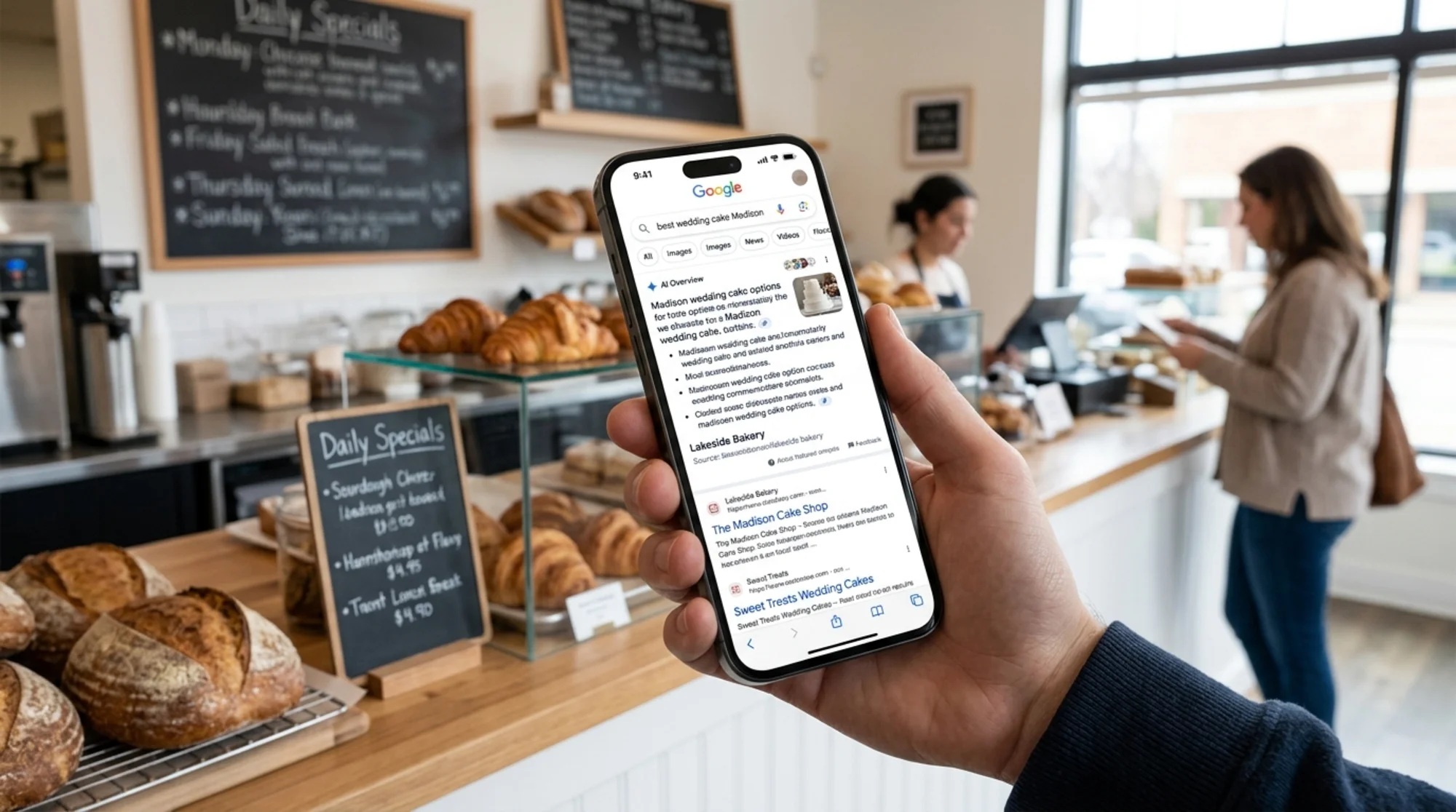
If you run a small business website, you have probably noticed something different at the top of Google lately. Instead of ten blue links, you sometimes see an "AI Overview" — a paragraph or two that answers the question directly, with a few small site logos cited as sources.
That feature grew out of what Google called the Search Generative Experience, or SGE. It is now baked into regular Google Search for most users, and it has changed the rules for everyone who depends on organic traffic.
The good news: you do not need to rebuild your website. You do not need an SEO agency on retainer. You do not need to pretend you understand large language models. You need a handful of practical changes so AI search can read your site, trust it, and quote it.
This guide walks through exactly what those changes are, in plain English, with examples you can copy.
What SGE actually is, in one paragraph
Google's AI search reads multiple websites, pulls out the parts that answer the query, and writes a short summary. It then cites the sources it used. Sometimes users click those sources; sometimes they get the answer and move on. Either way, being one of the cited sources is the new prize.
That is the whole game. Everything below is about making your site easy to read, easy to trust, and easy to quote.
What changes for small business owners
Before AI Overviews, the goal was simple: rank on page one. Now there are two goals stacked on each other.
- Rank well enough that AI search considers your page in the first place.
- Be written and structured in a way that makes your page easy to quote.
Skip the second and you can rank in the regular results yet still get bypassed by the AI summary. Skip the first and you never show up at all. Both matter.
The encouraging part: most of the work overlaps. Clear writing, accurate information, fast pages, and proof that a real person stands behind the content. That is the whole list.
The small business problem nobody talks about
Most advice about AI search is written for enterprise SEO teams. They talk about entity graphs, knowledge panels, and semantic retrieval — words that do not help a plumber in Akron or a wedding photographer in Lisbon.
Here is the version that matters for a small site:
- Your About page probably does not say who you are. It says "we are passionate about quality." That tells AI search nothing.
- Your service pages probably bury the answer. A customer asks "how much does a logo cost" and your page opens with three paragraphs about your design philosophy.
- Your FAQ probably does not exist — or if it does, it answers questions nobody asks.
- Your pages probably load slowly on a phone, which is where most search now happens.
If those four things are true, AI search has no reason to pick your site over a competitor's. Fixing them is achievable in a weekend.

What AI search looks for: a practical checklist
Google publishes guidance on what makes "helpful content," and the same principles apply to what AI search prefers to quote. Here is the short version, translated into things you can do this week.
1. Answer the question in the first two sentences
If someone searches "how long does sourdough take to bake," the page that gets quoted opens with: "Sourdough typically bakes for 35 to 45 minutes at 450°F." Not: "Bread has been part of human culture for thousands of years."
For every page on your site, ask: what one question does this page answer? Put the answer near the top. The rest of the page can have your story, your process, and your photos. The answer comes first.
2. Use real headings that match real questions
Your H2 and H3 headings are the easiest thing for AI search to scan. Make them match the way people actually ask things.
Weak: "Our Process"
Strong: "How long does a custom website take to build?"
Weak: "Pricing"
Strong: "How much does a custom website cost?"
Weak: "Service Areas"
Strong: "Do you build websites for clients outside Texas?"
These small rewrites do double duty: they help AI search understand the page, and they help human visitors find what they need.
3. Show who wrote it and why they should be trusted
Google has been clear that helpful-content systems reward first-hand experience and identifiable expertise. For a small business, that means:
- Author byline on blog posts with a real name and a one-line credential
- An About page that names the actual owner, not just "the team"
- Photos of the real people doing the real work
- Specific details that prove you have actually done this — case study numbers, project counts, years in business with a real start date
A dentist's site that says "Dr. Maria Chen, DDS, 18 years practicing in Portland" is more trustable than "our experienced team of dental professionals." Specificity is credibility.
4. Add structured data where it makes sense
Structured data is hidden code that tells search engines what a page is about. For most small business sites, three types matter:
- LocalBusiness schema on your homepage and contact page
- FAQPage schema on any page with a real FAQ section
- Article schema on blog posts, with author, publish date, and headline filled in
You do not need to write this code by hand. Most modern site builders — Squarespace, Wix, Shopify, WordPress with Yoast or Rank Math — handle it automatically once you fill in the fields. Google's documentation on Article structured data lists the required and recommended fields so you can check what your tool is producing.
If you find structured data missing or incomplete, that is one of the highest-leverage fixes you can make. Our structured data guide walks through the common gaps.
5. Make pages load fast on a phone
AI search favors sites it can crawl quickly and that load quickly for users. Google's Core Web Vitals are the published yardstick. The three metrics worth knowing:
- LCP (Largest Contentful Paint): the main content should appear in under 2.5 seconds
- INP (Interaction to Next Paint): the page should respond to taps in under 200ms
- CLS (Cumulative Layout Shift): things should not jump around as the page loads
If your page takes seven seconds to load on a mid-range phone, you are out of the running. The biggest culprits, in order: oversized hero images, unused third-party scripts (chat widgets, popup tools, multiple analytics platforms), and uncompressed video backgrounds. If any of those ring a bell, start with our page speed guide.
A walkthrough: preparing one page for AI search
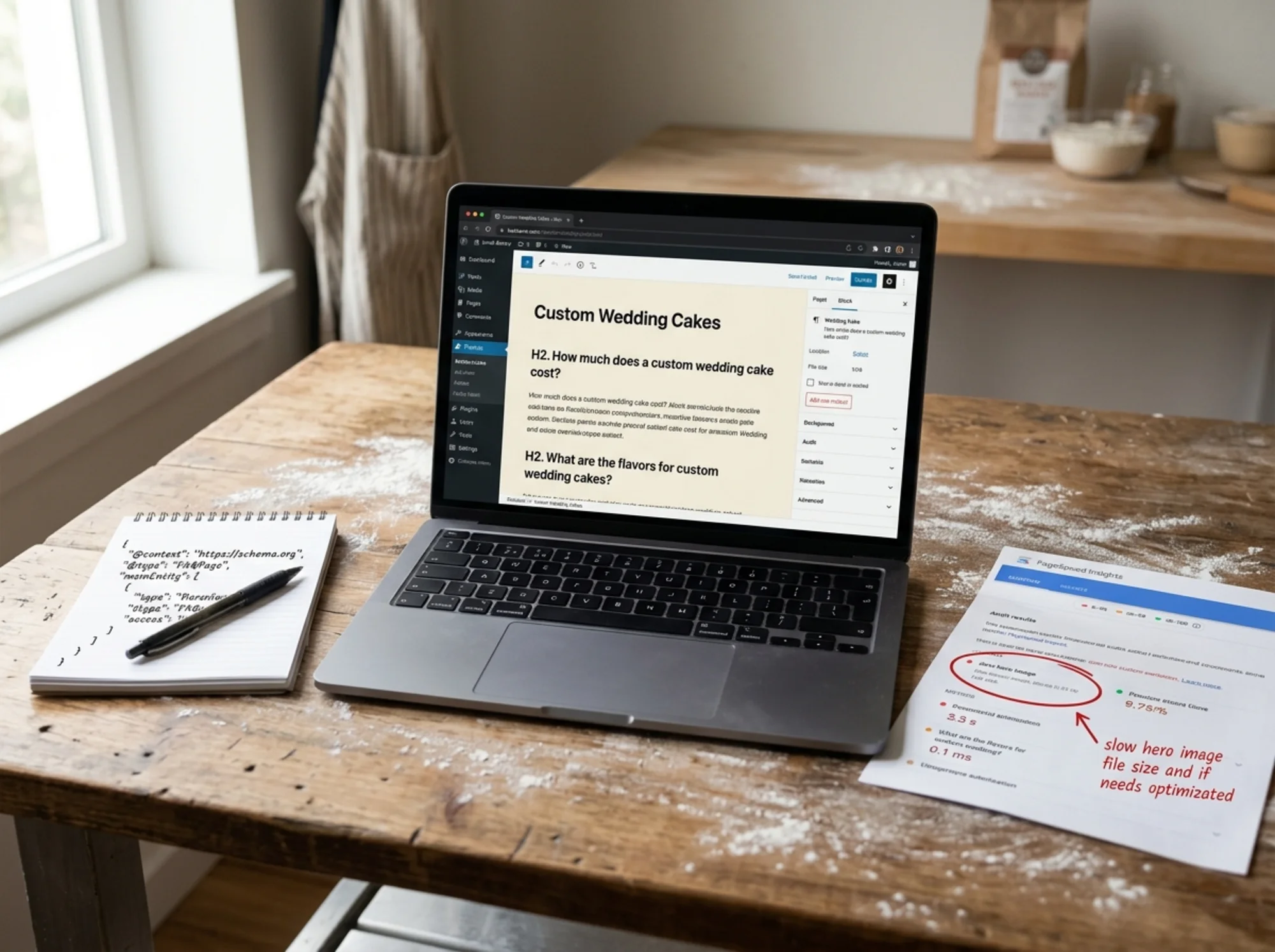
Imagine you own a small bakery in Madison, Wisconsin, and one of your most important pages is /wedding-cakes. Right now, the page is a hero image, a paragraph about your love of baking, and a contact form.
Here is how you would rework it in about two hours.
Step 1: Identify the questions the page should answer.
Brainstorm what someone Googling about wedding cakes in Madison actually wants to know:
- How much does a custom wedding cake cost?
- How far in advance do I need to order?
- Do you do dietary restrictions (gluten free, vegan)?
- Do you deliver to venues?
- Can I taste flavors before deciding?
- What sizes serve how many guests?
Step 2: Restructure the page around those questions.
Open with one sentence that establishes what the page is: "Custom wedding cakes for couples in the Madison area, with tastings, delivery, and dietary accommodations available." Then make each question an H2 or H3, and answer each with two to four sentences. Direct, specific, no hedging.
Step 3: Add proof of expertise.
Below the questions, add a short section titled "About our pastry chef" — with a real name, training background, and a photo. Then add three to five real wedding photos with one-line captions naming the venue and number of guests served. ("Quivey's Grove, 180 guests, four tiers, lemon and elderflower.")
Step 4: Add structured data.
In your site builder, fill out the FAQPage schema for your question-and-answer section. Add LocalBusiness schema to your homepage if it is not there. If you publish a blog post about the wedding, give it Article schema with your byline.
Step 5: Check the page speed on a phone.
Open the page on your phone over cellular data, not your home Wi-Fi. If it takes more than three seconds, look at the images. Most bakery sites have giant hero images at full camera resolution. Resizing them to a sane width — around 1600 pixels for a hero, 800 for inline — typically cuts load time in half.
That is it. One page, a few hours, and now it is the kind of page AI search likes to quote.
What to stop doing
Some habits make AI search less likely to pick your site. None of these are penalties exactly, but they all reduce your odds.
- Thin pages built only for keywords. "Best wedding cakes in [city]" templates with nothing real on them.
- Unedited AI filler. Pages obviously generated to look like a website without anyone reading them. AI search appears able to tell the difference between AI-assisted content that an expert reviewed and AI-assisted content that nobody did.
- Pop-ups that block the content within the first second. They hurt your Core Web Vitals and they hurt how AI crawlers perceive your page.
- Hiding contact information. AI search treats a site with a real address, phone number, and named owner as more trustworthy than one with none.
- Auto-playing video backgrounds. They look fancy and they tank load time on mobile.
A small operator's monthly routine
Once your pages are rewritten, the maintenance is light. A workable monthly routine:
- Week one: search three to five queries you want to be found for. Look at the AI Overview, if any. Note which sites it cites. Ask what they do that you do not.
- Week two: pick one page and improve it using the checklist above.
- Week three: write or update one piece of content that answers a real question your customers ask.
- Week four: run a site audit and clear any new technical issues.
That is about three hours of work per month, and it compounds.

How to know if your site is ready
You do not need to guess. Some concrete checks you can run yourself:
- Open your site in an incognito browser on your phone. Time how long the first screen takes to appear.
- Go to your three most important pages. Read the first two sentences aloud. Do they answer a question, or do they describe how passionate your team is?
- Look at your About page. Does it name a real person, with a real photo and a real bio? Would a stranger trust the business?
- Open one blog post. Is there an author byline? A publish date? A meta description that summarizes the post?
- View the page source (right-click, "view source") and search for the word
schema. If you see nothing, you are probably missing structured data.
If two or more of those checks fail, those are your starting points.
Where to go from here
The honest summary: AI search is not a separate skill. It is a sharper version of the same thing search engines have always wanted — useful pages, written by real people, with clear answers, that load fast and have technical hygiene. The bar is higher because AI is now selecting what to quote, and it is biased toward pages that make its job easy.
If you would rather not crawl your own site looking for what to fix, that is what audit tools are for. Run a free audit of your site and you will get back a prioritized list — speed issues, missing structured data, weak content patterns, mobile problems — with what to fix first. It takes about a minute to run, and it points you at the changes that will actually move the needle.
The site that gets quoted by AI search next year is the one you start tightening today.
Sources
- Google Search Central — Creating helpful, reliable, people-first content: https://developers.google.com/search/docs/fundamentals/creating-helpful-content
- Google Search Central — Article structured data: https://developers.google.com/search/docs/appearance/structured-data/article
- web.dev — Core Web Vitals: https://web.dev/articles/vitals
Check your website for free
Get an instant score and your top 3 critical issues in under 60 seconds.
Get Your Free Audit →