Speed Audit for News and Content Sites: What Matters Most
A practical speed audit guide for news, blog, and content sites. Learn what to measure, what to fix first, and what to safely ignore for faster mobile pages.
# Speed Audit for News and Content Sites: What Matters Most
News and content sites have a different speed problem from most websites. You are not selling one product. You are publishing dozens, sometimes hundreds of pages a week, each one stuffed with images, embeds, ads, analytics, and recirculation widgets. Every page is a fresh opportunity to be slow.
And readers are unforgiving. If a headline catches their eye on social and the page takes four seconds to render, they are gone. They are not browsing your category pages. They are not coming back tomorrow to give it another try. You get one shot.
This guide is for small publishers, niche blog operators, and content marketers who run their own site. No jargon, no theatre. Just the things that actually move the needle on a content site.

Why content sites are uniquely hard to make fast
Most "make your site faster" advice was written with ecommerce or SaaS marketing pages in mind. Those sites have a handful of templates and a tight content team. A news or content site has the opposite shape:
- Many authors and editors uploading images straight from their phones, often unoptimized
- Embedded media from YouTube, X, TikTok, Instagram, podcasts, and newsletters
- Multiple ad networks running header bidding, video pre-rolls, and sticky units
- Recirculation widgets ("More from us," "You may also like," "Trending now")
- Comment systems that load entire JavaScript frameworks
- Analytics, A/B testing, consent banners, and tag managers stacking up
Each one is a small problem. Together they are the reason an article that should weigh 200KB ends up shipping 6MB.
Speed auditing a content site is less about clever optimization tricks and more about ruthlessly cutting what you do not need on the page.
The three Core Web Vitals, in plain English
Google's Core Web Vitals are the measurable benchmarks search and most performance tools care about. For a content site, two of the three are nearly always the problem.
Largest Contentful Paint (LCP) measures how long it takes for the biggest visible element to render. On an article page, that is almost always the hero image or the headline block. Target: under 2.5 seconds on a mid-range mobile.
Cumulative Layout Shift (CLS) measures how much the page jumps around as it loads. On news sites this is the killer. Ads load late, push the article down, and the reader loses their place. Target: under 0.1.
Interaction to Next Paint (INP) measures how responsive the page feels when you tap or click something. On content sites it is usually fine, unless you have heavy comment systems or interactive embeds. Target: under 200 milliseconds.
If you focus on two, focus on LCP and CLS. Those are the ones your readers feel and the ones your site is probably failing.
What to measure before you fix anything
Run a speed audit on three different types of pages, not just your homepage. The homepage is rarely the slowest page on a content site. Test:
- A long-form article with a hero image and three or more embeds (your worst case)
- A category or tag page (lots of thumbnails)
- The homepage (often the most third-party scripts)
Run each one on a simulated mobile connection. Desktop scores lie. Most of your traffic is mobile, and most of your mobile traffic is on a slower connection than you are testing on right now.
You can run a free speed audit on any of these pages and get a breakdown of what is actually slowing them down, request by request.
The problem state: what a typical slow content page looks like
Here is what the audit usually finds on a content site that has not been touched in 18 months:
- Hero image: 2.1MB JPEG, 4000 pixels wide, served to a phone displaying 360 pixels
- Six ad scripts loading in the head, blocking everything
- An autoplay video embed in the second paragraph
- A consent banner that loads after the page renders, then re-renders the page
- A "trending" widget making three separate API calls
- Google Analytics, Google Tag Manager, Meta Pixel, Hotjar, and a custom event tracker
- Comment system loading 280KB of JavaScript whether the user scrolls to comments or not
- Three social share buttons, each pulling in their own SDK
Total page weight: 7.4MB. LCP: 4.8 seconds. CLS: 0.34. The article itself? About 8KB of text.

What matters most, in order
If you only have a weekend, here is the order to tackle things in. Each item is something a non-technical operator can verify, and most can be done by a developer in a few hours.
1. Fix the hero image
This is the single biggest LCP win on most content sites. The hero image is usually the LCP element, and it is usually too big.
- Serve images in WebP or AVIF, not JPEG or PNG
- Resize on the server to match the actual display size — a phone does not need a 4000px image
- Use the
srcsetso different devices get different sizes - Add
fetchpriority="high"to the hero image tag so the browser loads it first - Do not lazy-load the hero. Lazy-load everything below the fold, but not the hero
If your CMS has an image CDN built in (WordPress with Jetpack, Ghost, Substack, most modern hosts), turn it on. It is usually a single toggle. For deeper LCP fixes, see the Largest Contentful Paint fixes guide.
2. Reserve space for ads and embeds
This is the CLS fix. Layout shift on content sites is almost entirely caused by ads, embeds, and late-loading images.
Every ad slot, every video embed, every social embed needs a width and height attribute or a CSS aspect-ratio rule. If the browser knows the space the element will take, it reserves it. The page does not jump.
Check your ad insertion code. If your ad ops set up with no dimensions, the page will shift when the ad arrives. Add a min-height to the container that matches the most common ad size.
Same goes for images uploaded by writers. If they paste an image without dimensions, the browser does not know what to reserve. Modern CMSs handle this automatically. Older ones do not — check yours. More detail in the Cumulative Layout Shift fixes guide.
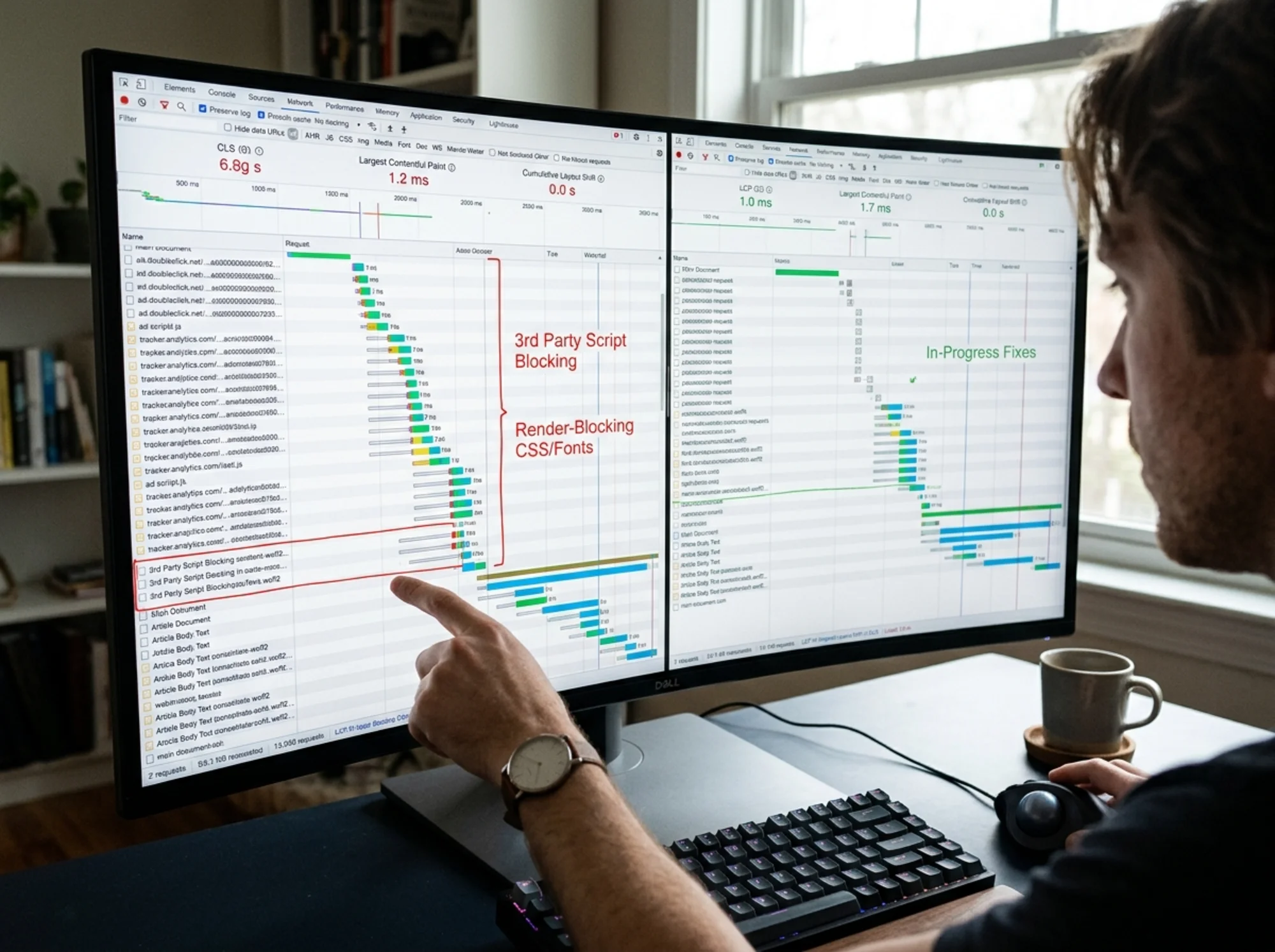
3. Audit your third-party scripts
This is the painful one, because it usually involves a conversation with marketing or ad ops.
Open your audit. Look at the list of third-party domains being called. Ask, for each one: do we actually use this?
Common dead weight on content sites:
- A heatmap tool nobody has checked in a year
- An A/B test platform with no active tests
- A consent management script and a separate cookie banner doing the same job
- Two different analytics tools
- Affiliate link tracking on a site with no affiliate program
Every one of those is a tax on every page load, for every reader. Kill what you do not use.
For the ones you keep, load them with async or defer so they do not block the page. Move them out of the where possible. And use your tag manager properly — with rules that only load scripts on the pages that actually need them.
4. Lazy-load the heavy stuff
YouTube, X, Instagram, and TikTok embeds are massive. Each one can pull hundreds of kilobytes of JavaScript and dozens of additional requests. A single article with three YouTube embeds can easily ship 3MB of player code that the reader may never click.
Use a "facade" approach. Show a static thumbnail with a play button. Only load the real embed when the reader clicks. There are open-source components for this for every major embed type. Your developer will know what to do if you ask for "lite YouTube embeds" or "embed facades."
For images below the fold, native lazy-loading works in every modern browser. Just add loading="lazy" to the image tag. Do not do this for the hero image.
5. Cache aggressively
Content sites have a huge advantage over ecommerce sites: most pages do not change once published. An article from last Tuesday should be served from a CDN cache, not regenerated from your database on every request.
- Put a CDN in front of your site (Cloudflare, Bunny, Fastly, or whatever your host offers)
- Cache HTML for at least a few minutes, longer for older articles
- Cache images, CSS, and JS for a year, with versioned filenames
- Let logged-in users (admins, editors) bypass the cache so they see fresh content
If your site regenerates the article HTML from scratch on every request, that is the fix. It also makes the site cheaper to run.
A specific walkthrough: auditing a recipe blog
Imagine a small recipe blog. The owner publishes three new recipes a week. Each recipe page has a hero image of the finished dish, a short intro, the recipe card, 8 to 12 step-by-step photos inline, a YouTube embed of the video version, a comments section, display ads from a single network, a newsletter signup, and a "more recipes you'll love" widget at the bottom.
The speed audit on a typical recipe page returns:
- LCP: 4.1s (the hero image is 1.8MB, served at full resolution)
- CLS: 0.28 (ads and the YouTube embed push the recipe card down)
- Page weight: 5.6MB
- Requests: 142
The owner does not need to learn React or hire a performance consultant. They need to do four things, in this order:
- Enable the image CDN the host already includes. The hero drops from 1.8MB to about 180KB and serves WebP automatically. LCP drops to about 2.2s. Time: 15 minutes.
- Add a min-height to the ad slot CSS. CLS drops from 0.28 to about 0.08. Time: 30 minutes with a developer, or a plugin if on WordPress.
- Replace the YouTube embed with a facade. A static thumbnail with a play button. Saves 600KB on initial load. Time: 30 minutes with the right plugin.
- Remove the unused Hotjar script installed two years ago for a redesign that never happened. Saves another 90KB. Time: 5 minutes.
Total page weight after: 1.4MB. LCP: 2.0s. CLS: 0.06. Nothing fancy — just deleting what was not needed and resizing what was already there. For more examples in the same vein, see news and media audits.

What to ignore
A lot of "performance" advice does not apply to content sites, or matters so little it is not worth your time. Things you can safely deprioritize:
- Inlining critical CSS. Helpful, but you will get 90% of the wins from images and third-party scripts first.
- HTTP/3. Your host either supports it or does not. There is nothing for you to do.
- Service workers and PWA features. Most readers come from social or search, view one article, and leave. Offline support is not your problem.
- Brotli vs gzip compression. Your CDN handles this. If it does not, switch CDNs.
- Server response time obsession. Unless your TTFB is over a second, image and script weight will dwarf this.
Spend your time on the big rocks: images, ads, embeds, and unused scripts.
How structured data fits in
While you are auditing, take ten minutes to check your Article structured data. This does not affect speed directly, but it is closely related to how your articles appear in search results, and it is easy to get wrong.
For news and content articles, Google looks for the Article, NewsArticle, or BlogPosting schema. You want a clean headline, a valid datePublished, an author with a real name, and an image that meets the size requirements. A speed audit is a good moment to double-check all of this is in place, because both speed and structured data feed into the same goal — getting helpful content surfaced and read.
Speed is a habit, not a project
The mistake most content site operators make is treating speed as a one-time project. They do an audit, fix the worst things, declare victory, and ship six months of unoptimized images and new tracking scripts on top of the fix.
A content site needs a recurring rhythm. Once a month, run an audit on three pages: your homepage, your most-trafficked article from the last 30 days, and your most-trafficked evergreen page. Look for regressions. The most common ones:
- A new ad partner pulled in a heavy SDK
- A writer uploaded an unoptimized image and the CMS did not catch it
- Marketing added a new tracking pixel without telling anyone
- A plugin update added new third-party calls
None of these are catastrophic on their own. But over a year, they pile up.
Run your audit
If you want to know where your site actually stands right now, the fastest way is to run an audit. FreeSiteAudit will scan your site for free, flag the specific images, scripts, and embeds slowing you down, and give you a prioritized list of what to fix first. No signup wall, no sales call. Just the data.
Once you know your numbers, the path forward is usually clearer than it looks. Most content sites are 80% of the way to a fast site already. They just need someone to delete what they do not need and resize what is already there.
Sources
Related Tools
Related Fixes
Check your website for free
Get an instant score and your top 3 critical issues in under 60 seconds.
Get Your Free Audit →