Website Audit for Mortgage Brokers and Loan Officers: A Practical Guide
A practical, plain-English website audit playbook for mortgage brokers and loan officers, covering speed, trust signals, compliance, leads, and local SEO.
# Website Audit for Mortgage Brokers and Loan Officers: A Practical Guide
If you broker mortgages or originate loans, your website does a job most other small-business sites do not. It has to build trust within seconds, handle rate-sensitive visitors who are comparing three other lenders in another tab, and capture a lead without scaring anyone off with compliance-heavy fine print. Most broker sites quietly fail at it.
This guide walks through a practical audit you can run on your own site this week. No jargon, no fluff. Just the checks that move the needle for mortgage brokers and loan officers.

Why a mortgage website needs a different audit
A general "is my site fast and does it rank" audit will miss what matters in this industry. Mortgage shoppers behave differently from people buying a t-shirt or booking a haircut:
- They are usually doing rate research late at night or on a phone during a lunch break.
- They are highly skeptical and will bounce if anything looks unprofessional or pushy.
- They will compare multiple lenders, so even small frictions cost you the lead.
- Your content has to stay on the right side of disclosure rules (APR examples, equal housing language, NMLS IDs, state licensing).
A mortgage website audit, then, is a mix of standard web hygiene and industry-specific trust and compliance checks.
Part 1: The technical baseline
Before we touch trust signals or copy, the site has to work. Google's Core Web Vitals are the practical floor here. They measure load speed, interactivity, and visual stability, and they influence both rankings and how visitors feel about your site.
Core Web Vitals: the three numbers to know
- Largest Contentful Paint (LCP): how long until the biggest thing on the page (usually your hero image or headline) shows up. Aim for under 2.5 seconds.
- Interaction to Next Paint (INP): how snappy the page feels when someone taps or clicks. Aim for under 200 milliseconds.
- Cumulative Layout Shift (CLS): how much stuff jumps around as the page loads. Aim for under 0.1.
For a mortgage site, LCP is usually the culprit. Brokers love big hero photos of houses or families, and those images often weigh 3 to 5 megabytes when they should be under 200 kilobytes.
Quick mini-checklist:
- Open your homepage on a 4G phone connection. Does it feel slow? It probably is.
- Compress hero images. JPEG quality 75 or WebP usually works.
- Remove any auto-play video on the homepage. It rarely helps and almost always hurts speed.
- Lazy-load images below the fold.
Mobile first, not mobile last
Run your own site on your phone, not your laptop. A startling number of mortgage broker sites have desktop layouts that survive on mobile by accident: text too small, buttons too close together, calculators that overflow the screen. If a pre-qualification form requires pinch-zooming to read, you will lose the lead.
Part 2: Trust signals (where most broker sites lose deals)
A mortgage is one of the biggest financial decisions a person makes. Visitors are scanning your site for reasons to believe you, and reasons to leave.

The trust signal checklist
- NMLS ID visible in the footer. Non-negotiable. Every page footer should display the company NMLS number and individual loan officer numbers where relevant.
- Equal Housing logo and lender statement. Standard practice; missing it looks careless.
- State licensing clearly listed. A simple "Licensed in [states]" line or a dedicated /licensing page.
- Real photos of real people. Headshots of the broker and team. Generic stock photos of handshakes signal "scam-adjacent" to a skeptical shopper.
- Local address and a real phone number. PO boxes and 800 numbers feel impersonal for a relationship-driven product.
- Testimonials with names and, ideally, photos. "J.M. — Verified Client" is worse than nothing. Use full names with permission or embed Google Reviews.
- Recent activity. A blog post from 2021 is a red flag. So is an "as featured in" logo bar for outlets that have not covered you in five years.
What "helpful content" looks like for a mortgage site
Google has published guidance on creating helpful, people-first content. The short version: write for the person, not for the algorithm. For mortgage sites that means:
- Explain how loan programs work in plain English, not in industry shorthand.
- Tell the visitor who you actually serve. "First-time buyers in Travis County with W-2 income under $150k" beats "We help everyone with all loan types."
- Show your work. If you claim faster closings, say what your average is and how that compares.
- Update content when rates or rules shift. Old APR examples in your blog posts look unprofessional and may run afoul of disclosure expectations.
Part 3: The lead capture path
If a visitor cannot get to "talk to a human" in three clicks or less, you are leaking leads. Audit this path explicitly.
A 60-second walkthrough
Sit down with a stopwatch and try to do these three things on your own site, from the homepage, on a phone:
- Find the broker's direct phone number.
- Start a rate quote or pre-qualification.
- Find at least two recent client testimonials.
If any of those takes more than 15 seconds of poking around, fix it.
Form friction is the silent killer
Most broker sites use a pre-qualification form with 15 to 25 fields. That number should be closer to 4 to 6 on the first step. You do not need DOB, SSN, employer, current rent, and three years of address history before someone has even decided to talk to you.
A good pattern:
- Step 1 (homepage CTA): name, email, phone, loan purpose. That is it.
- Step 2 (after they engage): loan amount, property type, timing.
- Step 3 (handled by the loan officer): the rest, in conversation.
A multi-step form makes this feel lighter. The audit question is simple: how many fields does my first form ask for, and can I cut it in half without losing what I need to start the conversation?
Part 4: Local SEO for brokers
Most mortgage leads search locally. "Mortgage broker [city]" or "FHA loan [neighborhood]" are the queries that pay your bills. Your audit needs a local SEO section.
The local SEO mini-checklist
- Google Business Profile claimed, complete, and active. Photos uploaded in the last 90 days. Posts published monthly. Reviews responded to within a week.
- Name, address, phone (NAP) consistent everywhere. If your website says "Suite 200" and your Google profile says "Ste. 200," fix it.
- City and state in title tags on key pages. Not crammed, just present. "Mortgage Broker in Boise, Idaho | [Brand]" works.
- Dedicated pages for each city or county you serve. Not thin doorway pages, but actual content about that market: typical loan amounts, local programs, neighborhoods.
- Local schema. Use LocalBusiness or MortgageBroker schema in your page source.
Structured data: a small lift, a real win
Schema markup helps Google understand what your page is. For mortgage sites, the most useful types are LocalBusiness, FAQPage (for your "what is PMI" explainer pages), and Article (for blog posts). Even basic LocalBusiness schema with your NMLS ID, hours, address, and accepted loan types can improve how your business shows up in local search.
Part 5: Compliance hygiene
This is not legal advice, and you should always defer to your compliance officer or attorney. But there are common audit findings worth flagging:
- APR examples in blog posts should be dated and current. A 2022 "sample rate" looks misleading in 2026.
- Equal Housing Opportunity statement on every page footer.
- Truth in Advertising compliance for any rate teasers. If you show a rate, you need the APR, term, and assumptions.
- Privacy policy and how you handle data from lead forms. Especially relevant given the broker industry's history with lead resale practices.
- Cookie consent if you serve visitors in jurisdictions that require it.
A practical audit finding might read: "Three blog posts cite a 30-year fixed rate of 6.25% with no date. Update the figures or remove the rate references."
A specific scenario: walking through an audit
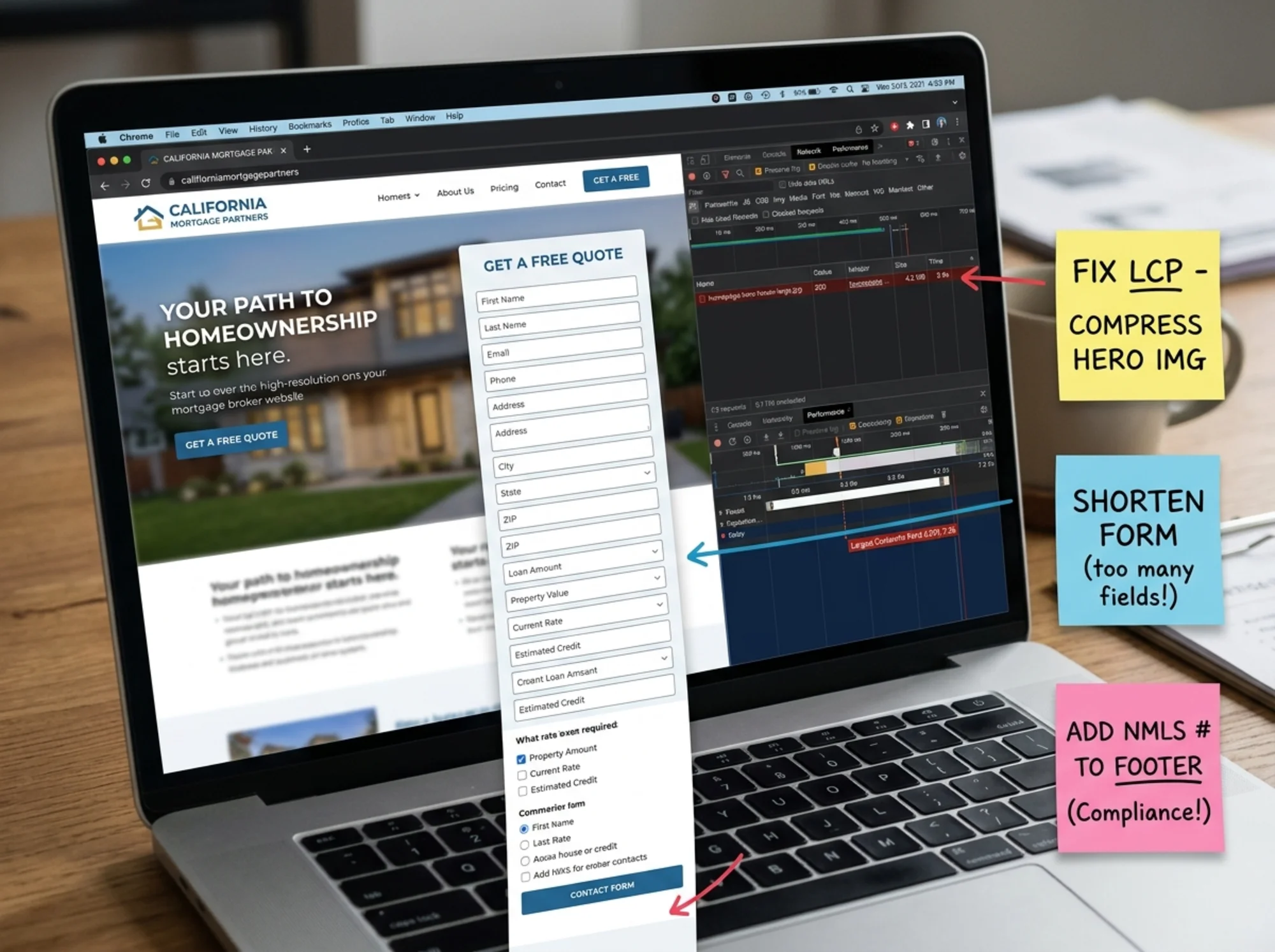
Say you are a loan officer in Denver who has been in business for eight years. You get most of your leads from referrals but want your website to start pulling its weight. You open your site on your phone. Here is what an honest audit might find:
Speed: The homepage takes 5.2 seconds to load on 4G. The hero is a 4.1 MB photo of the Rockies. Fix: compress the photo to under 250 KB, serve as WebP. Expected LCP drops to around 2 seconds.
Trust: Your NMLS ID is on the About page but not in the footer. Your headshot is professional, but the three "team" photos are stock. Two testimonials are signed "Happy Client" with no name. Fix: footer NMLS, replace stock with team headshots even if taken on a phone, get permission to use full first names on testimonials.
Lead capture: Your contact form has 18 fields including current housing payment, employer name, and years at job. Fix: cut to name, email, phone, loan purpose. Move the rest to a follow-up email or call.
Local SEO: Your homepage title is "Welcome to [Brand Name]." Your Google Business Profile has no posts in the last year. You have no city-specific page. Fix: change the homepage title to include "Denver Mortgage Broker," start posting monthly to GBP, build a single "Mortgage Loans in Denver" page with real local content.
Compliance: Your footer is missing the Equal Housing statement. A 2023 blog post quotes a 4.5% rate. Fix: add the statement site-wide; update the post with a current dated rate or remove the rate reference.
Five fixes. None require a developer. All can be done in an afternoon, and together they materially change how your site performs.
How to actually run this audit
You have two options.
Manual: Use the checklists above. Block out a Friday afternoon. Open your site on your phone, take notes, fix one section at a time. This works, especially if you are detail-oriented and like understanding the why behind each change.
Automated: Run your site through a tool that checks technical and content signals for you. You can run a free website audit with FreeSiteAudit and get a plain-English report covering speed, mobile usability, trust signals, structured data, and lead capture friction in a few minutes. It will not catch every industry-specific compliance issue (no automated tool can replace your compliance officer), but it will flag the technical problems and most of the trust signal gaps without you having to hunt for them.

What good looks like
After a thorough audit and a round of fixes, a mortgage broker website should:
- Load the hero image and headline in under 2.5 seconds on a phone.
- Show NMLS, Equal Housing, state licensing, and a real local phone number in the footer.
- Get a visitor from homepage to "start pre-qualification" in two taps or fewer.
- Ask for no more than 4 to 6 fields on the first form step.
- Have at least one page targeting "[loan type] in [city]" with genuine local content.
- Publish or update at least one piece of helpful content per month, with rates and figures dated.
- Run clean on Core Web Vitals for both mobile and desktop.
None of this is glamorous. None of it requires a redesign. But brokers who do this consistently outperform competitors who pour money into ads while their site quietly leaks every visitor they send to it.
The shortest version
If you only do one thing this week, do this: open your homepage on your phone, time how long it takes to load, then try to start a pre-qualification. Note everything that is slow, confusing, or missing.
That five-minute exercise is more useful than most paid audits. Then either work through the checklists above or run an automated audit to catch what you missed.
Your website is a 24/7 loan officer. Treat it like one.
Sources
- Google Search Central — Creating helpful, reliable, people-first content: https://developers.google.com/search/docs/fundamentals/creating-helpful-content
- Google Search Central — Article structured data: https://developers.google.com/search/docs/appearance/structured-data/article
- web.dev — Core Web Vitals: https://web.dev/articles/vitals
Check your website for free
Get an instant score and your top 3 critical issues in under 60 seconds.
Get Your Free Audit →