FAQ Schema: When It Helps and When Google Ignores It
A plain-English guide to FAQ schema for small business sites — when it still earns rich results, when Google drops it, and how to use it without wasting time.
# FAQ Schema: When It Helps and When Google Ignores It
If you run a small business website, you have probably heard that adding FAQ schema gets you those expandable answer boxes in Google search results. You might have already added it. And you might have noticed... nothing happened.
That is not your fault. FAQ schema used to be a near-guaranteed visibility boost. Then in August 2023, Google quietly changed the rules. Now most sites get nothing from it in Google search, even when the markup is perfectly valid.
This guide explains what changed, when FAQ schema still works, and how to decide if it is worth your time. No outdated 2020 advice, just what is true right now for a small business site.

What FAQ Schema Actually Is
FAQ schema is a small block of code you add to a page that tells search engines "this page contains questions and answers." It is written in JSON-LD and sits inside your HTML, usually in the .
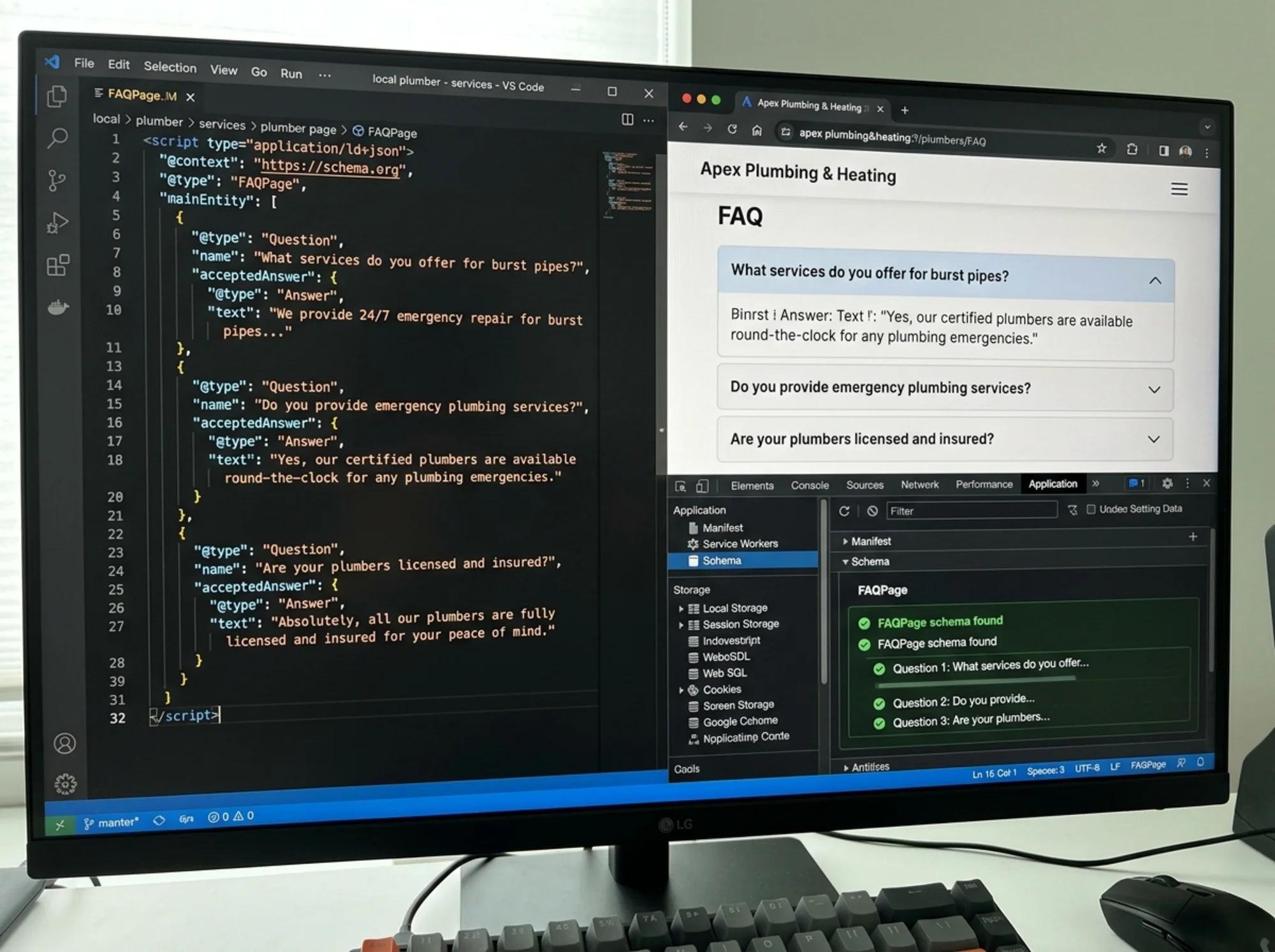
A bare-bones example:
{
"@context": "https://schema.org",
"@type": "FAQPage",
"mainEntity": [{
"@type": "Question",
"name": "Do you offer same-day plumbing service?",
"acceptedAnswer": {
"@type": "Answer",
"text": "Yes. Calls placed before 2 PM are scheduled the same day in our service area."
}
}]
}
When it works, Google can show this directly in search results as an accordion under your listing. When it does not, the markup just sits there.
What Changed in August 2023
Google restricted FAQ rich results to "authoritative government and health websites only." That is the official wording. For everyone else — including 99 percent of small businesses — FAQ rich results stopped appearing in Google search.
The schema itself is still valid. Google still reads it. It just will not render the expandable answer box for your bakery, your law firm, your e-commerce store, or your SaaS landing page anymore.
This is the key point. If you read a blog post written before August 2023 telling you to slap FAQ schema on every page for instant traffic, that advice is dead. Anyone telling you that today either has not read Google's documentation in two years or is selling you something.
So Is FAQ Schema Useless Now?
No, but the value is indirect:
1. It helps Google understand page structure. Structured data gives crawlers explicit signals about what each section means. It does not directly boost rankings, but it helps Google match your page to the right queries.
2. It feeds AI Overviews and answer-style features. Google's AI summaries pull from structured content. FAQ markup is one signal that flags content as clean question-and-answer pairs — exactly what AI summarizers prefer to quote.
3. It helps non-Google surfaces. Bing, DuckDuckGo, ChatGPT browsing, and Perplexity also parse schema. Bing still displays FAQ rich results for a broader range of sites than Google does.
4. It encourages clearer content. Writing a real FAQ forces you to answer questions customers actually ask. That has value even if no rich result ever shows.

When FAQ Schema Is Worth Adding
- You run a government or healthcare site. You are in the eligible category for Google FAQ rich results. Add it everywhere it makes sense.
- You have a service or product page with real, recurring customer questions. Even without rich results, the structured data helps with AI-generated answers and other surfaces.
- You already have a visible FAQ section on the page. The markup must describe content actually on the page and visible to users. If the FAQ is behind a tab or accordion that expands on click, it still qualifies as long as it is in the rendered HTML.
- You want better visibility in AI-powered search. ChatGPT, Perplexity, and Google's AI Overviews increasingly drive traffic. Structured Q&A pairs are the format these tools prefer.
When FAQ Schema Is a Waste of Time
- The page does not have a visible FAQ section. Hidden-only markup violates Google's guidelines and can get your site flagged for structured data spam.
- You are adding fake or filler questions to pad the page. "What is the best pizza?" with an answer that lists your menu is not an FAQ. It is keyword stuffing in a fancy wrapper.
- You are expecting Google rich results. Unless you are a government or healthcare site, that is no longer happening.
- Your page is already cluttered with structured data. More schema does not multiply benefits. It can dilute the page's clarity.
A Real Walkthrough: A Local HVAC Site
Say you run an HVAC company with a service page for "AC Repair in Austin."
Real prospects ask these questions before booking:
- How much does an AC repair visit cost?
- Do you charge a diagnostic fee?
- How fast can you come out?
- Do you service all brands?
- Do you offer financing?
A good FAQ section answers these clearly on the page. Each answer is two to four sentences, plain language, with real numbers where possible.
Your FAQ schema markup mirrors those exact questions and answers — not a fabricated list, not generic questions cribbed from a template. The same questions a real prospect would type into Google.
Here is what will actually happen:
- Google will not show your FAQ as a rich result in regular search (you are not government or health).
- Google may use your answers in AI Overviews for queries like "how much does AC repair cost in Austin."
- Bing may show the rich result.
- ChatGPT, when browsing for a user, can extract clean answers from your structured content.
- Customers landing on your page get clear answers without scrolling through paragraphs, which improves engagement and conversions.
Modest, indirect, and worth it because you were going to write a good FAQ section anyway. The schema is essentially free once the content exists.
How to Add FAQ Schema Correctly
1. Write the FAQ section first, on the page, visible to users. Start with content customers need, not the schema.
2. Use real questions. Look at what customers email you, what they ask in chat, and what shows up in Google's "People also ask" boxes for your topic. Avoid manufactured questions.
3. Keep answers concise. Two to four sentences works well. If an answer needs more, link out to a fuller page rather than dumping a wall of text into the schema.
4. Generate the JSON-LD. Write it by hand or use a generator. Most CMS platforms — WordPress with Rank Math or Yoast, Shopify apps, Webflow custom code — handle this. Place the script in or just before .
5. Validate it. Use Google's Rich Results Test at search.google.com/test/rich-results. Paste your URL or code. Fix any errors before publishing.
6. Submit or wait. Google will pick it up on the next crawl, but you can speed it up via URL Inspection in Search Console.
7. Monitor in Search Console. Under "Enhancements," check the FAQ report. Address errors and warnings. Zero impressions for FAQ rich results is normal post-August 2023 — it does not mean the markup is broken.
Common Mistakes to Avoid
- Markup that does not match visible content. If the schema says "Do you offer free shipping?" but that question is not on the page, Google ignores or penalizes the mismatch.
- Duplicate FAQ schemas across many pages. Add FAQ schema to a single relevant page, not every page on your site.
- Promotional language in answers. Keep answers factual. "We are the best HVAC company in Austin" is not an answer to "Do you charge a diagnostic fee?"
- Calls to action, links, or phone numbers inside answer text. This often gets the markup flagged. Use plain answers. Put your CTA in the surrounding page content.
- Adding schema to thin pages. If a page does not have enough substance to support an FAQ, the page itself needs work first.
What Google Actually Says About Helpful Content
Google's broader guidance on content matters more than any single schema type. Their helpful-content documentation makes the priority clear: write for humans, demonstrate first-hand knowledge, focus on the user's question rather than the keyword.
FAQ schema is a small technical signal. The content underneath it earns the visibility. A page with thoughtful, specific answers to real questions will outperform a page with perfect schema markup and generic, AI-padded text every time.
If you spend three hours writing genuinely useful answers and ten minutes adding the schema, you are doing it right. If you spend ten minutes generating bland questions and three hours optimizing the JSON-LD, you have your priorities reversed.
A Quick Decision Framework
For any page you are considering adding FAQ schema to:
- Does this page have a visible FAQ section with real questions and answers? If no, write one first.
- Are the answers specific, factual, and useful? If no, rewrite them.
- Is this page the right destination for these questions? If no, move them.
- Are you in the government or health vertical? If yes, you are eligible for Google rich results — prioritize this.
- Do you care about AI search tools, Bing, and crawler clarity? If yes, add it.
- Are you adding schema hoping for an instant Google traffic boost? If yes, you will be disappointed — but adding it for the other reasons above is still worthwhile.

The Bigger Picture: Structured Data Beyond FAQ
If you are spending effort on schema, FAQ is rarely the highest-impact place to start. For most small business sites, the schema types that move the needle today are:
- LocalBusiness — for any business with a physical location or service area
- Product — for e-commerce items
- Service — for service businesses
- Article — for blog posts and editorial content (Google's Article structured data docs are the reference)
- Review and AggregateRating — when you have real reviews to display
- BreadcrumbList — for site navigation hierarchy
- Organization — for site-wide brand identity
Get these right before fussing over FAQ markup. The rich results, knowledge panel signals, and crawler benefits from these types are far more meaningful for most small businesses.
The Honest Summary
FAQ schema is a "yes, but" feature. Yes, add it when you already have a real FAQ on a real page. But do not expect it to do what it used to do in 2020 or 2021. The rich result moment for non-government, non-health sites has passed in Google search. The structured data still serves you in smaller, indirect ways — AI Overviews, Bing, and clearer pages for everyone.
Spend most of your energy on the content itself. Make sure your pages answer the questions your customers actually ask. The schema is a thin layer on top of that — useful, free if you are already writing good content, and not worth obsessing over.
Run a Free Audit on Your Site
Want to know whether your site has structured data set up correctly, where the gaps are, and what would actually move your search visibility? Run a free website audit with FreeSiteAudit. You will get a plain-English report covering structured data, Core Web Vitals, content quality signals, and concrete next steps tailored to a small business owner — not a 300-page PDF written for an enterprise SEO team.
If you are working on structured data specifically, our structured data fixes guide covers the schema types that matter most for small businesses, with copy-paste examples for each. For sector-specific guidance, the local business resources section has playbooks tuned to brick-and-mortar and service-area businesses.
Sources
Related Tools
Related Fixes
Check your website for free
Get an instant score and your top 3 critical issues in under 60 seconds.
Get Your Free Audit →