See a real branded report before you pay.
The widget, the report page and the PDF below come from the same code that serves an agency's clients, shown on an Agency plan. The agency (Northline Studio), the business (harborview.example) and every score and finding are made up.
No account is needed. Nothing here is sent, saved or written to a database.
How much of freesiteaudit.com stays visible
On an Agency plan there is no FreeSiteAudit credit or watermark on the widget, the report page, the emails or the PDF. Three addresses are still ours:
- The report page address
- freesiteaudit.com/embed/report/<token>
- The address bar shows our name when your client opens their report. The page itself carries your logo, name and colours. The link works for 30 days.
- The email sender address
- hello@freesiteaudit.com
- Mail apps show your brand name first. This address sits behind it, in the message details. Replies go to you.
- The widget frame
- freesiteaudit.com/embed/<your key>
- The form loads from our address inside a frame. Your own page keeps your domain in the address bar.
Custom report domains and custom sending domains are not available. We have not built them and have no date for them, so please do not buy on the expectation that they will arrive.
1. The widget on your page
This is the real widget, set up for Northline Studio: its logo initial, name and colour, and no FreeSiteAudit credit. It sits on a made-up page of the agency's own site. The button is switched off here: pressing it only explains that this is a sample.
The widget on the agency's own page
Illustrative sampleReal output, made-up dataIs your website costing you customers?
Powered by Northline
Free website audit: see what's costing you customers
2. The report your client opens
The top of the report, as a client sees it: the agency's logo, name and colours, the score, a written summary, scores by area and the findings with fix steps. There is no FreeSiteAudit credit. The address bar shows freesiteaudit.com, as the step-by-step list below explains.
The report page, first screen
Illustrative sampleReal output, made-up data
Northline Studio
Website report for harborview.example
Overall score
61/100
Summary
This is an illustrative summary for a made-up dental practice. The site loads slowly on phones, the page titles do not name the service or the city, and the phone number is not a tap-to-call link. Fixing those three things is the quickest way to bring in more local patients.
Scores by area
- SEO54
- Performance48
- Mobile66
- Security78
- Accessibility63
- Content58
- Technical70
- Trust52
- Local45
What to fix (5)
Critical · SEO
Page title does not name the service or the city
The home page title is “Welcome”. Search results show it as the headline, so people searching for a dentist in your town have no reason to click.
How to fix:
- Change the title to the service and the city, for example “Family dentist in Springfield | Harborview”.
- Keep it under about 60 characters so it is not cut off in search results.
Major · Mobile
Phone number is not a tap-to-call link on mobile
The number in the header is plain text. On a phone, a visitor has to copy it before they can call.
How to fix:
- Wrap the number in a link that starts with tel:, for example tel:+15555550100.
- Test it by tapping it on a phone.
3. The emails and the PDF
The visitor gets the first email with the PDF attached. You get the second one for each lead.
Email to the visitor
Illustrative sampleDrawingPDF cover, page 1
Illustrative sampleReal output, made-up data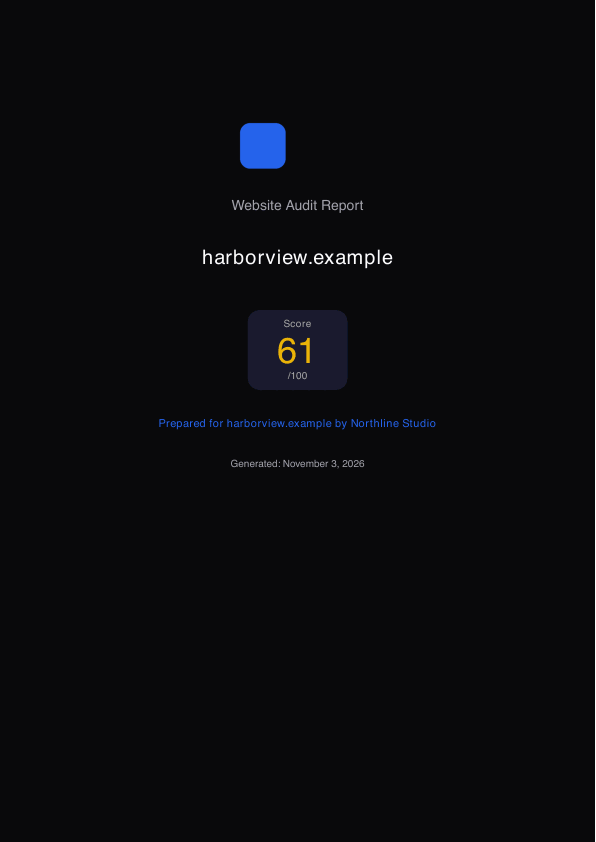
Email to you, for each lead
Illustrative sampleDrawingFrom: Northline Studio <hello@freesiteaudit.com>
To: hello@northline.example
Reply-to: sam@harborview.example (the lead)
Subject: New audit lead: harborview.example scored 61/100
Northline Studio
Name: Sam Rivera
Email: sam@harborview.example
Website: https://harborview.example
Score: 61/100
Top issues
- Page title does not name the service or the city (critical)
- Phone number is not a tap-to-call link on mobile (major)
- Hero image is much larger than it needs to be (moderate)
Open their report
All leads in your dashboard
“Open their report” opens: freesiteaudit.com/embed/report/<token>
How your brand still shows when the address is ours
The report address and the email sending address are FreeSiteAudit’s. Everything your client reads and replies to is yours. Here is where, on the made-up agency’s report and email.
In your client's inbox
Illustrative sampleDrawingNorthline Studio
Your website report from Northline Studio
Hi Sam Rivera, your website report for harborview.example is ready.
- From:
- Northline Studio <hello@freesiteaudit.com>
- Reply-to:
- hello@northline.example
- The sender name is the agency's. The address behind it, hello@freesiteaudit.com, is ours.
- Press Reply and the message goes to hello@northline.example, not to us.
On the report page they open
Illustrative sampleDrawingNorthline Studio
Website report for harborview.example
Score 61/100, summary, scores by area and findings with fix steps
Questions? Contact Northline Studio
- The address bar shows freesiteaudit.com. This is the one thing on the page that is ours.
- The agency's logo and name head the report. There is no FreeSiteAudit credit on Agency plans.
- The contact link at the bottom opens an email to the agency.
Both come from the “Lead forwarding email” in your dashboard. If you leave it empty, replies go to your account email and the report’s contact line is plain text with no link.
How agencies can explain it to clients
“Our audit reports are hosted by the audit software we use, so the web address starts with freesiteaudit.com. The report carries our name and logo at the top, has a contact link to us at the bottom, and any reply to our email comes straight to us.”
Custom domains. Custom report domains and custom sending domains are not available. We have not built them and have no date for them, so please do not buy on the expectation that they will arrive.
What your client sees, step by step
Your client sees your name and colours at every step, and your logo on the widget and the report page. Two things stay ours: the address of the report page, and the address the emails are sent from.
- 1
The widget on your page
- Address or sender
- Your own page. The address bar shows your domain.
- What it shows
- Your logo, name and colours. The form loads from freesiteaudit.com inside a frame on your page.
- FreeSiteAudit credit, Agency plans
- No FreeSiteAudit credit.
- FreeSiteAudit credit, Free plan
- A small “Free website audit tool by FreeSiteAudit” line under the form.
- 2
The email with their report
- Address or sender
- From: your brand name <hello@freesiteaudit.com>. Replies go to your inbox.
- What it shows
- Your brand name as the heading, their score, an “Open your report” button and the PDF attached.
- FreeSiteAudit credit, Agency plans
- No FreeSiteAudit credit.
- FreeSiteAudit credit, Free plan
- “This audit was provided by” your brand, plus the small FreeSiteAudit credit line.
- 3
The report page they open
- Address or sender
- freesiteaudit.com/embed/report/<token>. The link works for 30 days.
- What it shows
- Your logo, name and colours, the score, the findings with fix steps and a “Contact” link to you.
- FreeSiteAudit credit, Agency plans
- No FreeSiteAudit credit.
- FreeSiteAudit credit, Free plan
- The small credit line at the bottom.
- 4
The PDF attached to the email
- Address or sender
- File name: website-report-<their domain>.pdf
- What it shows
- Your logo (PNG or JPG), company name and colours on the cover. No FreeSiteAudit watermark, plan name or model name.
- FreeSiteAudit credit, Agency plans
- No FreeSiteAudit credit.
- FreeSiteAudit credit, Free plan
- The small credit line in the footer.
- 5
The lead email you get
- Address or sender
- From: your brand name <hello@freesiteaudit.com>. Replying goes straight to the lead.
- What it shows
- Their name, email, website, score and top issues, with a link to their report.
- FreeSiteAudit credit, Agency plans
- Not shown to your client.
What a client sees without a custom domain
Custom report domains and custom sending domains are not available. We have not built them and have no date for them, so please do not buy on the expectation that they will arrive.
- Works well for
- Freelancers and small agencies who are fine with the report link saying freesiteaudit.com, and want their name on the widget, the report, the email and the PDF.
- Less suited if
- Your clients expect every link and email to come from your own domain, or you need to send from your own email domain.
Recommended setup: the widget on your own page
The widget is an iframe. It works the same in WordPress, Webflow, Wix, Squarespace, GoHighLevel or plain HTML.
- 1Make a page on your own site for the audit, for example a page called Free website audit. Visitors then see your domain in the address bar.
- 2Paste the embed code where you want the form. Replace YOUR_EMBED_KEY with your key, which is in your dashboard under Settings, then Integrations.
- 3Optional: add the small resize script from the install guide, so the frame grows to fit the form.
- 4Set your lead forwarding email in the dashboard. Both come from the “Lead forwarding email” in your dashboard. If you leave it empty, replies go to your account email and the report’s contact line is plain text with no link.
- 5Test it once with your own email address and your own site, and open the report and the email as a visitor would.
The embed code, as your dashboard gives it
<iframe
  src="https://freesiteaudit.com/embed/YOUR_EMBED_KEY"
  title="Free website audit"
  loading="lazy"
  width="100%"
  height="560"
  style="border:0;max-width:640px"
></iframe>What is real here, and what is made up
- Real output, made-up data: the widget, the report page and the PDF. The same code that serves an agency's clients ran on invented input.
- Drawing: the two emails. They are laid out and worded to match the emails we send, but they are pictures, not messages that were sent.
- Made up: Northline Studio, its logo and colour, the business at harborview.example, the visitor, the score of 61, the summary and every finding. This is not an audit of a real site.
- Not shown: a report on the Free plan, which is the same but ends with the small FreeSiteAudit credit line.
Next
You need a free account, but not a card. Setup has three steps: sign in, add your logo and colours, and paste one line of code on your page.