Paste one snippet. Get a free website audit form.
The widget is an iframe you add to any page. Visitors enter their website and get a plain-English report in under a minute. You get their name, email, website and score by email.
Free for 25 leads a month, no card, with a small FreeSiteAudit credit. Full refund within 7 days of any charge on paid plans. Report links stay on freesiteaudit.com.
1. Paste this on a page of your site
The embed code. Your dashboard fills in your own key.
<iframe
  src="https://freesiteaudit.com/embed/YOUR_EMBED_KEY"
  title="Free website audit"
  loading="lazy"
  width="100%"
  height="560"
  style="border:0;max-width:640px"
></iframe>
2. Visitors see the form, where you pasted it
Powered by Northline
Free website audit: see what's costing you customers
Northline Studio is a fictional agency. This is the Free plan's widget, with the small FreeSiteAudit credit under the form; paid plans drop it. The button is switched off here.
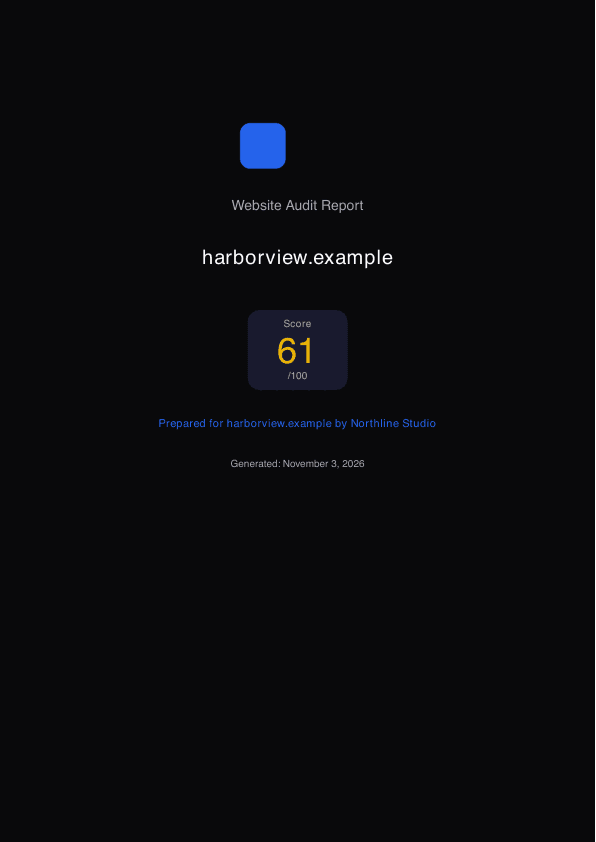
See a branded sample report and download its PDF
The real report page and the real PDF generator, run on made-up data for a fictional agency (Northline Studio). No account needed, nothing sent or saved.
It also shows what stays on freesiteaudit.com: the report address and the email sender address.
Try your own logo and colours
Type your business name, pick a colour and, if you like, choose a logo file. The widget, the report page, the PDF cover and the email redraw as you go. No sign-up. Your logo is read in your browser only: it is not uploaded and nothing is saved.
Illustrative sample. A drawing from what you type: it does not run an audit, and the visitor, site and score are made up.DetailsHide
- For the real thing with a made-up brand, open the sample report: the actual widget, report page, PDF and emails, with no account.
- The Free plan's widget is the real thing. It runs real audits on your own site and sends you real leads, with a small FreeSiteAudit credit under the form and on reports and emails.
- Paid plans change this: the credit goes, and you get a webhook, CSV export and PDFs branded for your own clients. Agency Pro adds up to 5 brands. Report links stay on freesiteaudit.com on every plan.
You need a free account, but not a card. Setup has three steps: sign in, add your logo and colours, and paste one line of code on your page.
The file is read in your browser only. It is never uploaded, and nothing here is saved.
Your widget
Illustrative sampleDrawingReport page header
Illustrative sampleDrawingPDF cover
Illustrative sampleDrawingEmail to your visitor
Illustrative sampleDrawingOpen the real sample report in my colours
Opens the sample report page, the one a client would get, with the name (if you typed one) and colour above applied in your browser. No sign-up. A logo file is not carried over. Nothing is sent or saved, and the findings and site are made up (Illustrative sample).
Your embed snippet
<iframe
  src="https://freesiteaudit.com/embed/YOUR_EMBED_KEY"
  title="Free website audit"
  loading="lazy"
  width="100%"
  height="560"
  style="border:0;max-width:640px"
></iframe>
This is the real format with a placeholder key. After you subscribe, your dashboard shows your own key. Your colour and logo are set there, not in the snippet.
Want it on your real widget?
It uses the logo, name and colours saved on your account and a real report of your own site. Nothing is sent or saved, and no lead is created.
The Free plan’s widget uses the same embed snippet as the paid plans. Subscribing removes the small FreeSiteAudit credit and adds branded PDFs, a webhook and CSV export, so you can test placement and page fit free first, with no new code to paste.
The widget, with and without your brand
The same form on a fictional agency's site. The Free plan keeps a small FreeSiteAudit credit under the form; Agency plans drop it.
Free plan
Illustrative sampleDrawingAgency plans
Illustrative sampleDrawingThree steps
- 1
Copy one line of code
You get an embed snippet in your dashboard.
- 2
Paste it on any page
WordPress, Webflow, Wix, Squarespace or plain HTML.
- 3
Get each lead by email or webhook
Webhooks are available on paid white-label plans.
What your prospect gets
The visitor who fills in the form.
- A plain-English report in under a minute: a score, the problems found with evidence, and fix steps.
- An email with the report link and a PDF copy, sent under your brand name. Replies go to you.
- A report page that shows your logo, name and colours and a contact link to you. The link works for 30 days.
- The same rule-based audit as the free tool. It has no AI summary and no device screenshots.
What you get in the dashboard
After you sign in. Plan limits are in the table below. Agency Pro ($79): up to 5 brands, each with its own widget, logo and colours. The brands share the plan’s lead cap, and leads are shown per brand.
- An email for every lead with name, email, website, score and top issues, and a link to their report.
- Your lead list, with a webhook and a CSV download on paid plans. Agency Pro shows leads per brand.
- Audits you run yourself for prospects and clients, with an AI summary, a 7-day plan and developer tasks on paid plans (50 a week on Agency, 100 a week on Agency Pro).
- Client projects (10 on Agency, 30 on Agency Pro) with automatic re-scans: weekly on Agency, daily on Agency Pro.
- PDFs with your logo, colours and company name. 3 team members on Agency, 5 on Agency Pro.
What your client sees, step by step
Your client sees your name and colours at every step, and your logo on the widget and the report page. Two things stay ours: the address of the report page, and the address the emails are sent from.
- 1
The widget on your page
- Address or sender
- Your own page. The address bar shows your domain.
- What it shows
- Your logo, name and colours. The form loads from freesiteaudit.com inside a frame on your page.
- FreeSiteAudit credit, Agency plans
- No FreeSiteAudit credit.
- FreeSiteAudit credit, Free plan
- A small “Free website audit tool by FreeSiteAudit” line under the form.
- 2
The email with their report
- Address or sender
- From: your brand name <hello@freesiteaudit.com>. Replies go to your inbox.
- What it shows
- Your brand name as the heading, their score, an “Open your report” button and the PDF attached.
- FreeSiteAudit credit, Agency plans
- No FreeSiteAudit credit.
- FreeSiteAudit credit, Free plan
- “This audit was provided by” your brand, plus the small FreeSiteAudit credit line.
- 3
The report page they open
- Address or sender
- freesiteaudit.com/embed/report/<token>. The link works for 30 days.
- What it shows
- Your logo, name and colours, the score, the findings with fix steps and a “Contact” link to you.
- FreeSiteAudit credit, Agency plans
- No FreeSiteAudit credit.
- FreeSiteAudit credit, Free plan
- The small credit line at the bottom.
- 4
The PDF attached to the email
- Address or sender
- File name: website-report-<their domain>.pdf
- What it shows
- Your logo (PNG or JPG), company name and colours on the cover. No FreeSiteAudit watermark, plan name or model name.
- FreeSiteAudit credit, Agency plans
- No FreeSiteAudit credit.
- FreeSiteAudit credit, Free plan
- The small credit line in the footer.
- 5
The lead email you get
- Address or sender
- From: your brand name <hello@freesiteaudit.com>. Replying goes straight to the lead.
- What it shows
- Their name, email, website, score and top issues, with a link to their report.
- FreeSiteAudit credit, Agency plans
- Not shown to your client.
What a client sees without a custom domain
Custom report domains and custom sending domains are not available. We have not built them and have no date for them, so please do not buy on the expectation that they will arrive.
- Works well for
- Freelancers and small agencies who are fine with the report link saying freesiteaudit.com, and want their name on the widget, the report, the email and the PDF.
- Less suited if
- Your clients expect every link and email to come from your own domain, or you need to send from your own email domain.
See every step with a made-up agency's real report and PDF →
Your brand vs ours
Report links open on freesiteaudit.com. Custom domains are not available, and we have no date for them. Everything else your visitor sees carries your name.
Yours on Agency plans
- The audit widget. Your logo, name and colours. On Agency plans there is no FreeSiteAudit credit.
- The report page your visitor opens. Your logo, name and colours, with a contact link to you.
- The email your visitor gets. Your brand name as the sender name and heading. Replies go to your inbox.
- The PDF attached to that email. Your logo (PNG or JPG), company name and colours, with no FreeSiteAudit watermark.
- PDFs you download for your own clients. Your logo, colours and company name, set once in your dashboard.
Still ours
- The report link. It starts with freesiteaudit.com. The address bar shows our name, not yours.
- The widget code. The embed loads from freesiteaudit.com inside an iframe on your page.
- The email sending address. Your brand name shows as the sender, but the address behind it is ours.
- Custom domains. Not available. We have not built a custom report domain or a custom sending domain.
On the Free plan the widget, report page and emails also show your own name, logo and colours, plus a small “Free website audit tool by FreeSiteAudit” credit. Webhook, CSV export and branded PDFs for your own clients need an Agency plan. A visitor's report link works for 30 days after the audit.
Limits by plan
These are the same numbers as on the pricing page, which also shows the cost per lead at each cap. See how this compares on the comparison page.
| Free | Agency | Agency Pro | |
|---|---|---|---|
| Price | $0 | $29/mo, or $290/yr | $79/mo, or $790/yr |
| Widget lead cap | 25 widget leads a month, with a small FreeSiteAudit credit | 250 widget leads a month | 1,000 widget leads a month, shared by all brands |
| Brands, each with its own widget, logo and colours | 1 | 1 | Up to 5 |
| FreeSiteAudit credit on the widget | Yes | No | No |
| Lead webhook and CSV export | No | Yes | Yes |
| Scans you run yourself | Up to 3 a day | 50 a week | 100 a week |
| Pages checked per scan | 5 | 750 | 1,000 |
| Client projects | 2 | 10 | 30 |
| Team members | None | 3 | 5 |
| Automatic re-scans | Not included | Weekly | Daily |
| AI summary, 7-day plan, developer tasks | No | Yes | Yes |
| Slack alerts | No | Yes | Yes |
| Compare with a competitor | Not included | 1 a week | 3 a week |
| Audit many sites at once | No | No | 50 sites |
What lands in each inbox
The two emails the widget sends, for a fictional agency. Under each one, what is yours and what stays ours.
Email to your visitor
Illustrative sampleDrawing- Yours:
- The sender name, the subject, the heading and the button colour. Replies go to your inbox.
- Ours:
- The address behind the sender name, hello@freesiteaudit.com. The “Open your report” button opens freesiteaudit.com/embed/report/<token>.
Email to you, for each lead
Illustrative sampleDrawingFrom: Northline Studio <hello@freesiteaudit.com>
To: hello@northline.example
Reply-to: sam@harborview.example (the lead)
Subject: New audit lead: harborview.example scored 61/100
Northline Studio
Name: Sam Rivera
Email: sam@harborview.example
Website: https://harborview.example
Score: 61/100
Top issues
- Page title does not name the service or the city (critical)
- Phone number is not a tap-to-call link on mobile (major)
- Hero image is much larger than it needs to be (moderate)
Open their report
All leads in your dashboard
“Open their report” opens: freesiteaudit.com/embed/report/<token>
- Yours:
- It lands in your inbox under your brand name. The details are your visitor’s. Replying goes to the lead.
- Ours:
- Sent from hello@freesiteaudit.com. “Open their report” opens freesiteaudit.com/embed/report/<token>, and the dashboard link opens freesiteaudit.com too.
A way to keep the visitor on your domain: Put the widget on a page of your own site. The visitor then starts on your domain, and only the report link and the address the emails are sent from are on freesiteaudit.com.
Questions
Will it slow my site down?
The widget loads in a lazy iframe, so it doesn’t load until a visitor scrolls near it. It is a separate page inside your page, so it doesn’t add scripts to your own site. The optional resize script is a few lines.
Who sees FreeSiteAudit branding?
The Free plan shows a small “Free website audit tool by FreeSiteAudit” credit under the form and on reports and emails. Agency plans (from $29/mo) remove it. Reports and emails go out under your brand name, and replies go to you. The report page and its link are still served from freesiteaudit.com, and custom domains are not available, so FreeSiteAudit is not hidden everywhere. The table above lists each place.
What counts as a lead?
Each visitor who submits their name, email and website and gets an audit. The allowance is per account, shared by all its brands, and resets each calendar month (UTC): 25 on Free, 250 on Agency and 1,000 on Agency Pro. Widget leads do not use up the scans you run yourself.
What happens if I go past my lead limit?
Every lead’s contact details always reach you, even past your monthly cap. Past the cap, visitors get a shorter homepage-only report until the month resets or you upgrade. We email you at 80% and 100% of your cap. Lead records are kept as long as your account exists, and a visitor's report link works for 30 days after the audit.
Is there a limit on how fast leads can come in?
Yes. One widget takes at most 50 audits in any 24 hours, and one visitor connection can run 5 an hour. This stops abuse. Beyond that, the monthly lead allowance above applies.
Can I have more than one widget or brand?
Free: 1 brand, with the FreeSiteAudit credit. Agency ($29): 1 brand. Agency Pro ($79): up to 5 brands, each with its own widget, logo and colours. The brands share the plan’s lead cap, and leads are shown per brand. You can paste a brand's widget on as many pages as you like.
Can leads go to my CRM?
Yes, on paid plans: we send each new lead to a webhook URL you choose, as JSON. That works with tools that accept incoming webhooks, such as GoHighLevel. The install guide lists the fields. Every plan also emails you each lead, and paid plans can download them as a CSV.
What happens to my visitors’ data?
You are the controller of your leads; FreeSiteAudit processes them on your behalf. Visitors do not become FreeSiteAudit users and get no FreeSiteAudit marketing. See data processing for the audit widget.
Free for 25 leads a month, no card, with a small FreeSiteAudit credit. Agency is from $29/mo.